dsh-input-file-ref
Run the following command in DeepSeek Harness:
dsh plugin install AFAP/dsh-input-file-ref
Paste the following prompt into your AI chat to install this plugin:
Run dsh plugin install AFAP/dsh-input-file-ref in DeepSeek Harness to install this plugin; source code is at https://github.com/AFAP/dsh-input-file-ref ; restart dsh web after installation to apply.
About this plugin
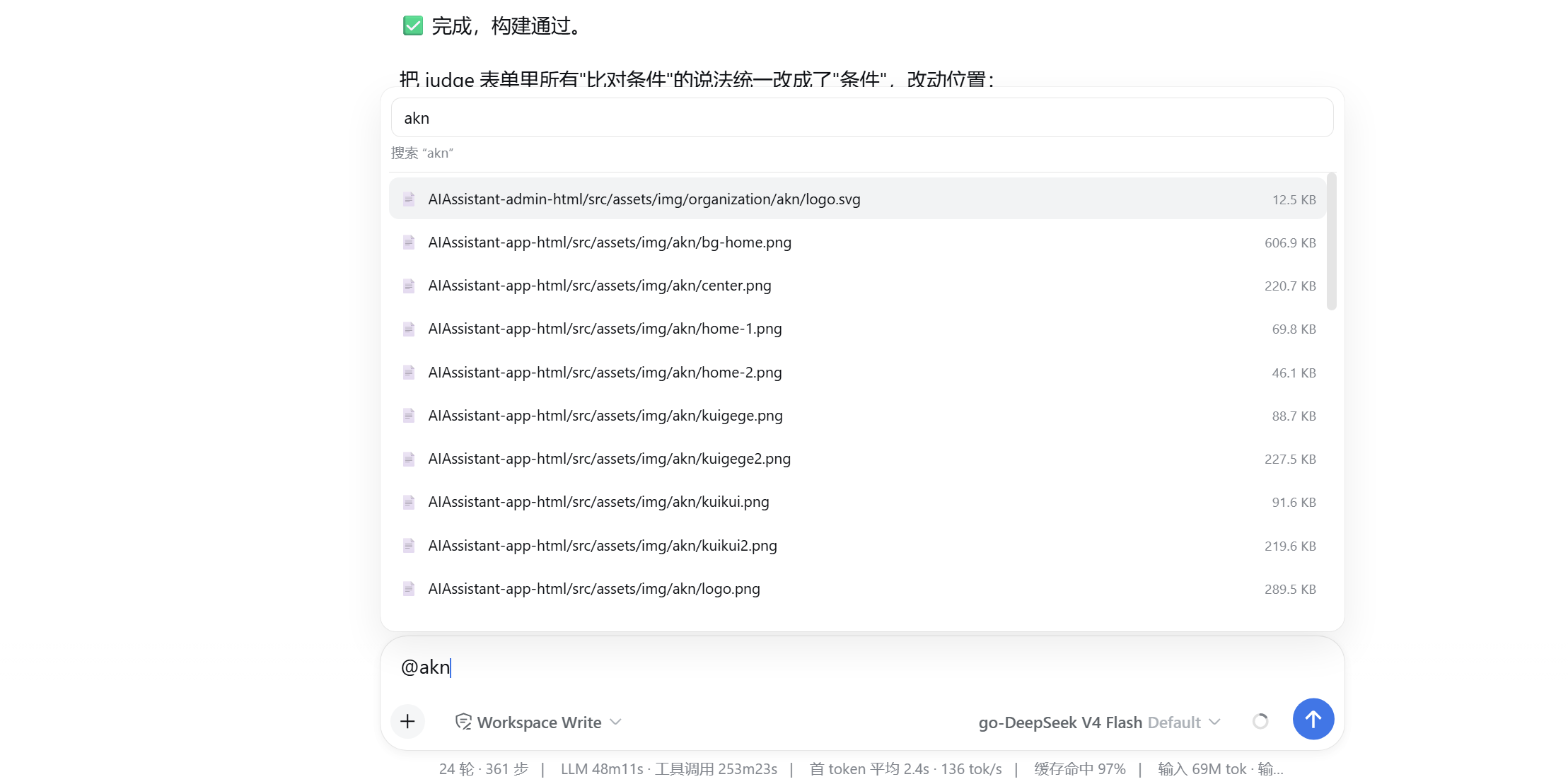
Before this plugin, the @ trigger pipeline in the DeepSeek Harness input box could only invoke skills and subagents. dsh-input-file-ref closes that gap by adding a file reference source: type @ in the input box and a same-width, search-first, drill-down file picker appears. Each file row shows its full relative path; selecting one backfills @relative-path into the input box with a trailing space, and the model then reads the file content via its own fs tool. The plugin is zero-dependency, strictly read-only, and never modifies or deletes anything.
It is built for developers who frequently need to point the model at local source files, configs, or docs. One @ invocation, a quick search, and the path is ready to send, replacing the hassle of pasting file contents into long prompts. Note that starting with DeepSeek Harness 0.1.2-alpha.3, @ file selection is a native feature; this plugin has been archived, and upgrading Harness is the recommended path forward.
Screenshots

Use Cases
- Reference local source files in a session via @ for model reading
- Search and pick config file paths to send to the model for debugging
- Consecutively @ reference multiple files for comparative analysis
Best For
- Developers who frequently reference local files in AI-assisted sessions
- Users of the DeepSeek Harness Web GUI for daily coding
- AI-assisted programming users wanting to skip manual file content copying into prompts
Related Plugins
A service-oriented sidebar framework for DSH, offering a full workbench with file explorer, embedded browser, real terminal, Git panel, and extensible plugin services.

A beautiful, practical Claude Code-style TUI plugin with pixel whale top bar, flowing glow title, real-time status line, streaming thought expansion, time rewind, context progress bar and TPS gauge — zero core changes.

The plugin market for DeepSeek Harness: browse/search/one-click install community plugins and themes, with updates, backup/restore, hot disable, diagnostics, and AI fix.

A persistent whale widget on the DSH web UI that shows DeepSeek balance, today's usage, and per-turn cost, with drag-and-snap and sound effects.