dsh-one-click-launcher
Run the following command in DeepSeek Harness:
dsh plugin install cheng249hx/dsh-one-click-launcher
Paste the following prompt into your AI chat to install this plugin:
Run dsh plugin install cheng249hx/dsh-one-click-launcher in DeepSeek Harness; the plugin source is available at https://github.com/cheng249hx/dsh-one-click-launcher
About this plugin
Starting the DeepSeek Harness Web service has always felt like a small ritual: fire up a terminal, type dsh web, watch it load, then switch to the browser by hand. It is not a lot of steps, but doing it three or four times a day adds up. dsh-one-click-launcher collapses the whole chain into a single double-click on a desktop icon shaped like a little black whale.
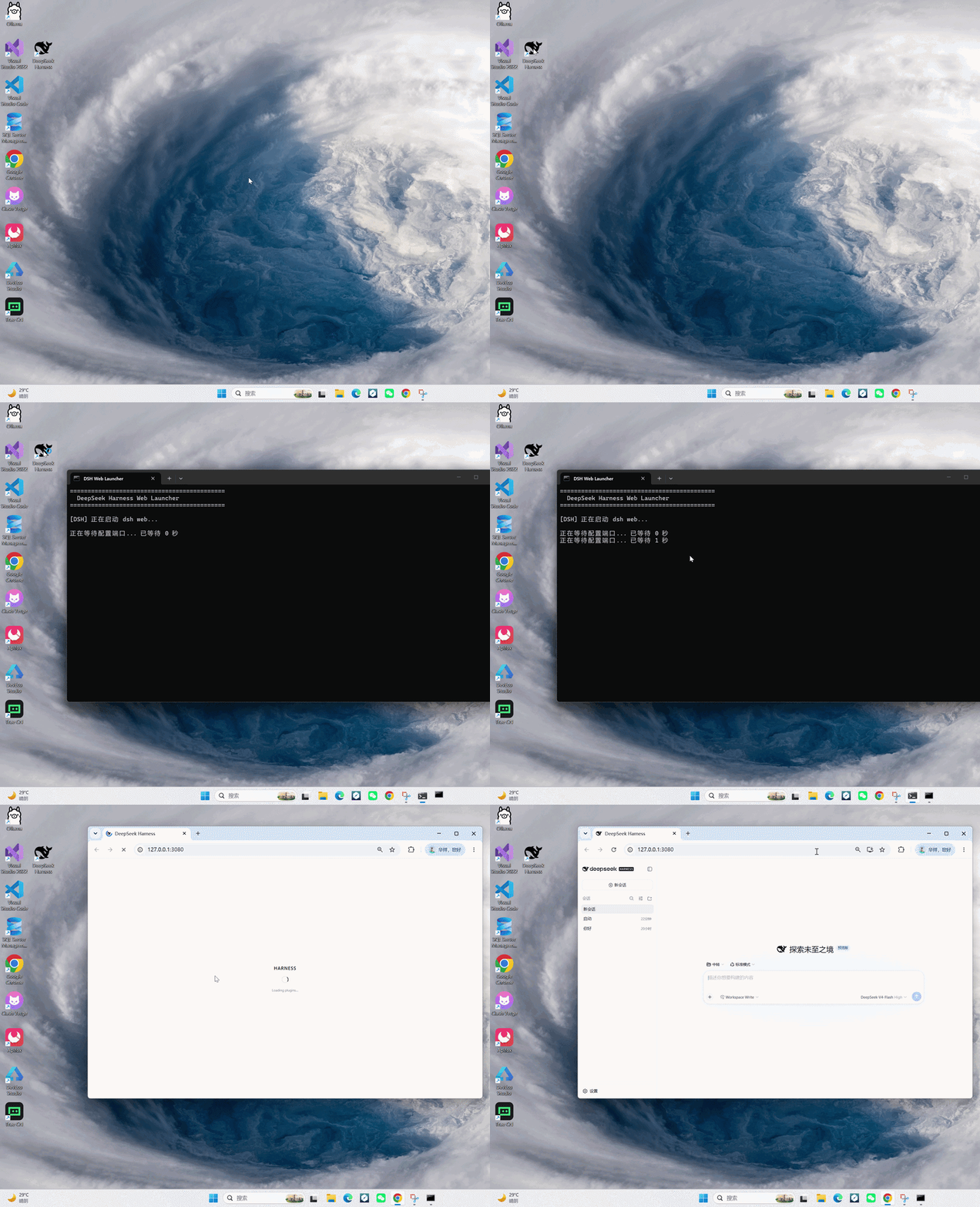
Under the hood the plugin does something very concrete. On startup it writes a launch-dsh.bat script into ~/.dsh/ and places a shortcut on the desktop pointing at it. The script does not blind-wait; it polls the target port once per second and opens the browser the moment the service is listening. If the service is already running it simply launches the browser. On failure a per-second countdown appears and a clear message shows up after 120 seconds, so you are never left staring at a blank window. Once the browser opens, the launcher window exits on its own, leaving only the minimised DSH Server window, which is the service itself: close it to stop the service. The shortcut icon defaults to a black whale but can be swapped to a blue variant, pointed at any custom .ico file, or changed directly through shortcut properties. All of these are cosmetic tweaks that survive restarts.
Pure ESM JavaScript, zero dependencies, no build step. After installing and restarting dsh web the plugin has already done its job. It is made for Windows users who rely on the Harness Web console every day and find the habit of having to open a terminal first simply redundant.
Screenshots
Use Cases
- Open the local Harness Web console with a single desktop click
- Launch the Web service without opening a terminal each time
- Customise the desktop shortcut icon to your liking
Best For
- Developers who use Harness Web on Windows daily
- Efficiency-focused users who want fewer repetitive steps
- Users who prefer GUI interaction over terminal commands
Related Plugins
A service-oriented sidebar framework for DSH, offering a full workbench with file explorer, embedded browser, real terminal, Git panel, and extensible plugin services.

A beautiful, practical Claude Code-style TUI plugin with pixel whale top bar, flowing glow title, real-time status line, streaming thought expansion, time rewind, context progress bar and TPS gauge — zero core changes.

The plugin market for DeepSeek Harness: browse/search/one-click install community plugins and themes, with updates, backup/restore, hot disable, diagnostics, and AI fix.

A persistent whale widget on the DSH web UI that shows DeepSeek balance, today's usage, and per-turn cost, with drag-and-snap and sound effects.