dsh-custom-instructions
Run the following command in DeepSeek Harness:
dsh plugin install lyke-61/dsh-custom-instructions
Paste the following prompt into your AI chat to install this plugin:
Run dsh plugin install lyke-61/dsh-custom-instructions in your terminal to install the plugin, sourced from https://github.com/lyke-61/dsh-custom-instructions, then restart dsh web once to activate it.
About this plugin
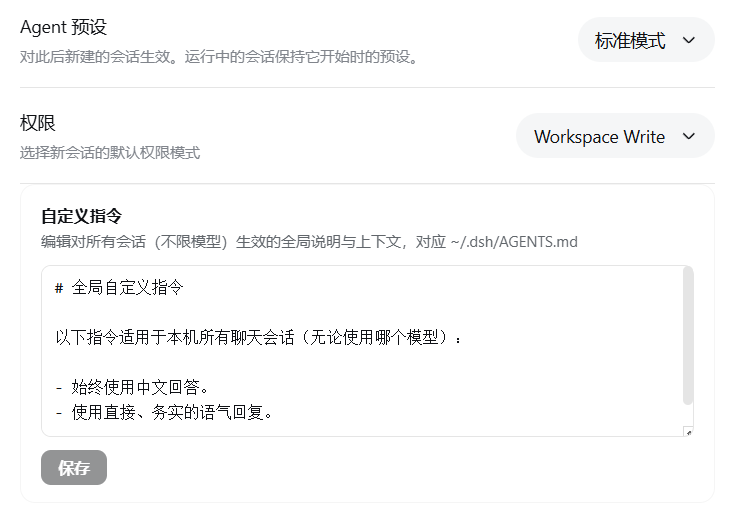
Opening a new conversation in DeepSeek Harness and retyping the same project context, preferred coding style, and output format for every new session and every model switch — the repetition compounds and slows you down. dsh-custom-instructions brings the Codex AGENTS.md / ChatGPT Custom Instructions idea into Harness: write your notes once in Settings General Custom Instructions, and every future conversation on this machine, across every model, carries them automatically.
What the plugin does is deliberately narrow. A monospace editor reads and writes the global instruction file directly; saving flushes to disk with immediate success or failure feedback. Injection rides on DSH built-in dsh-agent-instructions, so new sessions pick up the text from the very first message, and the current session picks it up after the next file read or write. The whole thing ships as a hand-written client bundle plus a pure Node ESM host — no build step, no extra tooling required.
If you live in DeepSeek Harness for development, writing, or data work and want a small fixed context block that stays on the machine and travels with every conversation, this fills the gap that was missing. If you prefer composing ad-hoc prompts in each message, the panel stays out of the way entirely.
Screenshots
Use Cases
- Every new conversation automatically inherits your project context and coding style
- Switching models without re-typing output preferences
- Maintaining a single global instruction set from the settings panel
Best For
- Engineers doing daily development in DeepSeek Harness
- Writers who need consistent style across sessions
- Data analysts who want uniform behavior across all models
Related Plugins
A service-oriented sidebar framework for DSH, offering a full workbench with file explorer, embedded browser, real terminal, Git panel, and extensible plugin services.

A beautiful, practical Claude Code-style TUI plugin with pixel whale top bar, flowing glow title, real-time status line, streaming thought expansion, time rewind, context progress bar and TPS gauge — zero core changes.

The plugin market for DeepSeek Harness: browse/search/one-click install community plugins and themes, with updates, backup/restore, hot disable, diagnostics, and AI fix.

A persistent whale widget on the DSH web UI that shows DeepSeek balance, today's usage, and per-turn cost, with drag-and-snap and sound effects.