dsh-ssh-tui
Run the following command in DeepSeek Harness:
dsh plugin install cyjyyd/dsh-ssh-tui
Paste the following prompt into your AI chat to install this plugin:
Run dsh plugin --profile tui add dsh-ssh-tui@latest in DeepSeek Harness to install; the plugin source is available at https://github.com/cyjyyd/dsh-ssh-tui
About this plugin
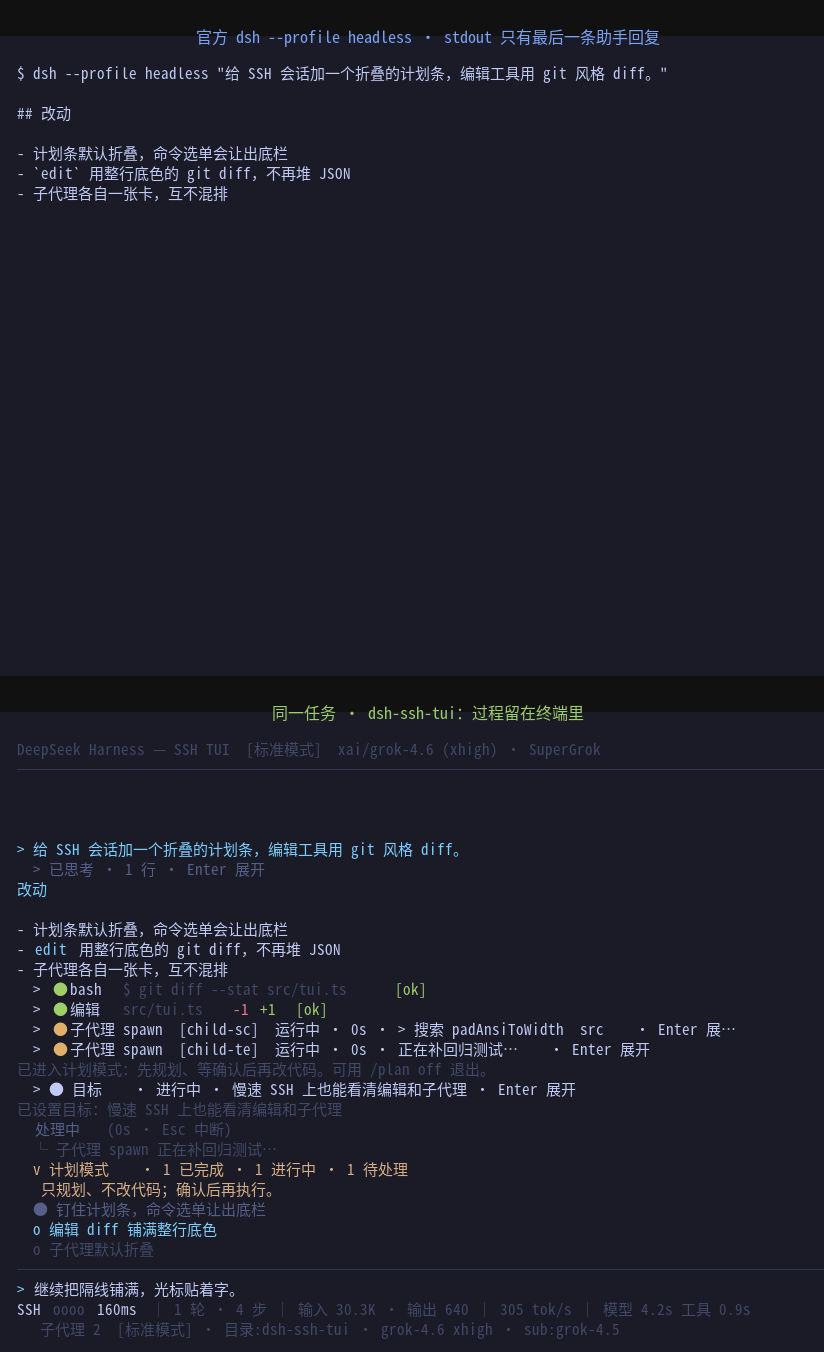
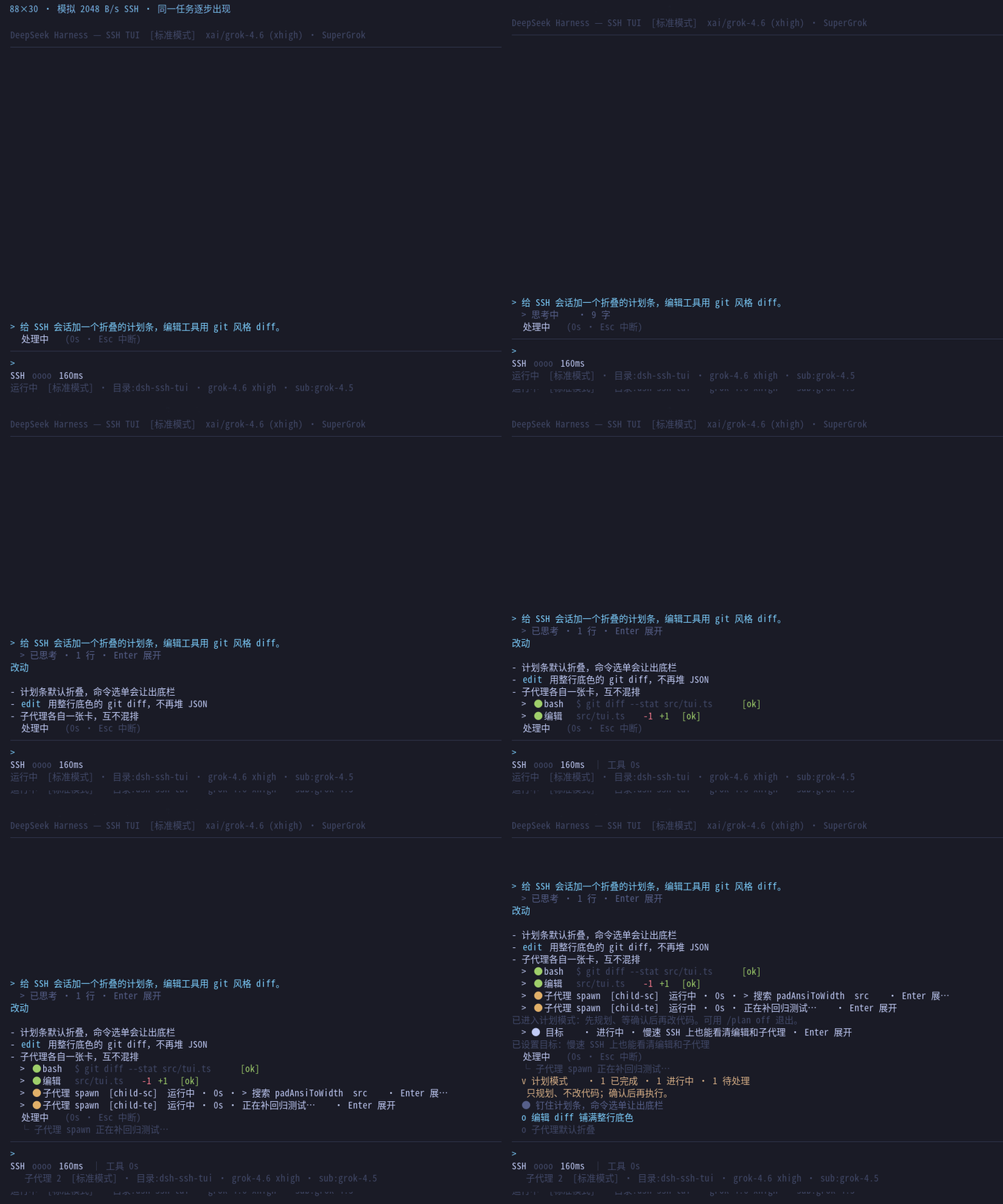
The official headless profile prints exactly one artifact to stdout: the final Markdown. Thinking traces, tool calls, sub-agent runs, and plan updates all live in the session JSONL, invisible from the terminal. If your daily workflow is a jump host, a test box, or a keyboard-only SSH session, that process is a black box. dsh-ssh-tui renders the same event stream into an 80-column pure-ANSI window: collapsed thinking with a live spinner, red/green whole-line edit diffs, one card per sub-agent, and a plan bar pinned above the input box—everything appearing incrementally as bytes arrive, with no browser, mouse, or heavyweight terminal framework required.
Weak links and dropped sessions are the two problems every remote SSH developer hits. The plugin repaints only dirty rows and batches them into a single stdout.write; on startup it probes round-trip latency via CSI 6n and picks a 80-to-400 ms paint cadence, while a four-segment signal chip in the status bar shows the current delay at a glance. When the SSH link drops, the Host process stays alive on the remote box and keeps working; reconnecting with --resume re-attaches to the same session instead of spawning a second host that would race the JSONL and approval queue. Paired with tmux or the built-in continue-on-disconnect mode, lid-close, network switch, and jump-host idle timeouts no longer mean losing your working context.
Beyond process visibility, the plugin folds multi-provider routing—DeepSeek official, SuperGrok via local OAuth, OpenCode Go/Zen, and any OpenAI-compatible gateway—into /provider and /commands that take effect on the very next request without a restart. Sub-agent models auto-persist with the parent route; /usage queries the current provider for remaining quota and surfaces a percentage in the status bar. Search with /find jumps to a category-tagged message, and the full shortcut set (navigate, expand, scroll, full repaint) gives the feel of a desktop IDE editor window—except it runs inside a single SSH connection.
Screenshots
Use Cases
- Running long tasks on a bastion host or headless test box and wanting live visibility into thinking traces, tool calls, and sub-agent progress
- Working over high-latency or multi-hop SSH where incremental dirty-row rendering keeps the screen responsive and the signal chip shows current RTT
- Swapping between DeepSeek, SuperGrok, OpenCode, and other providers mid-session with /provider and /model, taking effect on the next request without restart
Best For
- Engineers who write code primarily over SSH on bastion hosts, test boxes, or keyboard-only sessions
- Remote ops and platform teams that need to monitor long-running AI tasks without opening a browser
- Developers juggling multiple LLM providers who want unified model switching and quota checks inside the terminal
Related Plugins
A service-oriented sidebar framework for DSH, offering a full workbench with file explorer, embedded browser, real terminal, Git panel, and extensible plugin services.

A beautiful, practical Claude Code-style TUI plugin with pixel whale top bar, flowing glow title, real-time status line, streaming thought expansion, time rewind, context progress bar and TPS gauge — zero core changes.

The plugin market for DeepSeek Harness: browse/search/one-click install community plugins and themes, with updates, backup/restore, hot disable, diagnostics, and AI fix.

A persistent whale widget on the DSH web UI that shows DeepSeek balance, today's usage, and per-turn cost, with drag-and-snap and sound effects.