dsh-archive-manager
Run the following command in DeepSeek Harness:
dsh plugin install Ycet/dsh-archive-manager
Paste the following prompt into your AI chat to install this plugin:
Run dsh plugin install Ycet/dsh-archive-manager in your terminal to install this plugin from https://github.com/Ycet/dsh-archive-manager, then restart dsh web to apply the changes.
About this plugin
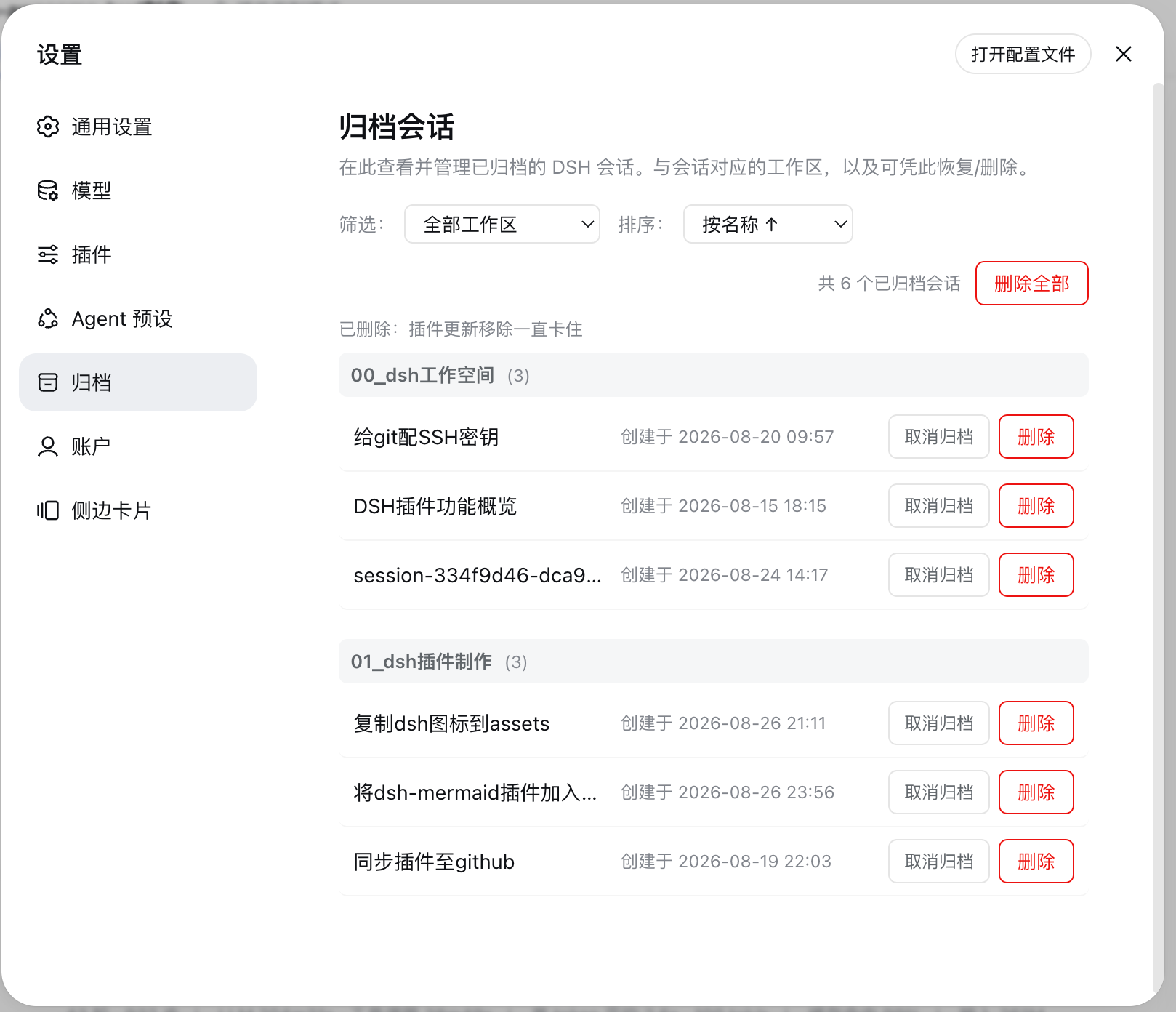
As a DSH workspace accumulates more and more conversations, archived sessions tend to drift to the back of your mind with no central place to review or clean them up. dsh-archive-manager fills that gap by adding a dedicated Archive page inside the DSH Web settings window. It collates every archived conversation into a single view, grouped by workspace with an ungrouped bucket for the rest, so you no longer need to dig through storage files to figure out what has been archived.
The Archive page offers a toolbar with workspace filtering and two sorting dimensions (name or creation date, ascending or descending). Each session row carries two actions: Unarchive, which instantly restores the conversation to its workspace group in the left sidebar so you can click and resume the chat; and Delete, which opens a double-confirmation dialog and, once confirmed, permanently removes the session log file, the archive flag, and the workspace bookkeeping record. All state changes propagate through the DSH domain store in real time — the sidebar and the Archive page refresh without a restart. The UI copy follows the active DSH language, supporting both Chinese and English.
The plugin requires no environment variables, no extra services, and no configuration file. After installation, simply restart the DSH web server and open the settings panel. It is ideal for DSH Web users who juggle multiple workspaces, manage a large volume of conversations, and want a confirm-guarded, one-stop place to unarchive or permanently tidy up history — or for any team that values a safety confirmation step before irreversible deletions.
Screenshots
Use Cases
- You have a growing pile of archived sessions and want one page to filter and sort them
- You want to permanently delete obsolete historical sessions with a double-confirmation guard
- You accidentally archived a session you are still using and want to restore it back to the sidebar instantly
Best For
- Users who juggle multiple workspaces in the DSH Web interface
- Users with a large conversation volume who need periodic cleanup and organization
- Teams that want a double-confirmation step before any irreversible session deletion
Related Plugins
A service-oriented sidebar framework for DSH, offering a full workbench with file explorer, embedded browser, real terminal, Git panel, and extensible plugin services.

A beautiful, practical Claude Code-style TUI plugin with pixel whale top bar, flowing glow title, real-time status line, streaming thought expansion, time rewind, context progress bar and TPS gauge — zero core changes.

The plugin market for DeepSeek Harness: browse/search/one-click install community plugins and themes, with updates, backup/restore, hot disable, diagnostics, and AI fix.

A persistent whale widget on the DSH web UI that shows DeepSeek balance, today's usage, and per-turn cost, with drag-and-snap and sound effects.