dsh-wechat-skin
Run the following command in DeepSeek Harness:
dsh plugin install licheng-ma/dsh-wechat-skin
Paste the following prompt into your AI chat to install this plugin:
Run dsh plugin install licheng-ma/dsh-wechat-skin in the DeepSeek Harness terminal to install the plugin; the source is available at https://github.com/licheng-ma/dsh-wechat-skin . After installation, enable it in Settings to apply the WeChat Windows look.
About this plugin
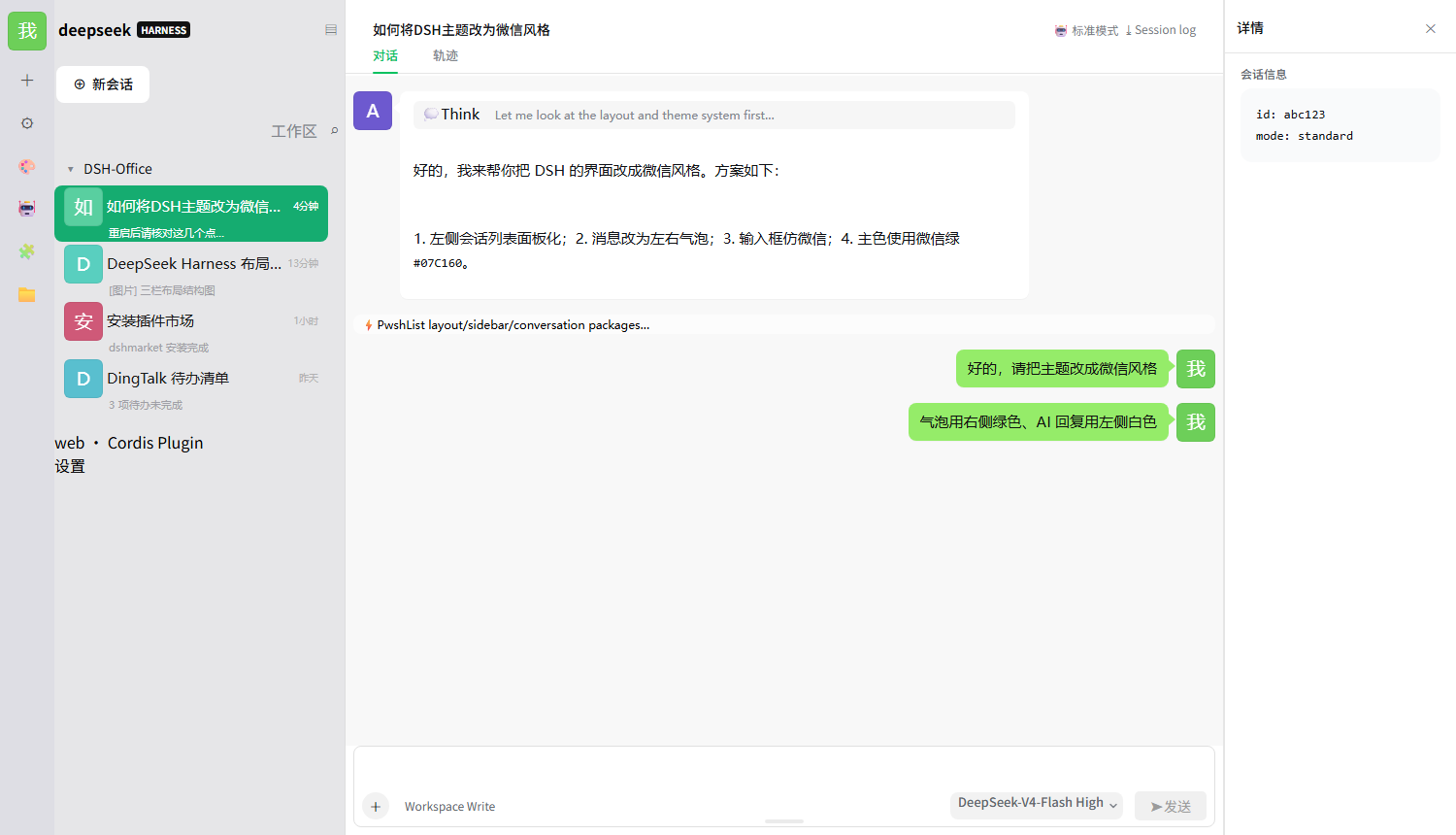
The out-of-the-box UI of DeepSeek Harness reads more like a developer workbench than a daily chat app-bubbles, avatars, and the input area all feel a step away from familiar messaging software. dsh-wechat-skin restyles those elements to mirror the WeChat Windows desktop look: your messages sit in light-green bubbles on the right, AI replies in white bubbles on the left, both with 8px rounded corners and a WeChat-style tail; the sidebar highlights the active conversation in solid green with a 40px square avatar per session; the input bar spans full width with a subtle border and rounded corners, resolvable by dragging either edge with the height persisted automatically. The skin targets light mode only and falls back to the official DSH appearance under dark mode, so you never see a half-applied theme.
The design promise is pure cosmetic, zero intrusion. Built on the official --dsw-* design tokens and the ctx.theme.overrideTokens extension point, it injects no runtime scripts, patches no installers, and removes or relocates no feature entry. Rich content such as code blocks, tool-call cards, and file attachments is fully preserved, merely restyled into WeChat-like grey strips. Avatars can be a deterministic colour-initial, one of 100 downloadable real portraits, or a personal upload-and they stay in sync across the left rail, message area, and sidebar. Typography is locked to Microsoft YaHei with a 5-step size slider; the 56px left rail lets you pick up to six shortcut icons that deep-link into settings sections.
Best suited for users who live in DSH for conversation, prefer the instantly recognisable feel of WeChat for Windows, and want a skin that is one toggle away from the official UI-no source edits, no upgrade breakage, no feature logic touched.
Screenshots
Use Cases
- Wanting a familiar WeChat Windows feel for daily DSH conversations
- Making the DSH UI more approachable during a colleague demo
- Trying a new chat appearance without touching source or risking upgrade breakage
Best For
- Daily DSH users who prefer the WeChat Windows chat feel
- Plugin users who want pure cosmetic changes with zero feature-logic impact
- Anyone seeking a one-toggle skin that survives DSH upgrades cleanly
Related Plugins

whale-girl is a desktop pet in the DSH Web GUI (bottom-right for instant companionship) — draggable, feedable, playable; completed tasks, sessions and companionship time accrue into seniority levels, titles, and memories.

A WebGPU ocean skin for DeepSeek Harness with five-wave Gerstner waves, translucent theme, day/night cycle, and quick controls, installable as plugin or extension.

A Galgame-style conversation view and visual scene editor for DSH web sessions, with a real-time editing mode.

A native skinning plugin for DeepSeek Harness: 8 designer themes, wallpapers, accent colors, and shareable theme packs, built purely on design tokens.