dsh-telegram-bridge
Run the following command in DeepSeek Harness:
dsh plugin install JxaMe/dsh-telegram-bridge
Paste the following prompt into your AI chat to install this plugin:
Run dsh plugin install JxaMe/dsh-telegram-bridge in your DeepSeek Harness terminal to install this plugin, source available at https://github.com/JxaMe/dsh-telegram-bridge
About this plugin
In daily development the dsh Agent workspace is typically tied to a terminal or a local Web UI, so stepping away from the desk means losing the thread. dsh-telegram-bridge turns a Telegram private chat into a direct entry point: send a message and the Agent reasons, calls tools, and executes commands; replies arrive as structured cards and rich text, with no browser or window switching required.
Its core capabilities revolve around reliability, responsiveness, and control. Messages line up in a bounded queue that can be interrupted at any time, which also clears pending items. A live status line surfaces what the Agent is actually doing—calling a tool or running a command—so long tasks no longer resemble a frozen connection. Each chat keeps the last N independent sessions, and model, reasoning effort, and Agent preset can be switched on the fly. Replies render structured blocks such as key-value pairs, step lists, tables, and todo items, while long messages are intelligently split at paragraph and code-block boundaries so structure is never lost.
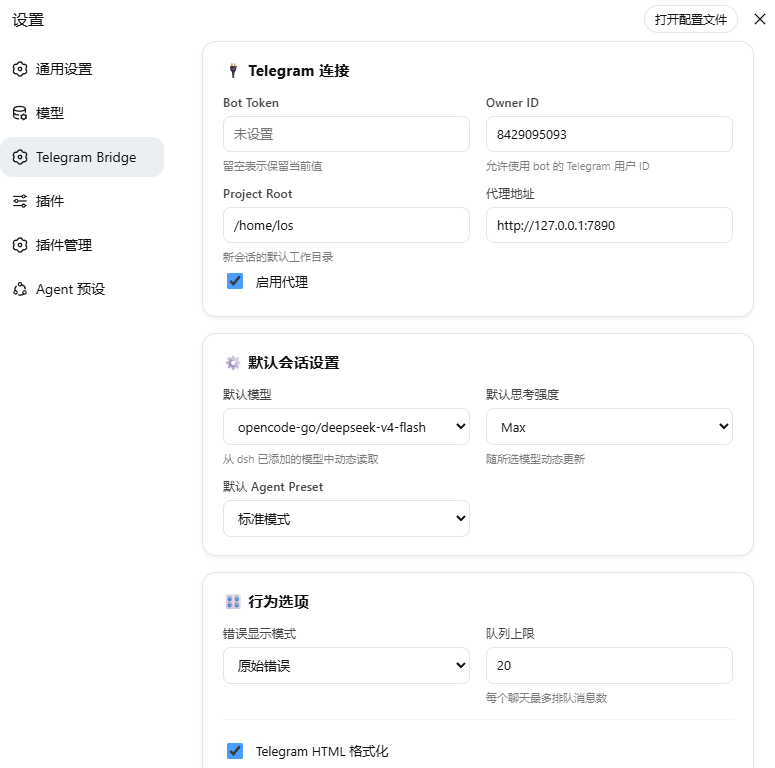
The plugin is built for developers and researchers who already run dsh Agent and want to extend the interaction to their phone or any chat client. It runs inside the dsh profile with no extra webhook server, and a dedicated section in the dsh Web UI settings page lets you manage Bot Token, proxy, default model, queue limits, and status-line behaviour with minimal setup.
Screenshots
Use Cases
- Keep talking to your Agent from your phone without being glued to a terminal
- Monitor live status, interrupt the queue, and retry failed messages mid-task
- Switch models, reasoning effort, and Agent presets directly from Telegram without opening a local UI
Best For
- Developers who already use dsh Agent and want mobile continuity
- AI researchers running long tasks who need to check progress anytime
- Engineers who prefer handling day-to-day technical work via a chat client
Related Plugins
A service-oriented sidebar framework for DSH, offering a full workbench with file explorer, embedded browser, real terminal, Git panel, and extensible plugin services.

A beautiful, practical Claude Code-style TUI plugin with pixel whale top bar, flowing glow title, real-time status line, streaming thought expansion, time rewind, context progress bar and TPS gauge — zero core changes.

The plugin market for DeepSeek Harness: browse/search/one-click install community plugins and themes, with updates, backup/restore, hot disable, diagnostics, and AI fix.

A persistent whale widget on the DSH web UI that shows DeepSeek balance, today's usage, and per-turn cost, with drag-and-snap and sound effects.