dsh-plugin-dosage
Run the following command in DeepSeek Harness:
dsh plugin install qingfeng200410/dsh-plugin-dosage
Paste the following prompt into your AI chat to install this plugin:
Run dsh plugin install qingfeng200410/dsh-plugin-dosage in your terminal to add the plugin; the source repository is at https://github.com/qingfeng200410/dsh-plugin-dosage .
About this plugin
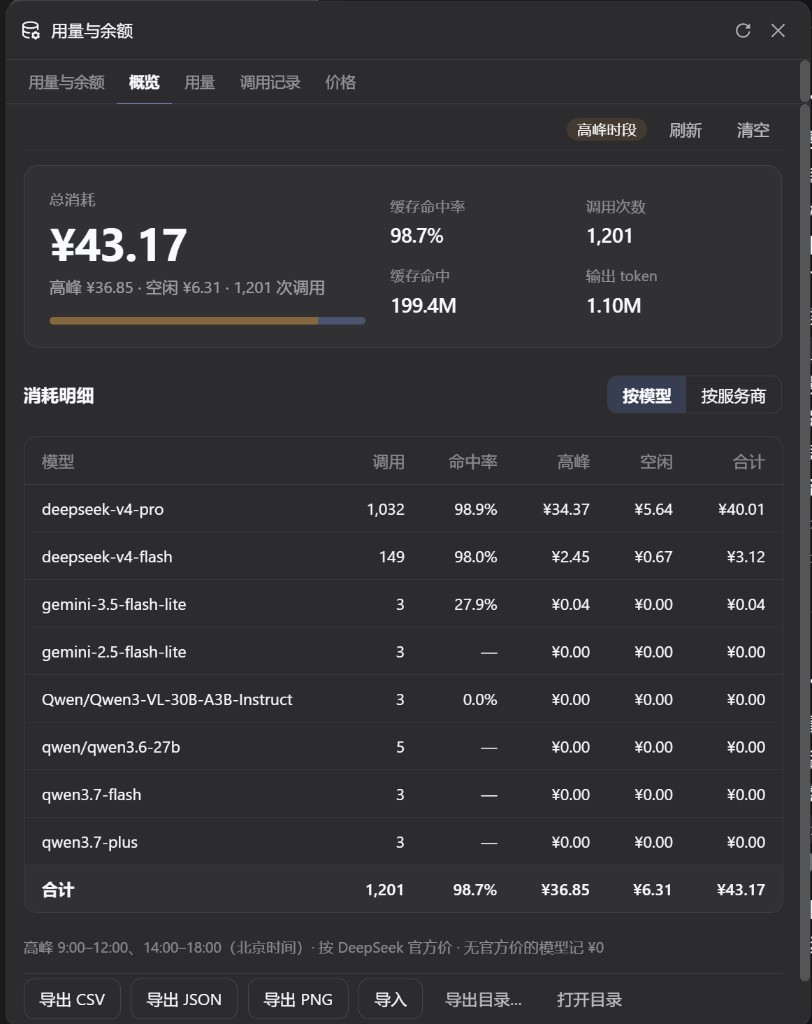
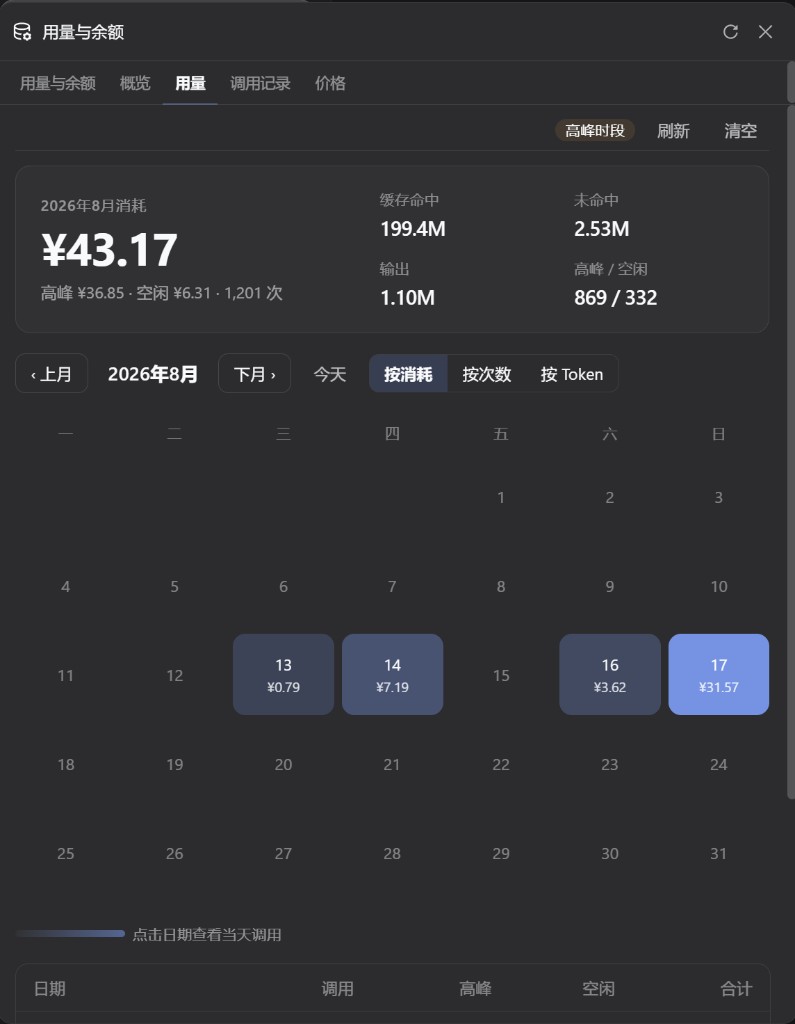
When your AI workflow spans DeepSeek, OpenRouter, Moonshot, MiniMax and other providers, balances are scattered across different dashboards, cost is never split into peak and off-peak, and call history means digging through raw logs. dsh-plugin-dosage folds account monitoring and per-call billing into a single Usage/Balance popover at the bottom of the sidebar, so one click replaces a maze of settings pages and duplicate buttons.\n\nThe popover exposes five tabs: provider balance and Token Plan, an overview with a peak-vs-off-peak bar and per-model totals, a monthly heatmap switchable to cost, call count, or tokens, a per-call log showing model, cache hit rate, finish reason, and off-peak pricing, and fixed DeepSeek price cards. The sidebar footer token counter refreshes every five seconds even while the popover is closed; when it is open, today's cost and the active provider balance also auto-update. All records live under the user-level ~/.dsh/dsh-usage/ directory, so switching projects never splits your data, and you can export CSV, JSON, or PNG or merge-import by timestamp.\n\nThis plugin is built for developers and small teams who call multiple model APIs through DeepSeek Harness day in and day out and need a persistent, glanceable view of balances and cost curves. Once each provider's credential is in place, everything is reachable from one sidebar entry with no extra tabs and no Settings detour.
Screenshots
Use Cases
- Track balances and spend across DeepSeek, OpenRouter, Moonshot and other providers in one sidebar popover
- Monitor daily and monthly token usage, call count, and cost trends to spot anomalies fast
- Split peak vs off-peak hours to optimize when you call the most expensive models
Best For
- Solo developers who call multiple model APIs every day
- Teams that must keep AI usage budgets under constant control
- Engineers building on top of the DeepSeek Harness workflow
Related Plugins
A service-oriented sidebar framework for DSH, offering a full workbench with file explorer, embedded browser, real terminal, Git panel, and extensible plugin services.

A beautiful, practical Claude Code-style TUI plugin with pixel whale top bar, flowing glow title, real-time status line, streaming thought expansion, time rewind, context progress bar and TPS gauge — zero core changes.

The plugin market for DeepSeek Harness: browse/search/one-click install community plugins and themes, with updates, backup/restore, hot disable, diagnostics, and AI fix.

A persistent whale widget on the DSH web UI that shows DeepSeek balance, today's usage, and per-turn cost, with drag-and-snap and sound effects.