
dsh-file-upload
Run the following command in DeepSeek Harness:
dsh plugin install a903067276-rgb/dsh-file-upload
Paste the following prompt into your AI chat to install this plugin:
Install the plugin via the command line in DeepSeek Harness, where you can find the full source code at https://github.com/a903067276-rgb/dsh-file-upload, and simply restart dsh web to activate it.
About this plugin
DeepSeek Harness natively drops dragged images whenever the active model lacks vision capabilities. This plugin eliminates that friction by introducing a unified upload button and seamless drag-and-drop zone directly within the composer toolbar. Its intelligent routing engine handles the heavy lifting: when your current model accepts images, files are routed straight to the official attachment rail, leveraging the DeepSeek Files API for automatic ID reuse and optimized delivery. If vision support is disabled or not available, it gracefully degrades to embedding a clean file path in your draft, bypassing native image blocks entirely while ensuring any baseline model can still parse the reference.
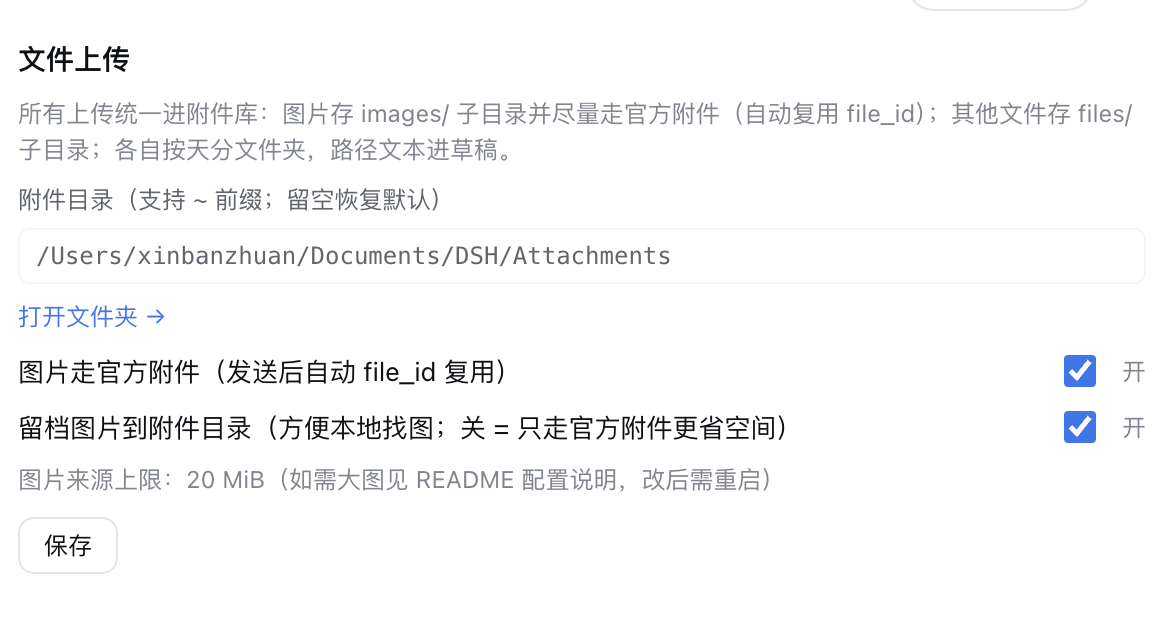
Beyond images, the tool fully embraces complex file management. Dropping an entire folder recursively reconstructs its structure under a configurable local archive, leaving only the original path in the draft for clean context handling. A dedicated settings panel puts you in control, allowing toggles for the official attachment channel, custom path prefixes, clipboard interception modes, and strict same-origin security defaults—all without requiring external system dependencies thanks to its pure Node.js implementation.
Designed for developers, researchers, and power users who frequently inject external resources into AI conversations. Whether you’re optimizing multimodal workflows by maximizing the official attachment rail, managing large codebases or datasets via structured folder archiving, or simply needing a reliable fallback mechanism when switching between chat models, this plugin streamlines how files bridge the gap between your local machine and the harness interface.
Screenshots
Use Cases
- Automatically converts dropped images into path references when switching to text-only models.
- Drag and drop an entire project folder to instantly archive its structure and generate reference paths.
- Batch-upload test images directly to the official attachment rail via a single click to speed up multimodal debugging.
Best For
- Developers who frequently insert local images and code files into AI conversations.
- Researchers quickly switching between models with varying vision capabilities.
- Knowledge workers accustomed to managing large volumes of reference materials via drag-and-drop workflows.
Related Plugins
A service-oriented sidebar framework for DSH, offering a full workbench with file explorer, embedded browser, real terminal, Git panel, and extensible plugin services.

A beautiful, practical Claude Code-style TUI plugin with pixel whale top bar, flowing glow title, real-time status line, streaming thought expansion, time rewind, context progress bar and TPS gauge — zero core changes.

The plugin market for DeepSeek Harness: browse/search/one-click install community plugins and themes, with updates, backup/restore, hot disable, diagnostics, and AI fix.

A persistent whale widget on the DSH web UI that shows DeepSeek balance, today's usage, and per-turn cost, with drag-and-snap and sound effects.