dsh-turn-rail
Run the following command in DeepSeek Harness:
dsh plugin install Luoji-Yuli/dsh-turn-rail
Paste the following prompt into your AI chat to install this plugin:
Run dsh plugin install Luoji-Yuli/dsh-turn-rail in the DeepSeek Harness terminal to install; the project is open-sourced at https://github.com/Luoji-Yuli/dsh-turn-rail
About this plugin
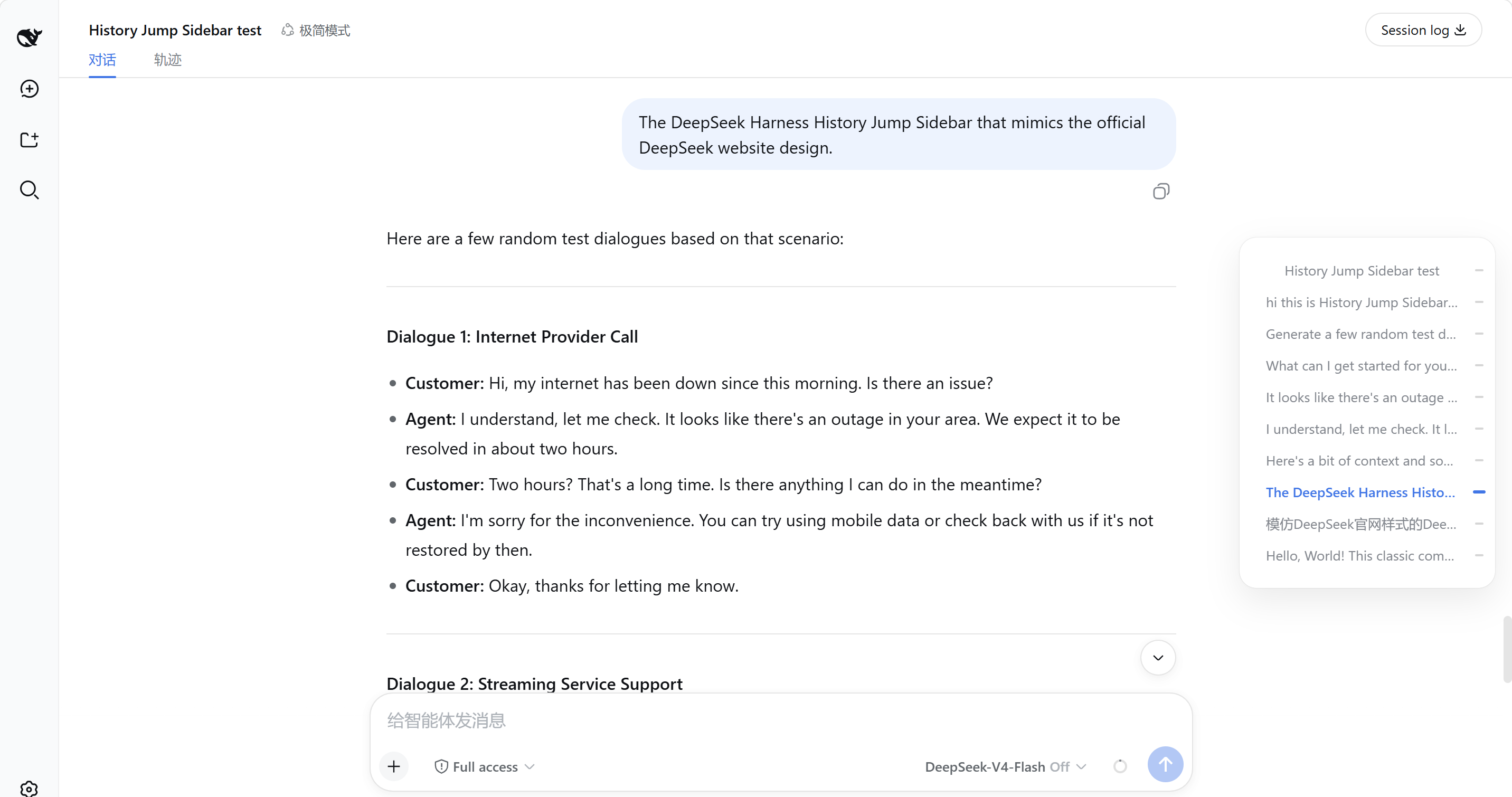
When a multi-turn conversation in DeepSeek Harness Web grows long, scrolling back to an earlier exchange becomes tedious. You end up endlessly paging up or trying to remember where a particular turn landed. dsh-turn-rail adds a slim navigation rail along the right edge, bringing the see-every-turn-at-a-glance click-to-jump feel of the official DeepSeek chat page into Harness Web.
In its collapsed state the rail is just a 34-pixel strip; each user turn gets a small gray marker while the active turn turns blue and stretches slightly. As you scroll, scrollspy keeps the highlight in sync automatically. Hover over the rail or give it keyboard focus and it expands into a 240-pixel floating panel listing every user message one per row; clicking any row jumps straight to that turn. Opening a session triggers automatic pagination of older history, so all past turns show up in the rail without having to scroll to the very bottom.
It is built for developers who work through long, multi-turn sessions in Harness Web and frequently need to revisit or reference an earlier exchange. The plugin also ships an optional frosted-glass rounded background, off by default, that renders in both light and dark themes, giving the rail a floating-card look if you want that extra polish. Leave it off and you get a clean, minimal marker strip.
Screenshots
Use Cases
- Jump back to a specific turn in a multi-turn conversation to refine or follow up
- Survey the full structure of a long session by scanning the turn list at a glance
- Stay oriented to the current turn while reading through a scrolling conversation
Best For
- Developers who work through long multi-turn sessions in Harness Web
- Technical teams that frequently reference or revise earlier turn outputs
- Harness users who want a closer-to-official DeepSeek chat experience
Related Plugins
A service-oriented sidebar framework for DSH, offering a full workbench with file explorer, embedded browser, real terminal, Git panel, and extensible plugin services.

A beautiful, practical Claude Code-style TUI plugin with pixel whale top bar, flowing glow title, real-time status line, streaming thought expansion, time rewind, context progress bar and TPS gauge — zero core changes.

The plugin market for DeepSeek Harness: browse/search/one-click install community plugins and themes, with updates, backup/restore, hot disable, diagnostics, and AI fix.

A persistent whale widget on the DSH web UI that shows DeepSeek balance, today's usage, and per-turn cost, with drag-and-snap and sound effects.