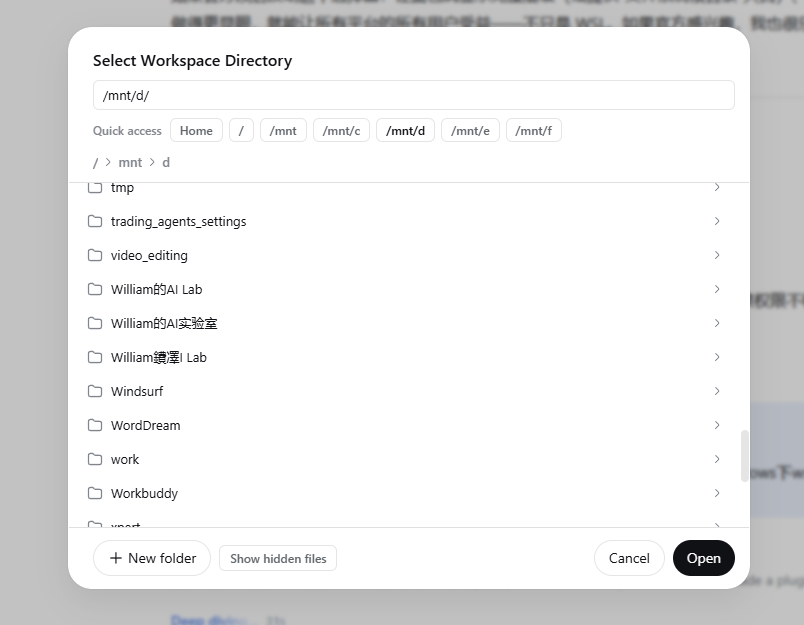
dsh-wsl-workspace-picker
Run the following command in DeepSeek Harness:
dsh plugin install WilliamShi666/dsh-wsl-workspace-picker
Paste the following prompt into your AI chat to install this plugin:
Run dsh plugin install WilliamShi666/dsh-wsl-workspace-picker in the DeepSeek Harness terminal to install this plugin; the source code is available at https://github.com/WilliamShi666/dsh-wsl-workspace-picker .
About this plugin
When working under WSL with the DeepSeek Harness web UI, the built-in workspace-directory picker has a painful blind spot: the dialog opens at the Linux home directory, its breadcrumb trail folds right there, and Windows drives at /mnt/c, /mnt/d, and beyond are reachable only through a nearly invisible pencil-glyph path editor. For developers who shuttle between Windows and Linux file systems every day, that workflow is both awkward and slow.
dsh-wsl-workspace-picker swaps in a single-pane browser that makes every path reachable at a glance. A row of quick-access chips at the top jumps straight to Home, the filesystem root, and each mounted Windows drive; an always-visible path input accepts any absolute path with a simple Enter press; and a full breadcrumb chain from / lets you climb up and down the entire tree without hitting a home-folding dead end. New-folder creation and a hidden-files toggle are retained, so the enhanced dialog feels like a natural extension of the stock one.
It is a pure client-side UI plugin: no host-side code is injected, no network connections are opened, and all directory listing and creation ride on the same browse capability the stock dialog already uses. It is ideal for developers running DeepSeek Harness 0.1.0-rc.6 or later (web profile) under WSL who regularly need to reach Windows drives from the workspace picker.
Screenshots
Use Cases
- Jump to Windows drives like /mnt/c with one-click quick-access chips under WSL
- Browse the full directory tree from / without the home-folding dead end
- Type any absolute path and press Enter to land on a workspace folder instantly
Best For
- Developers using DeepSeek Harness web UI under WSL
- Users who frequently switch paths between Windows and Linux filesystems
- DeepSeek Harness users managing multiple project directories via the workspace picker
Related Plugins
A service-oriented sidebar framework for DSH, offering a full workbench with file explorer, embedded browser, real terminal, Git panel, and extensible plugin services.

A beautiful, practical Claude Code-style TUI plugin with pixel whale top bar, flowing glow title, real-time status line, streaming thought expansion, time rewind, context progress bar and TPS gauge — zero core changes.

The plugin market for DeepSeek Harness: browse/search/one-click install community plugins and themes, with updates, backup/restore, hot disable, diagnostics, and AI fix.

A persistent whale widget on the DSH web UI that shows DeepSeek balance, today's usage, and per-turn cost, with drag-and-snap and sound effects.