dsh-width
Run the following command in DeepSeek Harness:
dsh plugin install Hanice404/dsh-width
Paste the following prompt into your AI chat to install this plugin:
Run dsh plugin install Hanice404/dsh-width in your terminal to install this plugin; source code is available at https://github.com/Hanice404/dsh-width .
About this plugin
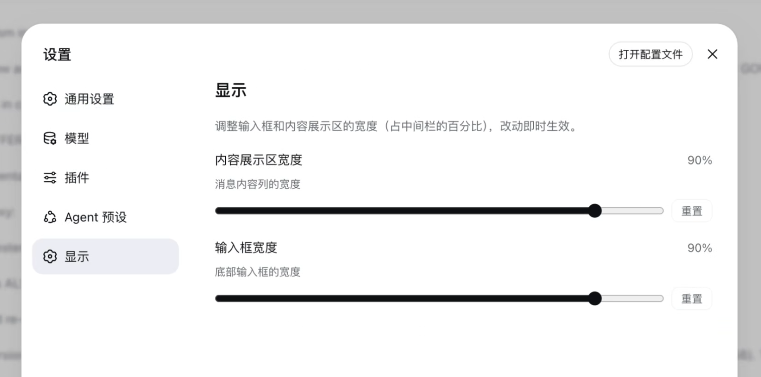
DeepSeek Harness ships with a fixed middle-column ratio for the message list and the composer, whether you are on a 4K monitor or a 14-inch laptop. dsh-width adds two sliders under Settings Display-one for the content area, one for the input box-letting you dial both between 30% and 100% in 5% steps. Changes apply instantly with no page reload, persist to ~/.dsh/settings.yaml, and can be reset to defaults with a single click.
Under the hood the plugin targets stable data-attribute selectors rather than hashed class names, so it survives CSS-bundle rebuilds. On the new-conversation (hero) page a MutationObserver keeps the workspace/mode selector row pixel-aligned to the input box left edge, and the in-conversation TodoPanel tracks the composer width in real time, keeping the whole visual column coherent.
Who it is for: anyone who wants a narrower message column on a wide display, or a full-width composer and chat list on a compact screen-without editing source files or maintaining a fork.
Screenshots
Use Cases
- Narrow the message column on a wide 4K display to free up sidebar space
- Stretch the composer and chat list across a compact laptop screen
- Toggle between a team-wide display preset and personal settings
Best For
- DSH web users who prefer customizing interface width
- Developers on multi-monitor or large displays needing flexible layout
- Users who want to tweak display ratios without writing CSS
Related Plugins
A service-oriented sidebar framework for DSH, offering a full workbench with file explorer, embedded browser, real terminal, Git panel, and extensible plugin services.

A beautiful, practical Claude Code-style TUI plugin with pixel whale top bar, flowing glow title, real-time status line, streaming thought expansion, time rewind, context progress bar and TPS gauge — zero core changes.

The plugin market for DeepSeek Harness: browse/search/one-click install community plugins and themes, with updates, backup/restore, hot disable, diagnostics, and AI fix.

A persistent whale widget on the DSH web UI that shows DeepSeek balance, today's usage, and per-turn cost, with drag-and-snap and sound effects.