dsh-tryboard-plugin
Run the following command in DeepSeek Harness:
dsh plugin install nexsjournal/dsh-tryboard-plugin
Paste the following prompt into your AI chat to install this plugin:
Run dsh plugin install nexsjournal/dsh-tryboard-plugin inside DeepSeek Harness to install this plugin, then restart DSH to see the Kanban entry in the sidebar; source repository: https://github.com/nexsjournal/dsh-tryboard-plugin
About this plugin
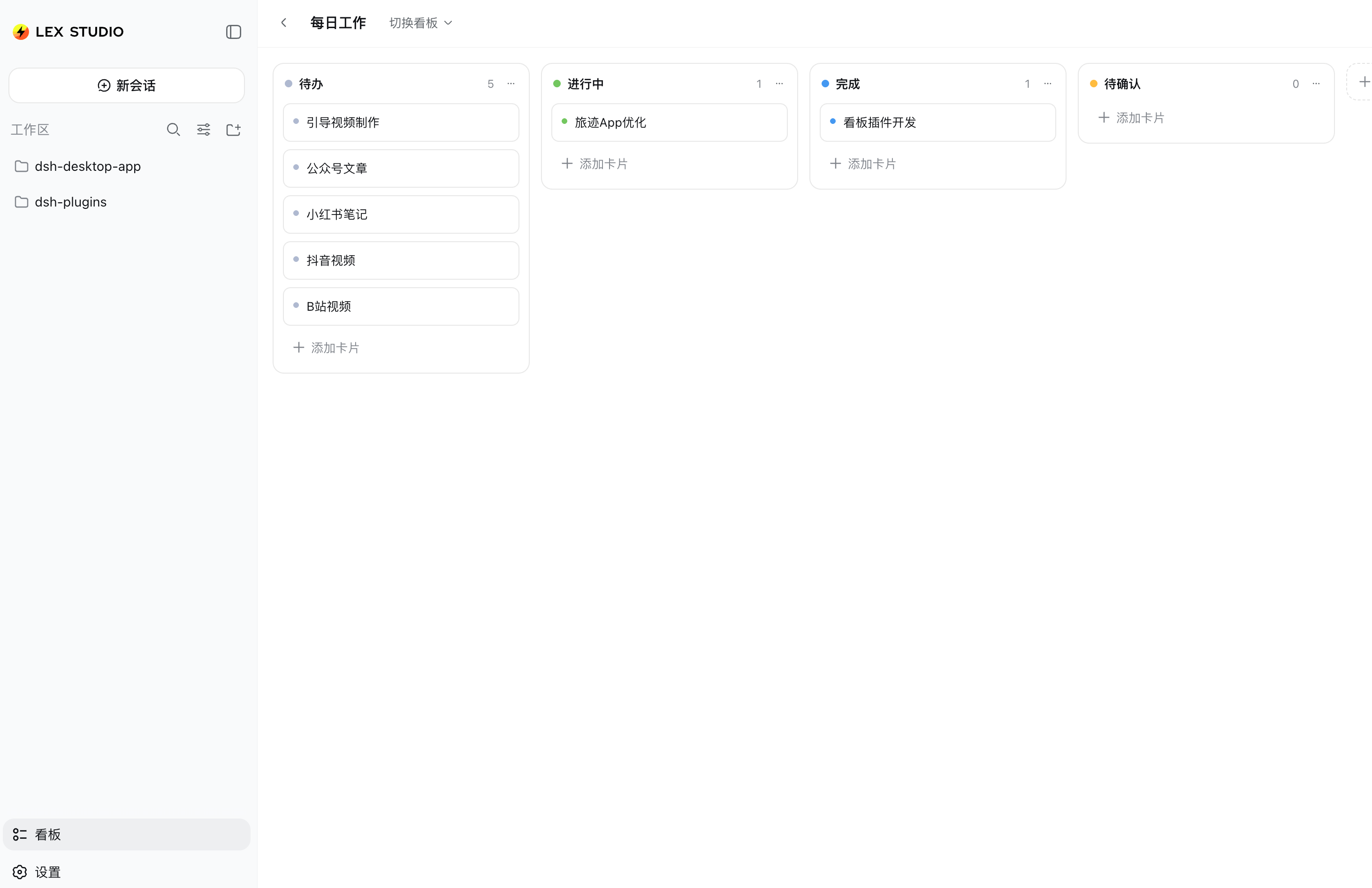
When you are deep in a DSH session—chatting, debugging, running tasks—tracking what you need to do today and how far each thread has come usually means switching to a separate app or a new browser tab. dsh-tryboard-plugin adds a Kanban entry in the sidebar; click it and the board expands across the main content area of the current session, keeping planning and execution in one window.
Each board ships with four columns—To Do, In Progress, Done, Pending—and dragging a card to a new column updates its status automatically. You can create multiple named boards, add or remove custom columns, and reorder cards within a column. All data is persisted as JSON under the tryboard namespace in DSH settings.yaml, survives restarts, and can be migrated by copying a single file.
The UI is built entirely with DSH design tokens, follows light and dark themes out of the box, and introduces zero external styles. Client code hot-reloads on save. This plugin suits developers who juggle several task threads in parallel inside DSH—debugging, writing, sprint planning—and want a single at-a-glance board showing what is moving and what is stuck, without ever leaving the current conversation.
Screenshots
Use Cases
- Planning daily tasks alongside a DSH conversation
- Tracking progress across multiple debugging or writing threads
- Maintaining a lightweight sprint board for personal or team use
Best For
- Developers juggling multiple task threads inside DSH
- Individual users who prefer lightweight tools and avoid app-switching
- Small teams that want a customizable kanban workflow
Related Plugins
A service-oriented sidebar framework for DSH, offering a full workbench with file explorer, embedded browser, real terminal, Git panel, and extensible plugin services.

A beautiful, practical Claude Code-style TUI plugin with pixel whale top bar, flowing glow title, real-time status line, streaming thought expansion, time rewind, context progress bar and TPS gauge — zero core changes.

The plugin market for DeepSeek Harness: browse/search/one-click install community plugins and themes, with updates, backup/restore, hot disable, diagnostics, and AI fix.

A persistent whale widget on the DSH web UI that shows DeepSeek balance, today's usage, and per-turn cost, with drag-and-snap and sound effects.