dsh-sidebar-balance
Run the following command in DeepSeek Harness:
dsh plugin install zhouchengke2046/dsh-sidebar-balance
Paste the following prompt into your AI chat to install this plugin:
Run dsh plugin install zhouchengke2046/dsh-sidebar-balance in your DeepSeek Harness terminal to install; see https://github.com/zhouchengke2046/dsh-sidebar-balance
About this plugin
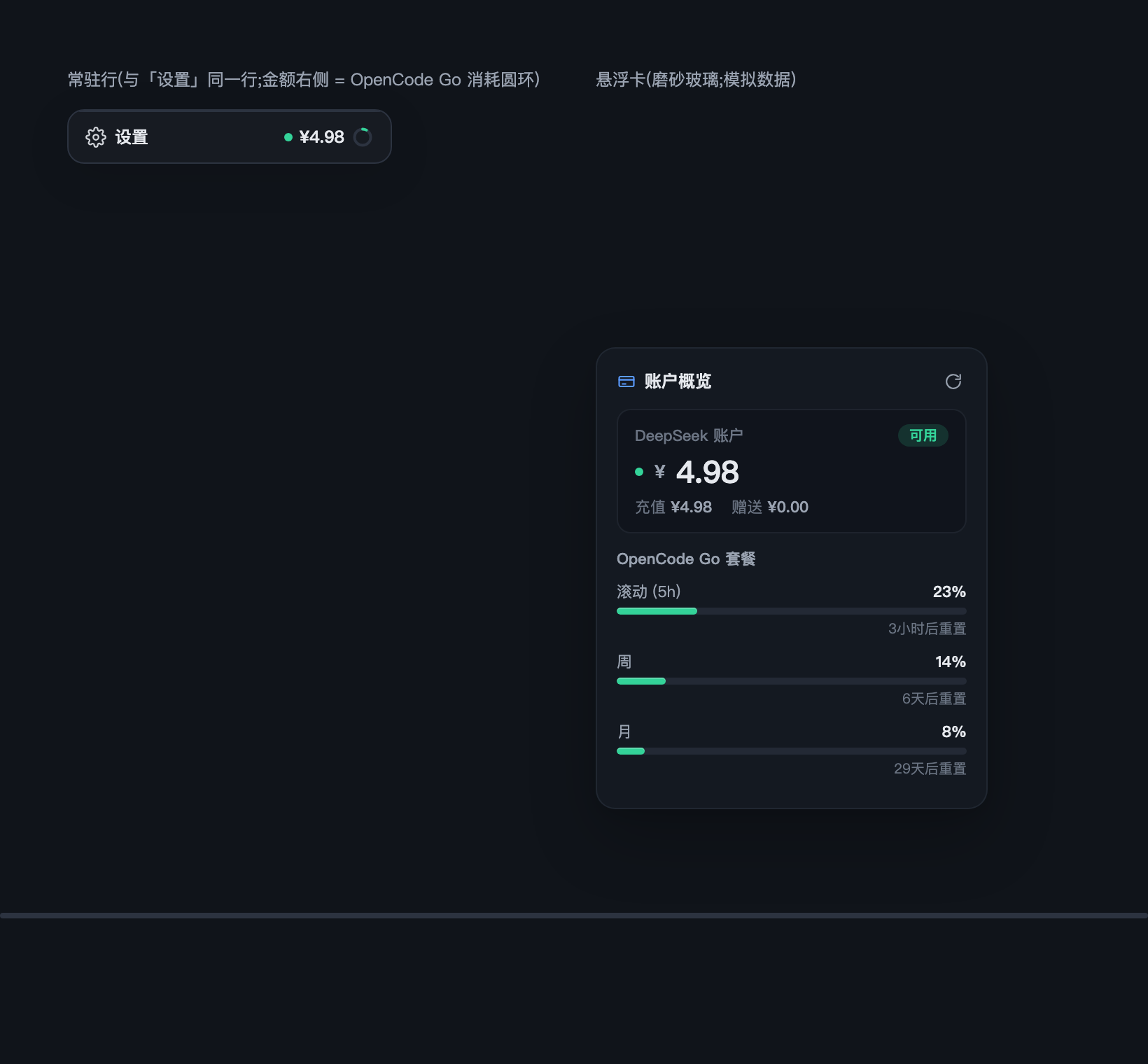
When you run both the DeepSeek official API and an OpenCode Go plan inside Harness, balance and usage numbers tend to live in different corners of the interface, and checking how much credit remains becomes a small chore. dsh-sidebar-balance pulls both figures into a single persistent line at the bottom of the sidebar—no new buttons, no layout changes, zero configuration.
The experience is deliberately restrained. The always-visible row keeps the settings entry on the left and places the DeepSeek balance as plain text with a status dot (green for 10 or above, yellow for 1 to 10, red below 1) followed by an OpenCode Go usage ring on the right. Hovering reveals a frosted-glass card that shows the full DeepSeek balance breakdown alongside the three OpenCode Go windows (daily, monthly, yearly) with their remaining proportions. The widget consumes 100% of the Harness design tokens, so light and dark themes adapt automatically; clicking the amount only triggers a refresh while clicking the settings area only opens settings, with zero risk of accidental activation. On the host side there are zero npm dependencies and zero build scripts—just a hand-written bundle that injects cleanly across platforms.
This plugin is built for users who run both the DeepSeek official API and an OpenCode Go plan in Harness and want to glance at remaining credit without hunting through menus. Install it, and the numbers appear exactly where you expect them, ready to use with no extra setup.
Screenshots
Use Cases
- Glancing at DeepSeek balance and Go plan window usage during daily work
- Avoiding repeated UI navigation when managing multiple plans side by side
- Consistent balance visualization across light and dark themes
Best For
- Users running both the DeepSeek official API and OpenCode Go plans
- Harness users who prefer a minimal sidebar with no extra buttons
- Developers who favor zero-config, install-and-go lightweight plugins
Related Plugins
A service-oriented sidebar framework for DSH, offering a full workbench with file explorer, embedded browser, real terminal, Git panel, and extensible plugin services.

A beautiful, practical Claude Code-style TUI plugin with pixel whale top bar, flowing glow title, real-time status line, streaming thought expansion, time rewind, context progress bar and TPS gauge — zero core changes.

The plugin market for DeepSeek Harness: browse/search/one-click install community plugins and themes, with updates, backup/restore, hot disable, diagnostics, and AI fix.

A persistent whale widget on the DSH web UI that shows DeepSeek balance, today's usage, and per-turn cost, with drag-and-snap and sound effects.