dsh-session-nav
Run the following command in DeepSeek Harness:
dsh plugin install karmiy/dsh-session-nav
Paste the following prompt into your AI chat to install this plugin:
Wait until DeepSeek Harness is idle, then run dsh plugin install karmiy/dsh-session-nav to install the plugin. Source: https://github.com/karmiy/dsh-session-nav .
About this plugin
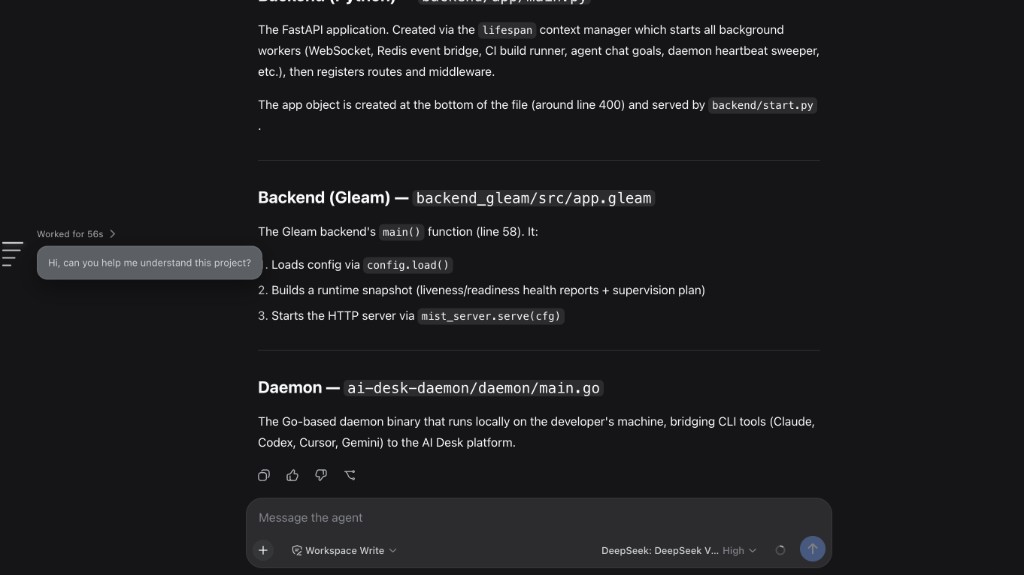
Long conversations make it tedious to scroll back to a specific prompt, check how long a turn took, or review which files were edited. dsh-session-nav overlays a vertical rail on the left side of the conversation column, compressing every user message, steering command, or slash-command turn into a single short dash so you can see the full structure of a session at a glance without leaving the current view.
Hovering over the rail triggers a staggered wave that lengthens neighbouring dashes and reveals a prompt bubble, a Worked for duration, and an Edited N files +X −Y card summarising file edits. Clicking any dash or pressing the up/down arrow keys scrolls that turn into view. Turns that Chat has not yet loaded are paged from session.history on demand, so you can navigate even very early conversation history. The rail caps at 66 percent of the column height, scrolls internally when the stack is long, and a toggle in the session header persists your preference in localStorage.
Ideal for DeepSeek Harness power users who iterate across many turns and need to quickly revisit past prompts, compare per-turn durations, or audit file-level changes. It is a pure overlay that does not replace Chat, the sidebar, or the Trajectory tab, and it coexists with other layout plugins.
Screenshots
Use Cases
- Quickly locate a specific user prompt or steering command in a long multi-turn session
- Hover the rail to check per-turn duration and file-edit summary without scrolling back
- Survey the full turn structure of an extended session at a glance via the left-edge rail
Best For
- Heavy DeepSeek Harness users who frequently revisit past prompts across many turns
- Developers who need to audit per-turn file changes and durations
- Users who want efficient session navigation without replacing the existing Chat layout
Related Plugins
A service-oriented sidebar framework for DSH, offering a full workbench with file explorer, embedded browser, real terminal, Git panel, and extensible plugin services.

A beautiful, practical Claude Code-style TUI plugin with pixel whale top bar, flowing glow title, real-time status line, streaming thought expansion, time rewind, context progress bar and TPS gauge — zero core changes.

The plugin market for DeepSeek Harness: browse/search/one-click install community plugins and themes, with updates, backup/restore, hot disable, diagnostics, and AI fix.

A persistent whale widget on the DSH web UI that shows DeepSeek balance, today's usage, and per-turn cost, with drag-and-snap and sound effects.