dsh-plugin-sidebar-manager
Run the following command in DeepSeek Harness:
dsh plugin install rain02333z-spec/dsh-plugin-sidebar-manager
Paste the following prompt into your AI chat to install this plugin:
Install in DeepSeek Harness by running dsh plugin install rain02333z-spec/dsh-plugin-sidebar-manager; full source at https://github.com/rain02333z-spec/dsh-plugin-sidebar-manager
About this plugin
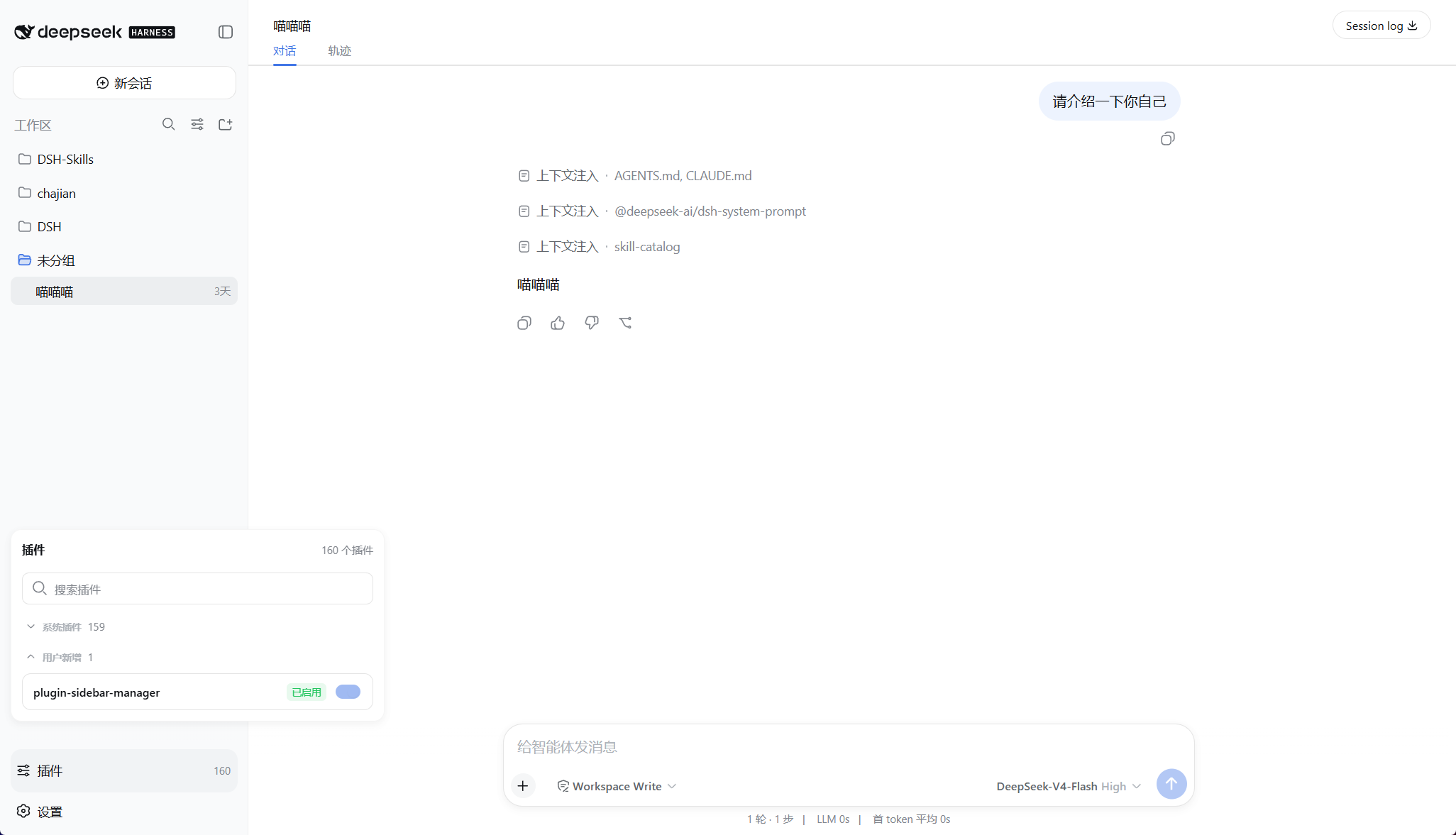
The DSH Web UI buries plugin management under Settings → Plugins, so toggling or finding a single extension requires repeated sidebar collapse and menu digging. dsh-plugin-sidebar-manager adds a dedicated "Plugins" button at the bottom of the sidebar, bringing plugin management within one reach.
The panel groups @deepseek-ai/ and cordis: modules as system plugins and everything else as user-installed, each group independently collapsible. Search matches full module names, short names, and Loader entryIds in a case-insensitive manner. User plugins can be enabled or disabled at runtime, with status re-read from the Host after each action; system plugins and the manager itself remain strictly read-only. The panel follows DSH's global language setting and covers loading, empty-list, no-result, failed-retry, and per-item error states.
Ideal for developers and power users who frequently switch plugins, manage multiple custom extensions, and need to quickly locate and toggle specific modules without diving into nested settings.
Screenshots
Use Cases
- Frequently toggling custom plugins without digging into nested settings menus
- Searching and locating extensions by short name or entryId among many custom plugins
- Grouping system vs user plugins to avoid accidentally modifying read-only modules
Best For
- Developers maintaining multiple custom extensions in DSH
- Power users who frequently toggle plugin enable/disable states
- Users who prefer direct sidebar access over nested menu navigation
Related Plugins
A service-oriented sidebar framework for DSH, offering a full workbench with file explorer, embedded browser, real terminal, Git panel, and extensible plugin services.

A beautiful, practical Claude Code-style TUI plugin with pixel whale top bar, flowing glow title, real-time status line, streaming thought expansion, time rewind, context progress bar and TPS gauge — zero core changes.

The plugin market for DeepSeek Harness: browse/search/one-click install community plugins and themes, with updates, backup/restore, hot disable, diagnostics, and AI fix.

A persistent whale widget on the DSH web UI that shows DeepSeek balance, today's usage, and per-turn cost, with drag-and-snap and sound effects.