
dsh-opencode-go-usage
Run the following command in DeepSeek Harness:
dsh plugin install v587d/dsh-opencode-go-usage
Paste the following prompt into your AI chat to install this plugin:
Execute the installation command within DeepSeek Harness using https://github.com/v587d/dsh-opencode-go-usage as the source to seamlessly deploy and activate this plugin.
About this plugin
Are you worried about unexpectedly hitting your rate limits or running out of quota while using the OpenCode Go subscription? This plugin integrates seamless monitoring directly into the DeepSeek Harness Web interface. Positioned right above the chat input, it provides a persistent dock that tracks three critical timeframes—rolling 5-hour, weekly, and monthly usage—with real-time percentages and reset countdowns, so you can manage your quota proactively.
Engineered for efficiency, it uses a lightweight polling mechanism paired with smart server-side caching to deliver up-to-the-second data without stressing the official APIs. The widget is context-aware, automatically hiding itself unless your session is actively routed through the opencode-go provider. Visual feedback changes dynamically based on severity: a normal state shifts to a yellow alert at 80% consumption and turns red at 90% or when throttling occurs. A built-in configuration panel lets you manage credentials securely, ensuring cookies are stored locally on the host and never exposed to the browser.
Ideal for developers, researchers, and power users who rely heavily on continuous AI generation workflows, this tool eliminates the guesswork around subscription management. With full bilingual support (EN/CN), optimized dark mode rendering, and zero-config setup, it gives you complete peace of mind while maximizing every request in your OpenCode Go plan.
Screenshots
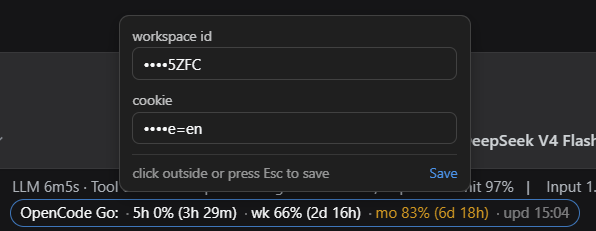
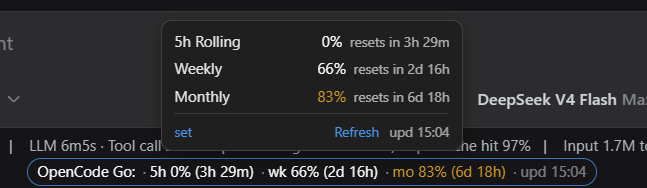
Use Cases
- Monitor remaining quota in real-time during extended code generation or writing sessions to prevent unexpected interruptions.
- Track weekly and monthly resource consumption progress accurately across multiple parallel projects or shared accounts.
- Quickly verify active service quotas before switching between different large model providers within your workflow.
Best For
- Developers and creators who rely heavily on continuous AI generation workflows.
- Team leads and operations staff managing AI subscription budgets and allocation efficiency.
- Power users seeking an immersive, single-window experience without disruptive context switching.
Related Plugins
A service-oriented sidebar framework for DSH, offering a full workbench with file explorer, embedded browser, real terminal, Git panel, and extensible plugin services.

A beautiful, practical Claude Code-style TUI plugin with pixel whale top bar, flowing glow title, real-time status line, streaming thought expansion, time rewind, context progress bar and TPS gauge — zero core changes.

The plugin market for DeepSeek Harness: browse/search/one-click install community plugins and themes, with updates, backup/restore, hot disable, diagnostics, and AI fix.

A persistent whale widget on the DSH web UI that shows DeepSeek balance, today's usage, and per-turn cost, with drag-and-snap and sound effects.