
dsh-search-switcher
Run the following command in DeepSeek Harness:
dsh plugin install Hudson-Junior-Wang/dsh-search-switcher
Paste the following prompt into your AI chat to install this plugin:
Run dsh plugin install Hudson-Junior-Wang/dsh-search-switcher in your terminal to install this plugin (source: https://github.com/Hudson-Junior-Wang/dsh-search-switcher), then restart the Harness host or reload the Web UI to see the engine switcher appear to the left of the model picker.
About this plugin
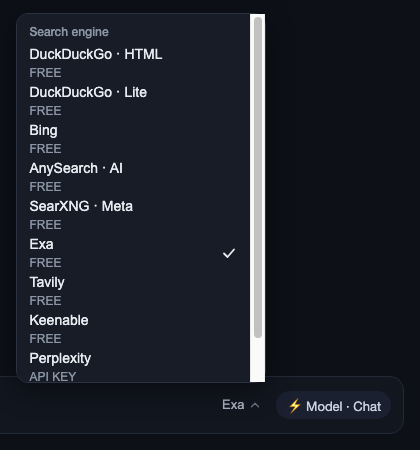
Switching search engines in DeepSeek Harness used to mean opening Settings, hunting for the provider field, typing a new value, or firing off a slash command. If you find yourself wanting to hop between two or three sources in a single conversation, that friction adds up fast. dsh-search-switcher puts a compact dropdown right to the left of the model picker so you can cycle through ten engines with one click, without ever leaving the active input context. It is especially handy on overseas campus or corporate networks that block api.deepseek.com while Bing, DuckDuckGo, or SearXNG remain reachable.
The menu reads and writes the dsh-free-search provider setting over the loopback bridge, highlights the current engine, and keeps the list scrollable. Keyboard support is complete: arrow keys expand the menu and move between entries, Home and End jump to the first and last item, Enter or Space confirms, and Escape dismisses with focus returning to the trigger. Styling follows Harness theme variables so the control blends in visually. The current release also surfaces a precise compatibility diagnosis for dsh-free-search 0.4.22 instead of a generic error.
It suits heavy Harness users who switch search sources often, and anyone whose network makes the official endpoint unreliable. The plugin is a single self-contained bundle with no build step, so it installs and works immediately.
Screenshots
Use Cases
- Campus or corporate proxy blocks the official endpoint, so you need to fall back to Bing or SearXNG in one click
- You want to hop between DuckDuckGo, Exa, and Tavily within a single conversation
- You prefer switching providers inline rather than re-opening Settings to edit the provider field by hand
Best For
- Heavy DeepSeek Harness users who switch search sources often
- Users on restricted networks where the official endpoint is unreachable but search is still needed
- Keyboard-first power users who want zero-friction workflow transitions
Related Plugins
A service-oriented sidebar framework for DSH, offering a full workbench with file explorer, embedded browser, real terminal, Git panel, and extensible plugin services.

A beautiful, practical Claude Code-style TUI plugin with pixel whale top bar, flowing glow title, real-time status line, streaming thought expansion, time rewind, context progress bar and TPS gauge — zero core changes.

The plugin market for DeepSeek Harness: browse/search/one-click install community plugins and themes, with updates, backup/restore, hot disable, diagnostics, and AI fix.

A persistent whale widget on the DSH web UI that shows DeepSeek balance, today's usage, and per-turn cost, with drag-and-snap and sound effects.