dsh-billing-tui
Run the following command in DeepSeek Harness:
dsh plugin install Ethanz11-creat/dsh-billing-tui
Paste the following prompt into your AI chat to install this plugin:
Run dsh plugin install Ethanz11-creat/dsh-billing-tui in your terminal to install; source code is available at https://github.com/Ethanz11-creat/dsh-billing-tui
About this plugin
Once a DeepSeek Harness conversation is running, your API spend stays a black box: you have no idea how much a single turn cost, whether the session is in the full-price peak window or the 50%-discount off-peak window, or how much cached-token hits saved you. dsh-billing-tui listens to every input, output, cache-hit, and reasoning token in real time, bills strictly against DeepSeek official peak/off-peak pricing, and pins a live readout (Cost: ¥1.2340 [Peak]) on the TUI status line so spend is always visible.
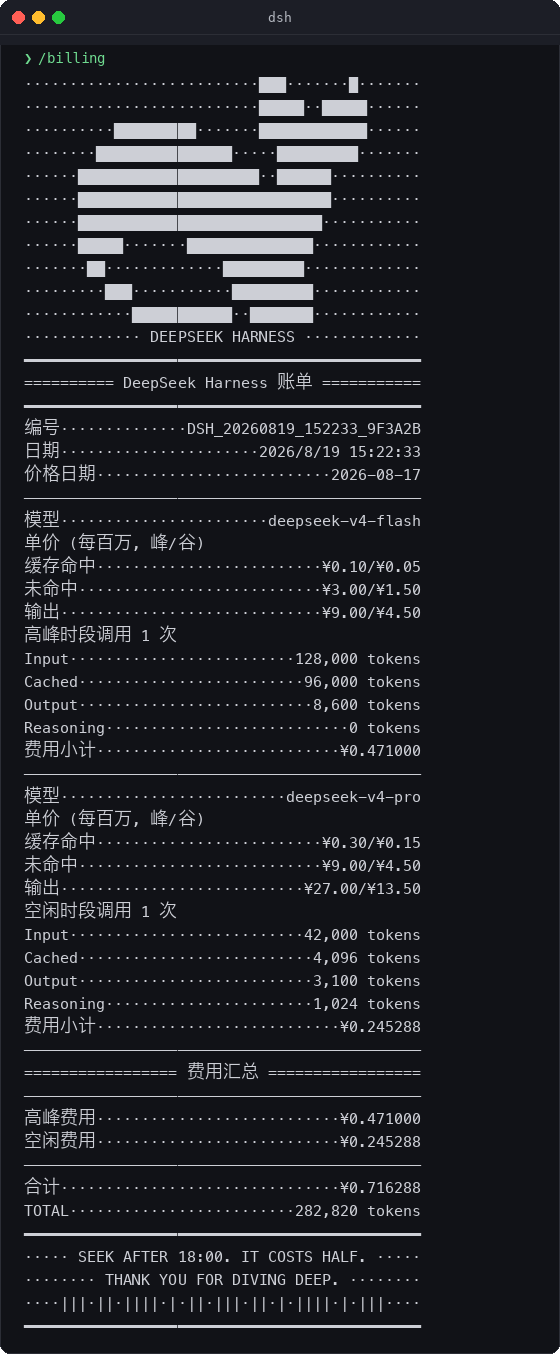
Type /billing in the chat stream and a persistent whale-ASCII register receipt is printed: per-model subtotals for input (cache hit / miss), output, and a grand total, all formatted with dot leaders that survive terminal spacing quirks. Repeating the command without new usage does not stack duplicate receipts, and child sessions forked from a model switch inherit the parent snapshot so costs never reset to zero. The plugin also exposes two Agent tools, show_billing and check_pricing_period, letting automation pipelines query spend and the current pricing window on their own.
Developers who work daily in the DSH terminal or Web UI with deepseek-v4-flash or deepseek-v4-pro get zero-config transparency out of the box. The plugin recognises only DeepSeek official models; Claude, GPT, local models, and unknown identifiers all return null and are never billed, eliminating any risk of misattributing a third-party price.
Screenshots
Use Cases
- Track real-time DSH session API cost and current peak or off-peak status
- Print a persistent ASCII billing receipt in the chat stream via the /billing command
- Query current spend and pricing period from Agent automation pipelines
Best For
- Developers who use DeepSeek models daily in the DSH terminal
- Engineering teams that need to control API budgets by peak and off-peak window
- Automation engineers who want cost awareness built into Agent pipelines
Related Plugins
A service-oriented sidebar framework for DSH, offering a full workbench with file explorer, embedded browser, real terminal, Git panel, and extensible plugin services.

A beautiful, practical Claude Code-style TUI plugin with pixel whale top bar, flowing glow title, real-time status line, streaming thought expansion, time rewind, context progress bar and TPS gauge — zero core changes.

The plugin market for DeepSeek Harness: browse/search/one-click install community plugins and themes, with updates, backup/restore, hot disable, diagnostics, and AI fix.

A persistent whale widget on the DSH web UI that shows DeepSeek balance, today's usage, and per-turn cost, with drag-and-snap and sound effects.