dsh-git-dashboard
Run the following command in DeepSeek Harness:
dsh plugin install Sombrer0-1/dsh-git-dashboard
Paste the following prompt into your AI chat to install this plugin:
In DeepSeek Harness, run dsh plugin install Sombrer0-1/dsh-git-dashboard to install the plugin; the source repository is at https://github.com/Sombrer0-1/dsh-git-dashboard .
About this plugin
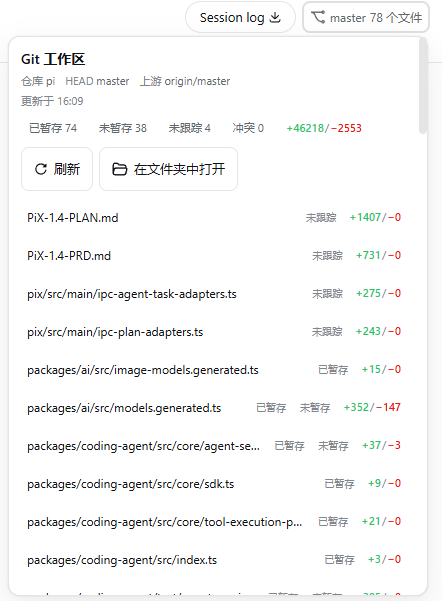
Inside a DeepSeek Harness web session, checking which branch you are on, what files changed, or what is staged usually means switching to a terminal or IDE and back — an interruptive loop that breaks flow. dsh-git-dashboard embeds a read-only Git workspace dashboard right into the session header: the current branch (or detached HEAD) and a change count are visible at a glance, and expanding the panel reveals counts for staged, unstaged, untracked, and conflicted files, each annotated with +N/−M relative to HEAD.
Clicking a file surfaces a size-capped unified diff preview (default: at most 500 changed lines and 256 KiB of output), so you can assess the scope of a change without leaving the conversation. Binary files, conflicts, or over-limit diffs are handled gracefully with a clear explanation instead of a raw dump. Branch comparison is also supported: pick a base branch to see ahead/behind counts and a per-file summary, which is handy before a merge or rebase.
The plugin is strictly read-only — it never executes write operations. Exposed data (repo name, branch names, paths, line counts, and small diffs) is bound by the Gateway trusted-host mechanism, and loopback usage is recommended. If you develop in a dsh web session and want a constant, quiet glance at your Git state without context-switching, this dashboard slots in cleanly at the top of your conversation.
Screenshots
Use Cases
- Glance at the current branch and changed files mid-session without switching windows
- Compare ahead/behind against a base branch before merging or rebasing
- Preview a unified diff of small changes inline to assess impact quickly
Best For
- Frontend or backend developers who work in dsh web sessions frequently
- Engineers who prefer AI-assisted coding and want fewer context switches
- Programmers who need a constant Git state glance without interrupting conversation flow
Related Plugins
A service-oriented sidebar framework for DSH, offering a full workbench with file explorer, embedded browser, real terminal, Git panel, and extensible plugin services.

A beautiful, practical Claude Code-style TUI plugin with pixel whale top bar, flowing glow title, real-time status line, streaming thought expansion, time rewind, context progress bar and TPS gauge — zero core changes.

The plugin market for DeepSeek Harness: browse/search/one-click install community plugins and themes, with updates, backup/restore, hot disable, diagnostics, and AI fix.

A persistent whale widget on the DSH web UI that shows DeepSeek balance, today's usage, and per-turn cost, with drag-and-snap and sound effects.