dsh-web-icon-indicator
Run the following command in DeepSeek Harness:
dsh plugin install waknow/dsh-web-icon-indicator
Paste the following prompt into your AI chat to install this plugin:
Run dsh plugin install waknow/dsh-web-icon-indicator in DeepSeek Harness to install this plugin; the source code is available at https://github.com/waknow/dsh-web-icon-indicator .
About this plugin
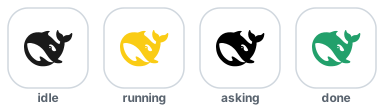
Running multiple agents in DSH Web GUI and switching away to another tab, only to come back and forget which one is still working, which is waiting on your answer, and which has finished? dsh-web-icon-indicator turns the tiny browser-tab favicon into a live status beacon. Deep grey means idle, bright yellow means running, a red-and-yellow blink means it is asking for your input or approval, and a brief green flash means done before settling back to idle. One glance tells you what every background agent is doing right now.
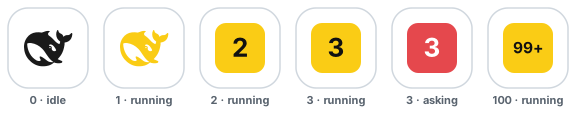
Under the hood the plugin ships a single whale SVG template and repaints every frame client-side as a data-URI, so you can pick from six built-in effects — static, blink, breath, rainbow, heartbeat, and bounce — and tweak colors, cycle speeds, and hold timings from the DSH settings page. Changes reach the running tab in about a second, with no reload or restart. When more than one agent is non-idle, the whale is replaced by a full-frame number block showing the live active count up to 99+, so parallel workloads remain readable even in a 16-pixel pinned tab.
It is built for developers who manage several concurrent agents in DSH and would rather glance at a tab than tail logs. Background tabs keep animating via a wall-clock fallback so they never freeze, the status poll self-heals across host restarts, and ask_user_question, approval, and sandbox-escalation prompts all pin the icon into the asking state until you decide — no manual refresh required.
Screenshots


Use Cases
- Monitor multiple running agents at a glance from the browser tab
- Get instant visual alerts when an agent waits for user input or approval
- Track parallel workloads with a live active-agent count in the favicon
Best For
- Developers running multiple concurrent agents in DSH
- Engineers using the DSH Web GUI who want to reduce log polling
- Workflow users who prefer visual browser-tab status cues
Related Plugins

whale-girl is a desktop pet in the DSH Web GUI (bottom-right for instant companionship) — draggable, feedable, playable; completed tasks, sessions and companionship time accrue into seniority levels, titles, and memories.

A WebGPU ocean skin for DeepSeek Harness with five-wave Gerstner waves, translucent theme, day/night cycle, and quick controls, installable as plugin or extension.

A Galgame-style conversation view and visual scene editor for DSH web sessions, with a real-time editing mode.

A native skinning plugin for DeepSeek Harness: 8 designer themes, wallpapers, accent colors, and shareable theme packs, built purely on design tokens.