dsh-plugin-image-tools
Run the following command in DeepSeek Harness:
dsh plugin install Pasumao/dsh-plugin-image-tools
Paste the following prompt into your AI chat to install this plugin:
In DeepSeek Harness, run dsh plugin install Pasumao/dsh-plugin-image-tools to install this plugin (source: https://github.com/Pasumao/dsh-plugin-image-tools). Restart the dsh launcher and refresh your browser page after installation.
About this plugin
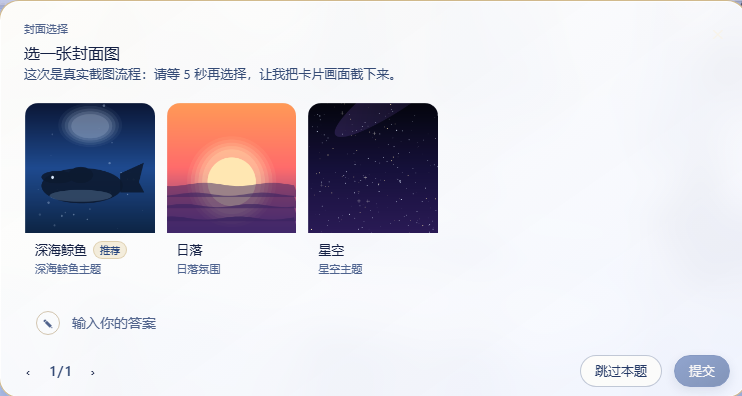
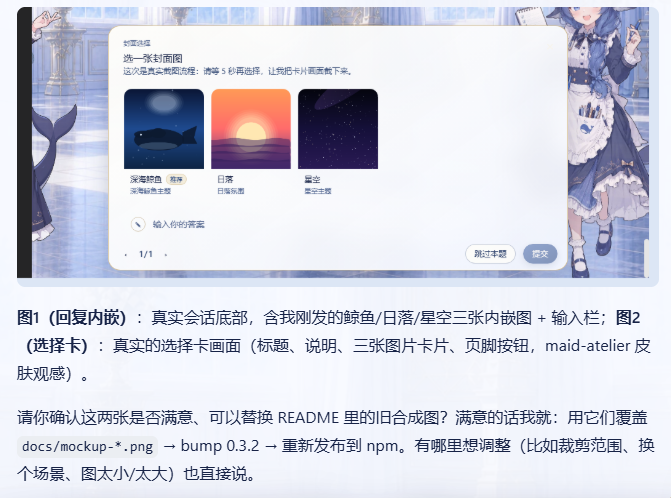
DeepSeek Harness Web GUI had virtually no image-interaction capability before: a model could not let users pick an image from a set of options, could not inline images inside a reply, and had no way to handle image messages arriving at a text-only adapter. dsh-plugin-image-tools fills that gap as a pure plugin change to no core code, consumes zero tokens, and renders everything locally. It ships three tools, each targeting a distinct scenario: ask_user_choice attaches an image to every option in the choice card with a Lightbox enlarge view; show_images lets a model embed 1 to 9 captioned images directly in the reply body so they display inline with the text; save_received_images rewrites image blocks in user messages to text placeholders so text-only adapters no longer error, then lets the model call the tool to persist the image as a workspace file for further analysis. Image sources are uniform across all three - local paths (including ComfyUI output), HTTP/HTTPS URLs, and base64 data URIs - with no configuration, no API key, and no external service dependency. It is well suited to three groups of users: dsh users who want the model to present image options for selection; workflow authors who need to display generated images inside model replies; and developers pairing a text-only model (no vision input) with ComfyUI, Stable Diffusion, or similar tools who need to bring images into the conversation and inspect dimensions, pixel data, or hashes.
Screenshots
Use Cases
- Model presents image-backed options in the choice card with Lightbox enlarge
- Inline 1 to 9 captioned images inside model replies alongside text
- Persist user-sent images to workspace files for text-only model analysis
Best For
- dsh users who want image-based option selection in conversations
- Workflow authors needing to display generated images in model replies
- Developers pairing text-only models with ComfyUI or similar image tools
Related Plugins
A service-oriented sidebar framework for DSH, offering a full workbench with file explorer, embedded browser, real terminal, Git panel, and extensible plugin services.

A beautiful, practical Claude Code-style TUI plugin with pixel whale top bar, flowing glow title, real-time status line, streaming thought expansion, time rewind, context progress bar and TPS gauge — zero core changes.

The plugin market for DeepSeek Harness: browse/search/one-click install community plugins and themes, with updates, backup/restore, hot disable, diagnostics, and AI fix.

A persistent whale widget on the DSH web UI that shows DeepSeek balance, today's usage, and per-turn cost, with drag-and-snap and sound effects.