dsh-plugin-choice-refresh
Run the following command in DeepSeek Harness:
dsh plugin install Pasumao/dsh-plugin-choice-refresh
Paste the following prompt into your AI chat to install this plugin:
Run dsh plugin install Pasumao/dsh-plugin-choice-refresh in DeepSeek Harness to install. Source at https://github.com/Pasumao/dsh-plugin-choice-refresh . It takes effect after a browser refresh with zero configuration required.
About this plugin
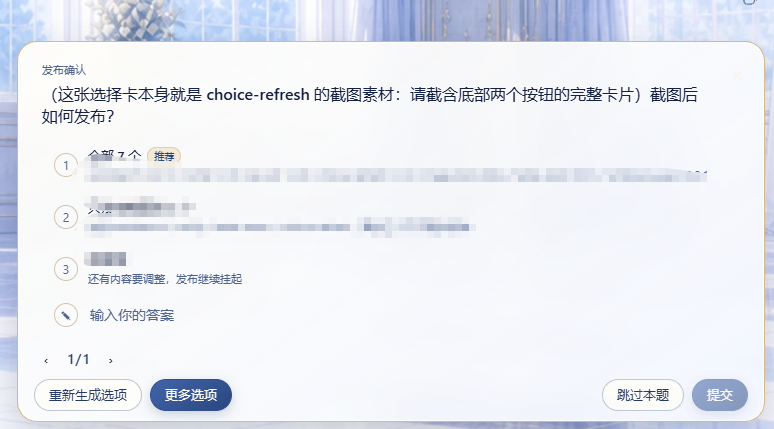
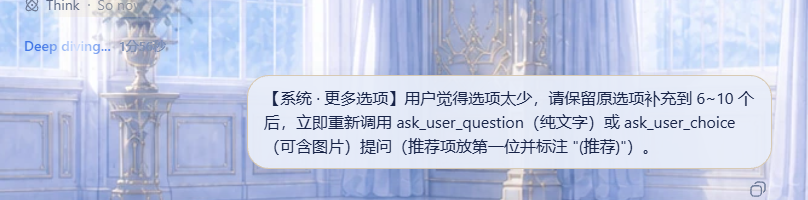
When the model calls ask_user_question or ask_user_choice, the offered choices often miss the mark or are simply not enough. Before this plugin, the only fix was to type out a correction and wait for another round. With dsh-plugin-choice-refresh, the choice card gains two buttons: Regenerate swaps in a completely fresh set of 5 to 8 options from a new angle, and More Options keeps the originals while topping the list up to 6 to 10 items before asking again.
Under the hood it is a pure front-end enhancement. No new tools are registered, the core package is untouched, and there is no configuration, API key, or environment variable to set up. Buttons follow ctx.locale automatically, and the behavior is driven by a short system message the model reads before re-invoking the question tool. It works with both native text cards and the image choice cards from dsh-plugin-image-tools, and it leaves the plan-review panel completely untouched.
If your workflow keeps cycling through unsatisfied options, typing a correction, and waiting for regeneration, this plugin collapses that loop into a single click and keeps the conversation moving.
Screenshots
Use Cases
- None of the offered options fit and you want a fresh set instantly
- Too few options to choose from so you want the model to add more
- Using it alongside dsh-plugin-image-tools image choice cards
Best For
- DSH users who frequently interact with ask_user_question choice cards
- Developers already using image choice card plugins
- Anyone who wants to skip the type-a-correction-and-wait loop
Related Plugins
A service-oriented sidebar framework for DSH, offering a full workbench with file explorer, embedded browser, real terminal, Git panel, and extensible plugin services.

A beautiful, practical Claude Code-style TUI plugin with pixel whale top bar, flowing glow title, real-time status line, streaming thought expansion, time rewind, context progress bar and TPS gauge — zero core changes.

The plugin market for DeepSeek Harness: browse/search/one-click install community plugins and themes, with updates, backup/restore, hot disable, diagnostics, and AI fix.

A persistent whale widget on the DSH web UI that shows DeepSeek balance, today's usage, and per-turn cost, with drag-and-snap and sound effects.