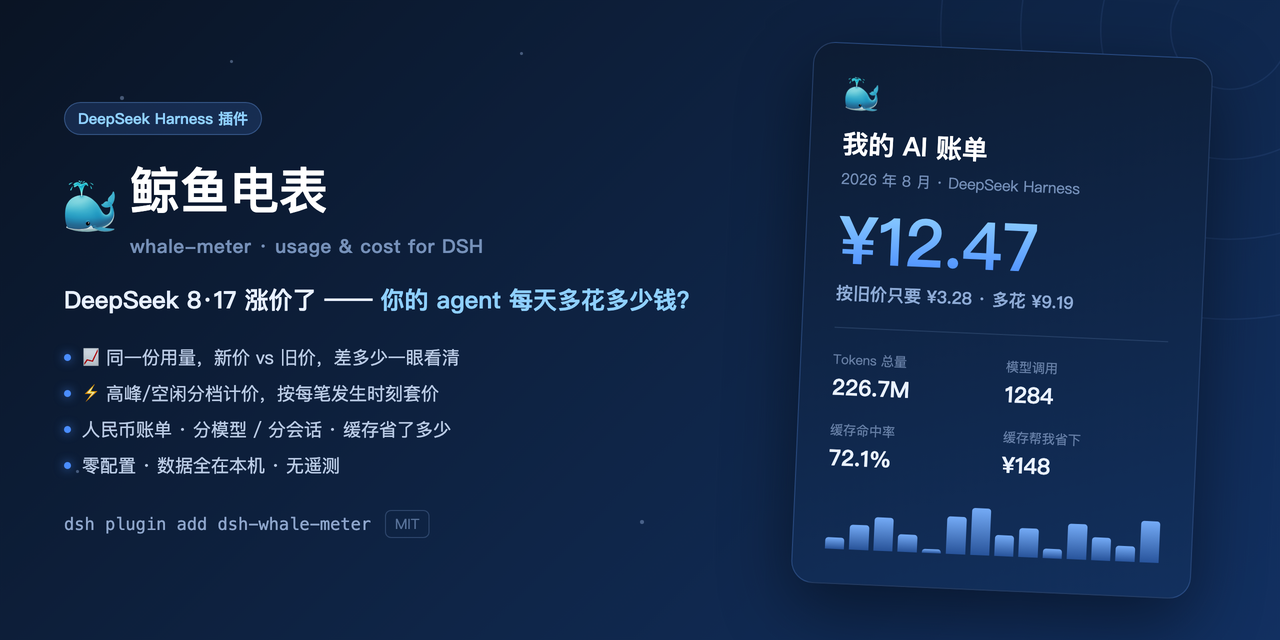
dsh-whale-meter
Run the following command in DeepSeek Harness:
dsh plugin install Shiye-10Pages/dsh-whale-meter
Paste the following prompt into your AI chat to install this plugin:
Run `dsh plugin install Shiye-10Pages/dsh-whale-meter` in DeepSeek Harness to install, and the full source code is available at https://github.com/Shiye-10Pages/dsh-whale-meter .
About this plugin
When heavily relying on AI coding assistants like DeepSeek Harness, developers often struggle to track actual token consumption and costs, especially when navigating complex peak/off-peak pricing and historical rate changes. Whale-meter solves this by providing a zero-config, local-first usage and billing dashboard that accurately parses session logs and transforms raw token data into highly readable financial insights.
Its core capabilities go beyond precise billing for 46 models across 6 major vendors—including cache savings calculations. It introduces a unique "consumption tier" system, ranking your usage from "fry" to "blue whale" with fun, relatable metrics like "equivalent to reading The Three-Body Problem X times." Furthermore, it automatically compares costs before and after recent price hikes based on exact request timestamps, giving you complete transparency over your spending. All calculations and data storage remain strictly on your local machine, ensuring total privacy.
This plugin is perfectly suited for power users, budget-conscious developers, and tech enthusiasts who want to optimize their API calls during off-peak hours or share their impressive coding milestones. If you want to demystify your AI spending and manage your token economy like a pro, whale-meter is the ultimate cost-control companion.
Screenshots

Use Cases
- Track monthly token consumption and actual costs of AI coding assistants.
- Compare billing differences before and after model price hikes alongside cache savings.
- Generate and share achievement cards featuring usage tiers and fun metrics.
Best For
- Independent developers heavily relying on AI coding assistants.
- Technical teams needing strict control over API call budgets.
- Geeky users prioritizing data privacy and local-first statistics.
Related Plugins
A service-oriented sidebar framework for DSH, offering a full workbench with file explorer, embedded browser, real terminal, Git panel, and extensible plugin services.

A beautiful, practical Claude Code-style TUI plugin with pixel whale top bar, flowing glow title, real-time status line, streaming thought expansion, time rewind, context progress bar and TPS gauge — zero core changes.

The plugin market for DeepSeek Harness: browse/search/one-click install community plugins and themes, with updates, backup/restore, hot disable, diagnostics, and AI fix.

A persistent whale widget on the DSH web UI that shows DeepSeek balance, today's usage, and per-turn cost, with drag-and-snap and sound effects.