dsh-code-ide
Run the following command in DeepSeek Harness:
dsh plugin install SakalioLabs/dsh-code-ide
Paste the following prompt into your AI chat to install this plugin:
To install this plugin, run dsh plugin install SakalioLabs/dsh-code-ide in your terminal; its full open-source repository is available at https://github.com/SakalioLabs/dsh-code-ide.
About this plugin
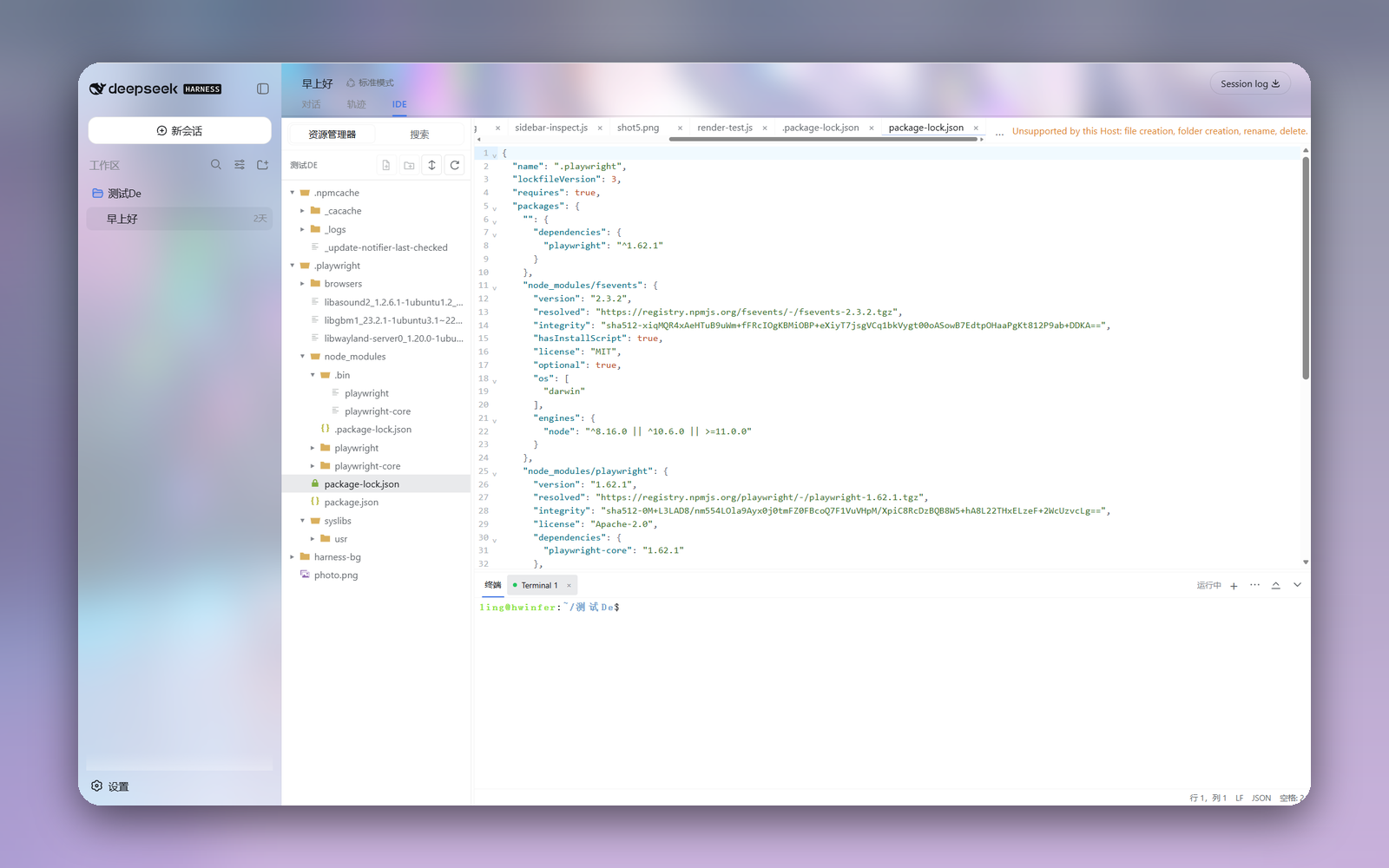
When using DeepSeek Harness for AI-assisted programming, constantly switching between the chat interface and a local editor can disrupt your workflow. dsh-code-ide solves this by adding a fully-featured, browser-based IDE workspace as an optional native tab. It allows you to interact with your workspace code directly within the same browser window, creating a seamless loop between AI conversation and code editing without ever leaving the session.
Drawing inspiration from VS Code, the plugin features a multi-tab editor powered by CodeMirror 6, complete with syntax highlighting for dozens of languages, robust search-and-replace capabilities, and rich previews for Markdown and media files. It also includes a lazy-loading file explorer with platform-aware security probes and a multi-session xterm.js terminal. Deeply integrated with Harness, it automatically syncs workspace contexts, themes, and language settings, while enforcing strict same-origin security boundaries to protect your local environment.
This plugin is perfect for developers who prefer a browser-centric workflow or those who want to instantly review, tweak, and test AI-generated code right inside the Harness interface. It delivers a lightweight yet powerful web IDE experience, enabling you to manage files and run terminal commands without compromising local security.
Screenshots
Use Cases
- Seamlessly review and modify AI-generated code by switching tabs during conversations.
- Execute terminal commands and manage workspace files without leaving the browser.
- Preview Markdown documents and media assets in real-time to assist content creation.
Best For
- Full-stack developers who prefer a browser-centric development workflow.
- Harness users seeking to maintain flow and reduce window switching during AI-assisted coding.
- Engineers needing a lightweight web IDE for quick code tweaks and script execution.
Related Plugins
A service-oriented sidebar framework for DSH, offering a full workbench with file explorer, embedded browser, real terminal, Git panel, and extensible plugin services.

A beautiful, practical Claude Code-style TUI plugin with pixel whale top bar, flowing glow title, real-time status line, streaming thought expansion, time rewind, context progress bar and TPS gauge — zero core changes.

The plugin market for DeepSeek Harness: browse/search/one-click install community plugins and themes, with updates, backup/restore, hot disable, diagnostics, and AI fix.

A persistent whale widget on the DSH web UI that shows DeepSeek balance, today's usage, and per-turn cost, with drag-and-snap and sound effects.