
dsh-openpencil
Run the following command in DeepSeek Harness:
dsh plugin install ZSeven-W/dsh-openpencil
Paste the following prompt into your AI chat to install this plugin:
To install this plugin in DeepSeek Harness, add the plugin dependency to your Web profile and run dsh plugin install ZSeven-W/dsh-openpencil, or install directly from the source repository at https://github.com/ZSeven-W/dsh-openpencil.
About this plugin
In a typical conversation, an AI design assistant just hands back a generated image—you cannot inspect every frame, select a specific node, or directly modify the document. DSH OpenPencil bridges DeepSeek Harness with OpenPencil so the Agent drives a real, editable, interactive design canvas instead: from exact multi-frame previews (a large first-frame PNG plus a horizontally scrollable thumbnail rail), to an interactive canvas with pan, zoom, and fit for inspecting any page or node, to a managed editor with selection, layers, properties, drawing tools, undo/redo, and explicit save semantics—all inside the conversation.\n\nThe plugin ships a complete set of agent-native design tools: five direct-canvas tools plus six openpencil_pipeline_* tools covering the full loop of creating, inspecting, refining, publishing, modifying, and reading a live canvas. Capabilities are signed, hash-bound grants—browser metadata never exposes arbitrary host paths, and signed preview/editor capabilities never enter the canonical tool result or model context. Transactional safety keeps a full-pipeline document in a private unpublished draft until every native and DSH quality gate passes; publication never overwrites an existing path, and aborts or failed batches leave no empty target behind. Every tool card and the managed editor follow DSH's Chinese/English locale and light/dark theme without reloading the session.\n\nWho is this for? If you are building design workflows in DSH that require multi-frame documents, pixel-level review, and controlled publication—whether a dashboard, homepage, or mobile UI—this plugin lets you run the complete loop: requirement → private draft → semantic batches → exact PNG review and repairs → quality-gated atomic publish. It is especially valuable for teams and solo developers who want the Agent to act as a true design engineer rather than an image generator, with every step reversible, auditable, and recoverable.
Screenshots
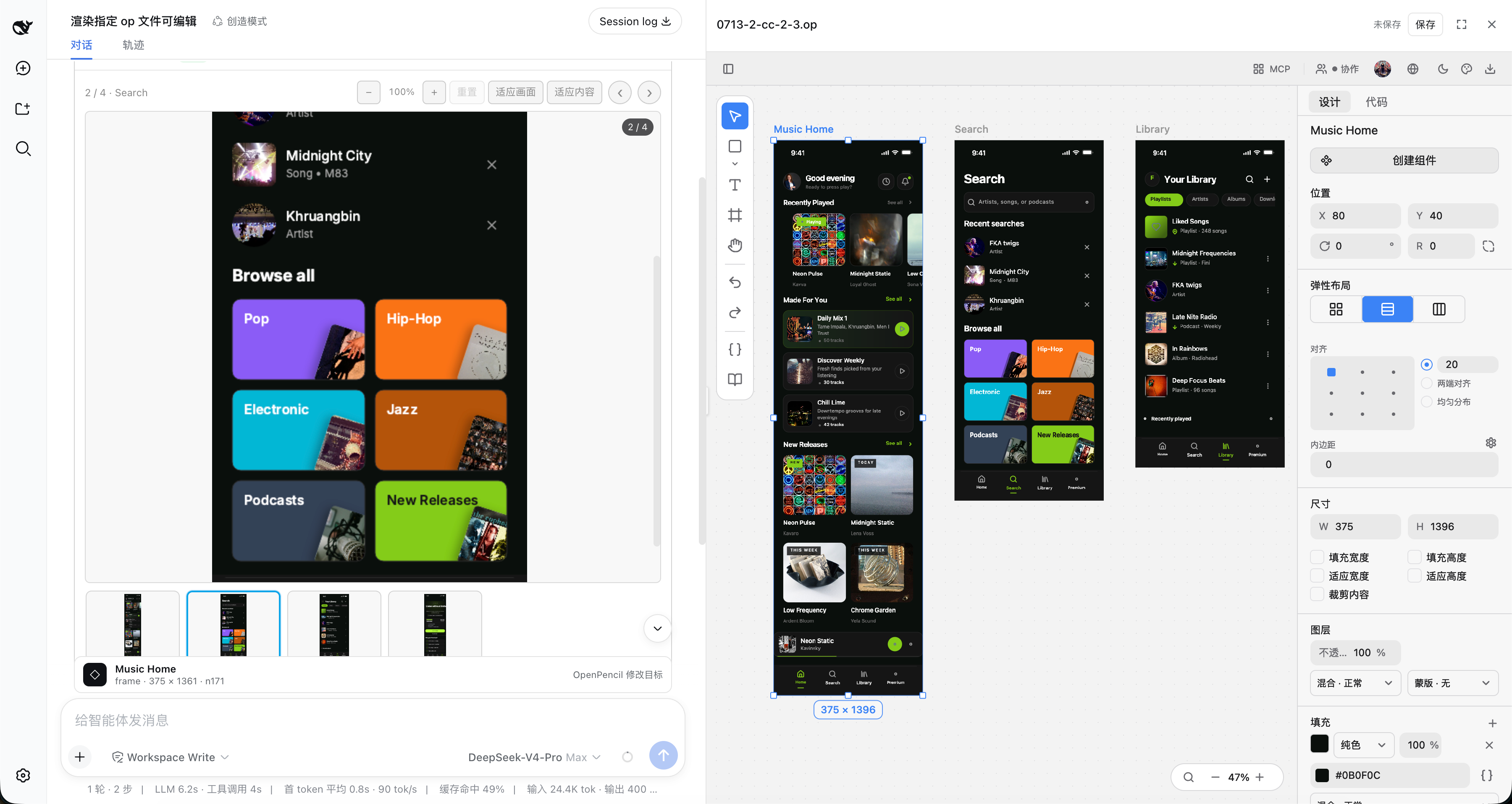

Use Cases
- Preview, inspect, and edit real OpenPencil .op multi-frame documents directly inside a conversation
- Design dashboards, homepages, or mobile UI through a draft-batch-quality-gated atomic publish workflow
- Let the Agent create, inspect, repair, and publish a real canvas with the openpencil_pipeline_* tools
Best For
- Developers building interactive design workflows inside DeepSeek Harness
- Teams that need frame-by-frame, pixel-level design review with a full audit trail
- Anyone who wants the Agent to drive real design engineering instead of just generating images
Related Plugins
A service-oriented sidebar framework for DSH, offering a full workbench with file explorer, embedded browser, real terminal, Git panel, and extensible plugin services.

A beautiful, practical Claude Code-style TUI plugin with pixel whale top bar, flowing glow title, real-time status line, streaming thought expansion, time rewind, context progress bar and TPS gauge — zero core changes.

The plugin market for DeepSeek Harness: browse/search/one-click install community plugins and themes, with updates, backup/restore, hot disable, diagnostics, and AI fix.

A persistent whale widget on the DSH web UI that shows DeepSeek balance, today's usage, and per-turn cost, with drag-and-snap and sound effects.