dsh-skill-manager
Run the following command in DeepSeek Harness:
dsh plugin install LongSir0419/dsh-skill-manager
Paste the following prompt into your AI chat to install this plugin:
Install the plugin by running the install command in your DeepSeek Harness terminal; the source code is available at https://github.com/LongSir0419/dsh-skill-manager
About this plugin
User-level Skills in DSH live as directories under $DSH_HOME/skills, each paired with a SKILL.md file. Tinkering with descriptions, flipping frontmatter flags, renaming directories, or adding and removing entries all required opening a text editor and editing lines by hand — error-prone and hard to survey at a glance.
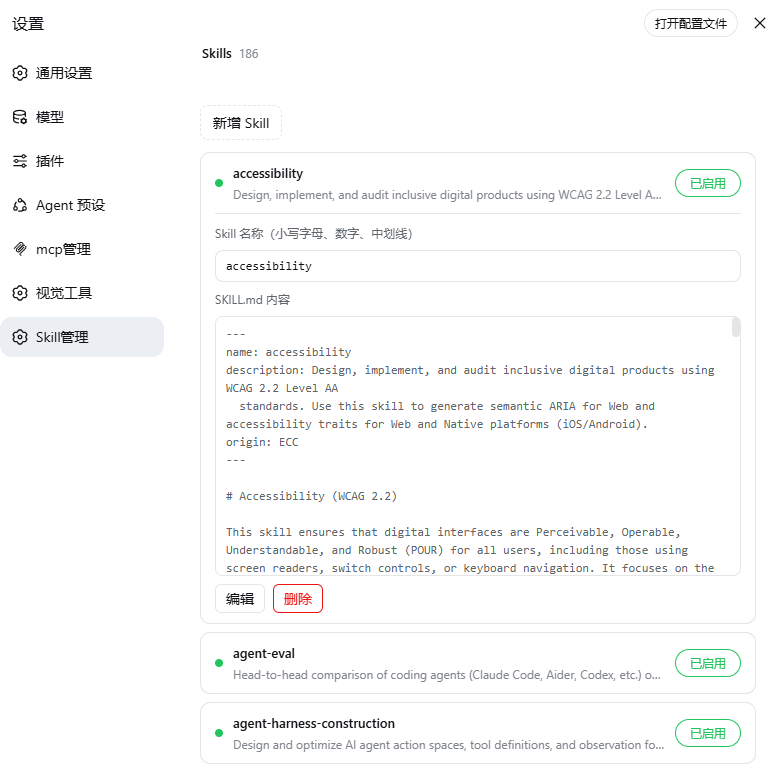
dsh-skill-manager moves that entire workflow into the Web settings panel. Open Settings → Skill Manager and every Skill shows up in a clean list. Click a row to expand the full SKILL.md content and edit it inline; flip the toggle on the right to enable or disable a Skill instantly — under the hood it rewrites the disable-model-invocation field in the frontmatter, and DSH's filesystem watcher immediately excludes that Skill from the model catalog without a restart. Creating a new Skill, renaming it (directory name and frontmatter stay in sync), and deleting it (with a confirmation step) are all one-step operations.
If you maintain several user-level Skills day to day or frequently toggle their enabled state to switch model behaviour, this plugin lets you manage the whole Skill collection through a visual interface instead of editing markdown line by line in a text editor.
Screenshots
Use Cases
- View, edit, or create SKILL.md content from the Web settings panel
- Toggle a Skill on or off instantly without restarting DSH
- Rename or delete a user-level Skill with directory and frontmatter auto-synced
Best For
- DSH users who maintain multiple user-level Skills day to day
- Operators who prefer a visual UI over manual file editing
- Developers who frequently toggle Skill states to test model behaviour
Related Plugins
A service-oriented sidebar framework for DSH, offering a full workbench with file explorer, embedded browser, real terminal, Git panel, and extensible plugin services.

A beautiful, practical Claude Code-style TUI plugin with pixel whale top bar, flowing glow title, real-time status line, streaming thought expansion, time rewind, context progress bar and TPS gauge — zero core changes.

The plugin market for DeepSeek Harness: browse/search/one-click install community plugins and themes, with updates, backup/restore, hot disable, diagnostics, and AI fix.

A persistent whale widget on the DSH web UI that shows DeepSeek balance, today's usage, and per-turn cost, with drag-and-snap and sound effects.