dsh-toolkit
Run the following command in DeepSeek Harness:
dsh plugin install LongSir0419/dsh-toolkit
Paste the following prompt into your AI chat to install this plugin:
Run dsh plugin install LongSir0419/dsh-toolkit in the DeepSeek Harness terminal to install this toolkit. Source: https://github.com/LongSir0419/dsh-toolkit
About this plugin
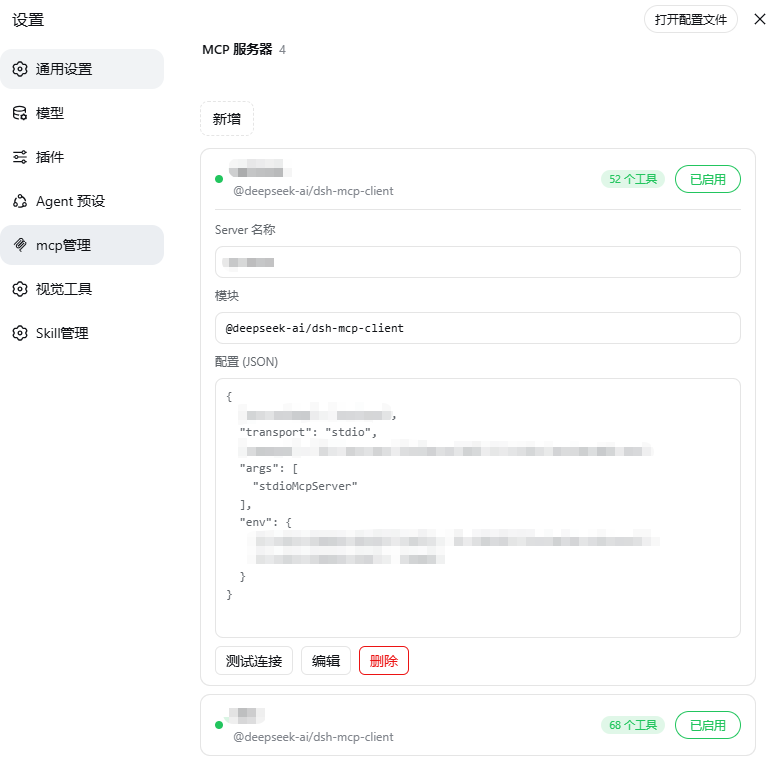
DeepSeek Harness configuration is spread across YAML files, Markdown frontmatter, and the Git working directory. Managing MCP servers, AI skills, and branch state used to mean hand-editing files and refreshing the interface. dsh-toolkit pulls all three concerns into a visual settings panel and the session header, turning routine configuration into a few clicks.
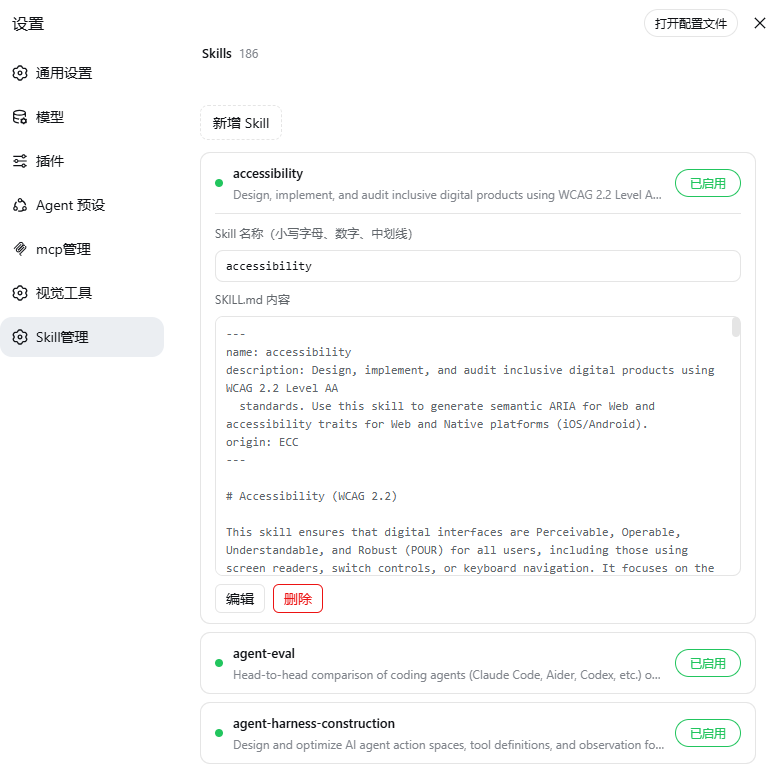
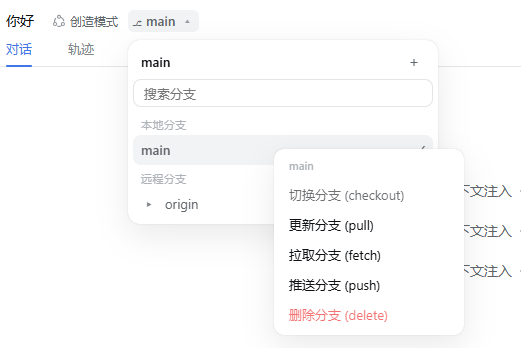
The toolkit ships three tightly integrated panels: MCP Manager lets you inspect each server connection live, add, edit, rename, delete, and toggle servers from the settings page, with a one-click handshake test (initialize + tools/list) to verify reachability, tool count, and latency; Skill Manager lists every skill under your DSH skills directory, supports inline editing, rename (syncing the folder name), delete with confirmation, and instant enable/disable that excludes the skill from the model directory without a restart; Git Branch Badge displays the active branch in the conversation header and the new-session hero, and opens an IDEA-style branch menu for switching, creating, pulling, fetching, pushing, or deleting local branches while staying workspace-aware.
If your daily DSH workflow touches multiple MCP servers, a growing set of custom skills, and regular Git branch operations, and you would rather click through a panel than juggle terminal commands and file edits, this single install covers all three in one go.
Screenshots
Use Cases
- Configure multiple MCP servers and verify connectivity with one click
- Add, edit, or disable custom AI skills without touching config files
- Switch, create, or delete local Git branches right from the session header
Best For
- DSH users who juggle multiple MCP servers
- AI engineers maintaining a growing set of custom skills
- Developers who switch between Git branches frequently
Related Plugins
A service-oriented sidebar framework for DSH, offering a full workbench with file explorer, embedded browser, real terminal, Git panel, and extensible plugin services.

A beautiful, practical Claude Code-style TUI plugin with pixel whale top bar, flowing glow title, real-time status line, streaming thought expansion, time rewind, context progress bar and TPS gauge — zero core changes.

The plugin market for DeepSeek Harness: browse/search/one-click install community plugins and themes, with updates, backup/restore, hot disable, diagnostics, and AI fix.

A persistent whale widget on the DSH web UI that shows DeepSeek balance, today's usage, and per-turn cost, with drag-and-snap and sound effects.