dsh-history-mirror-plugin
Run the following command in DeepSeek Harness:
dsh plugin install xiaoyanjin15-ux/dsh-history-mirror-plugin
Paste the following prompt into your AI chat to install this plugin:
Run dsh plugin install xiaoyanjin15-ux/dsh-history-mirror-plugin in the DeepSeek Harness terminal to install the plugin; the full source repository is at https://github.com/xiaoyanjin15-ux/dsh-history-mirror-plugin .
About this plugin
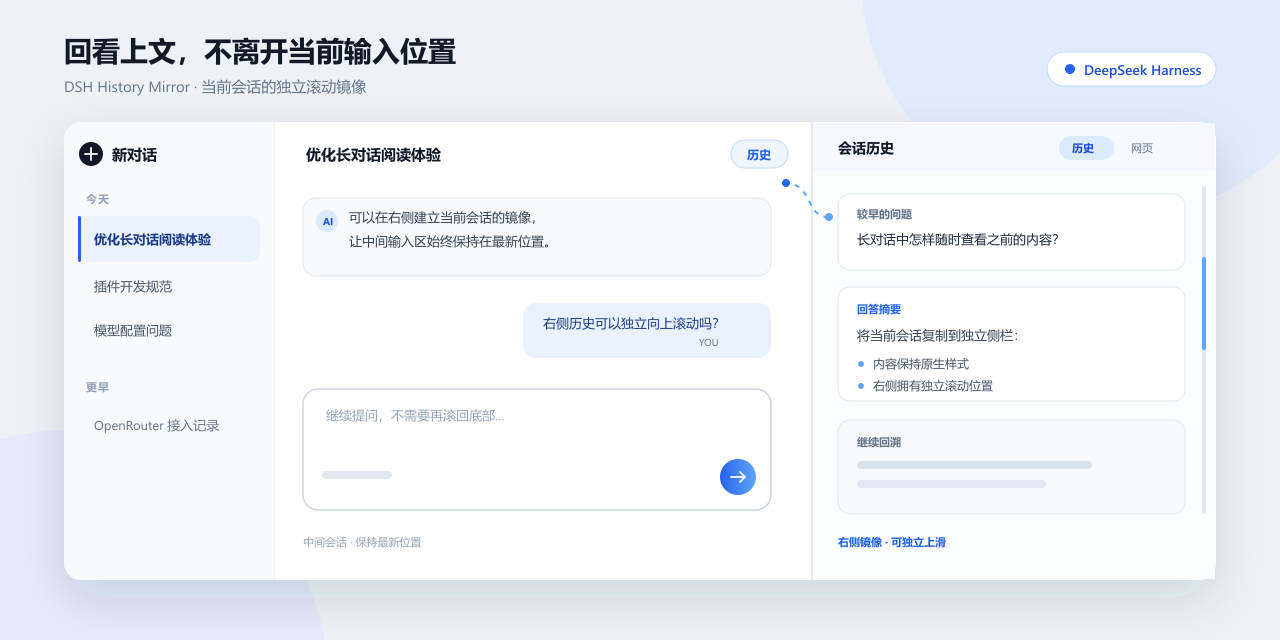
Working through a long conversation in the DeepSeek Harness web client often means dragging the entire main view away from the latest message and the input box just to glance at something you said ten turns ago, then scrolling back down before you can keep typing. dsh-history-mirror-plugin solves that friction with a small "History" button in the conversation title bar. Click it and the current chat is mirrored into the right-side detail panel with its own independent scroll position, so the main conversation stays pinned at the latest message while you flip freely upward on the right.
The history panel does not re-render the chat from scratch; it reuses the already-rendered DOM nodes and native styles of the main conversation, so code highlighting, tool-call collapsibles, images, and every other visual element look exactly as they do in the main view. New messages and streaming tokens are synced to the panel in real time, and scrolling on the right never nudges the main conversation. Clicking an http or https link inside the panel opens a sandboxed iframe under the "Web" tab with no same-origin access and no top-level navigation, keeping the preview contained. The plugin reads no API keys, cookies, or local storage, makes no network calls, and executes no system commands—all mirroring lives in the current browser page.
It is a good fit for DeepSeek Harness users who frequently revisit earlier context in long sessions, such as multi-step code generation, chained tool calls, or any workflow where you need to read history while continuing to type. Enabling the plugin replaces the native tool-detail panel with the history panel; simply disable or remove it to restore the original behavior.
Screenshots
Use Cases
- Review earlier context in a long conversation without scrolling the main view away from the latest message and input box
- Flipping through history while typing the next turn during multi-step tool calls or long code generation
- Recalling code snippets or tool-call results from earlier turns with native styling preserved
Best For
- DeepSeek Harness web users who frequently revisit earlier context in long sessions
- Developers working through multi-turn code generation or chained tool calls
- Users who prioritize client-side plugin security and want zero network access from their tools
Related Plugins
A service-oriented sidebar framework for DSH, offering a full workbench with file explorer, embedded browser, real terminal, Git panel, and extensible plugin services.

A beautiful, practical Claude Code-style TUI plugin with pixel whale top bar, flowing glow title, real-time status line, streaming thought expansion, time rewind, context progress bar and TPS gauge — zero core changes.

The plugin market for DeepSeek Harness: browse/search/one-click install community plugins and themes, with updates, backup/restore, hot disable, diagnostics, and AI fix.

A persistent whale widget on the DSH web UI that shows DeepSeek balance, today's usage, and per-turn cost, with drag-and-snap and sound effects.