dsh-git-sidebar
Run the following command in DeepSeek Harness:
dsh plugin install H2O-MERO/dsh-git-sidebar
Paste the following prompt into your AI chat to install this plugin:
Run dsh plugin install H2O-MERO/dsh-git-sidebar in the DeepSeek Harness terminal; source repository at https://github.com/H2O-MERO/dsh-git-sidebar
About this plugin
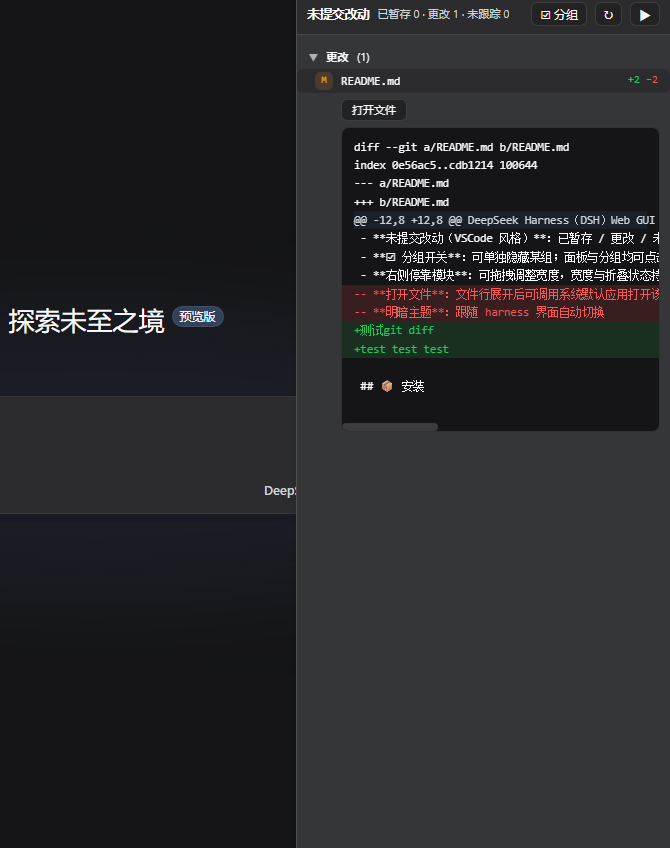
Checking git status mid-conversation in DSH usually means switching to a terminal and losing your train of thought, while a full Git graph view is often more complexity than the moment calls for. dsh-git-sidebar strips the workflow down to the one step that matters: a VSCode-style uncommitted-changes panel docked on the right side of the chat page, automatically following whatever workspace the active conversation points to, and quietly showing an empty state for non-repo conversations.
The panel lists files in three groups - staged, modified, and untracked - each row carrying a status badge and plus/minus line counts. Click a row to expand a single-file diff; renamed files display as old to new, and untracked files show their content inline. Groups can be hidden individually, and both the panel and each group collapse down to a slim handle that renders nothing and fires no requests. The docked width is draggable and persists across sessions, and the panel yields space automatically when the host tool detail panel opens. Light and dark themes follow the harness UI seamlessly, and any expanded file row can be opened in your system default application.
Built for developers who work with Git repositories inside DSH and want an at-a-glance summary of uncommitted changes without ever leaving the chat window. If you need to see what changed and by how much, without a commit history graph or branch filter, this is the sidebar for you.
Screenshots
Use Cases
- Inspect uncommitted changes in the active DSH workspace without leaving the chat
- Expand a file row to review the inline diff and per-line stats at a glance
- Toggle group visibility to focus on staged, modified, or untracked files as needed
Best For
- Developers who work with Git repositories intensively inside DSH
- Engineers who want a full workspace change summary without leaving the chat
- Users who prefer a lightweight sidebar over a full Git graph interface
Related Plugins
A service-oriented sidebar framework for DSH, offering a full workbench with file explorer, embedded browser, real terminal, Git panel, and extensible plugin services.

A beautiful, practical Claude Code-style TUI plugin with pixel whale top bar, flowing glow title, real-time status line, streaming thought expansion, time rewind, context progress bar and TPS gauge — zero core changes.

The plugin market for DeepSeek Harness: browse/search/one-click install community plugins and themes, with updates, backup/restore, hot disable, diagnostics, and AI fix.

A persistent whale widget on the DSH web UI that shows DeepSeek balance, today's usage, and per-turn cost, with drag-and-snap and sound effects.