dsh-open-in-app
Run the following command in DeepSeek Harness:
dsh plugin install open-dsh-plugins/dsh-open-in-app
Paste the following prompt into your AI chat to install this plugin:
Install the dsh-open-in-app plugin by running dsh plugin install open-dsh-plugins/dsh-open-in-app in DeepSeek Harness; the source repository is https://github.com/open-dsh-plugins/dsh-open-in-app. Restart dsh web after installation and you will see the open-workspace button in the session header.
About this plugin
You are mid-conversation in the dsh web UI and suddenly need to jump into your local terminal or IDE to keep typing. Dragging windows around, hunting for the right folder, re-typing a path—these small frictions are where momentum goes to die. dsh-open-in-app collapses all of that into a single click in the top-right corner of the chat window.
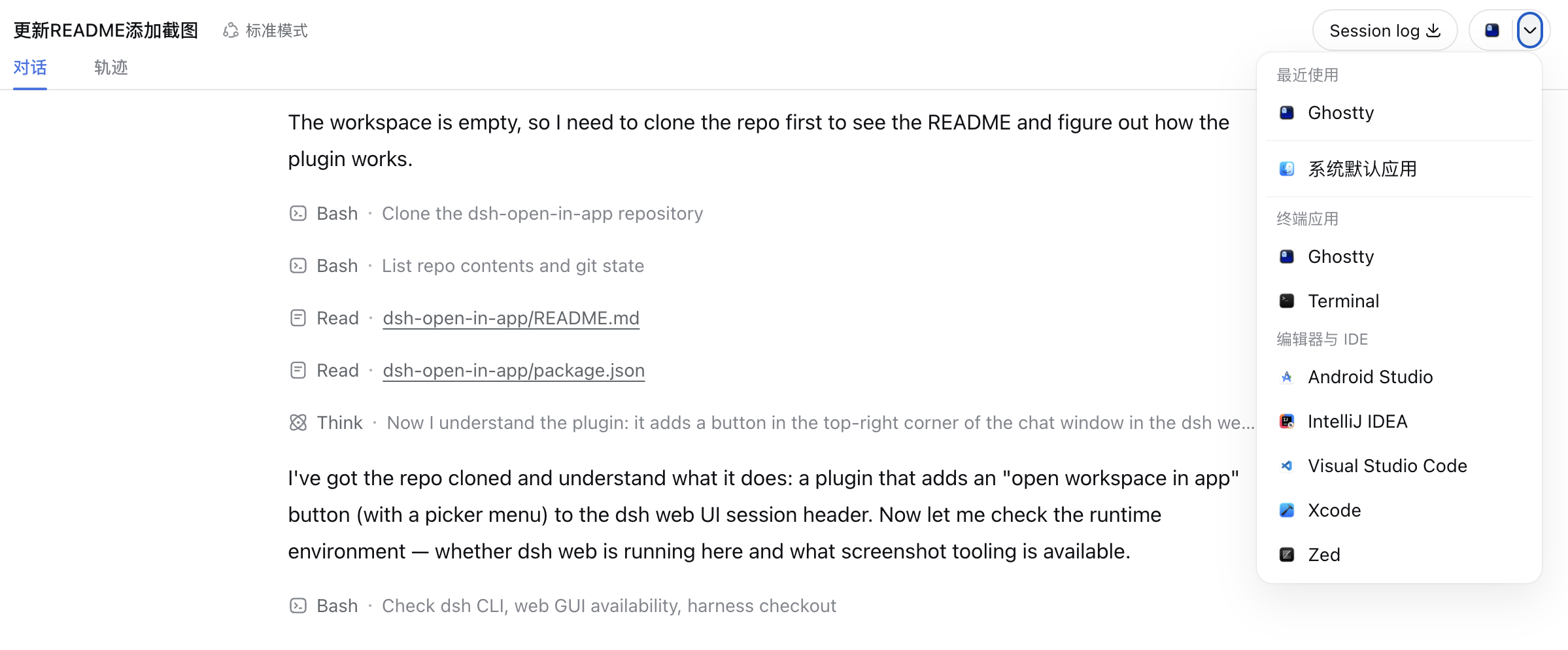
The plugin adds a capsule-style split control right beside the Session log button. The folder half opens the current workspace with whatever app you last selected for that directory (remembered per cwd in localStorage). The arrow half opens a menu showing recently used apps, the system default folder handler (Finder on macOS, Explorer on Windows, xdg-mime default on Linux), and a curated whitelist of terminals (iTerm2, Warp, Alacritty, Windows Terminal, and more) plus editors and IDEs (VS Code, Cursor, Zed, the full JetBrains family, Xcode, and others), every entry rendered with its real application icon. All three major platforms get native app discovery, icon extraction, and open-command handling out of the box.
If you think in the browser but type in your IDE, this plugin is the smoothest bridge between the two—no more breaking stride mid-thread to re-navigate your file system. One click and you are there.
Screenshots
Use Cases
- Jumping from a web conversation straight into your local IDE to keep coding
- Opening the current working directory in a terminal mid-session
- Skipping manual path copy-paste and folder dragging with a single click
- Switching which IDE opens the same workspace without re-navigating
Best For
- Developers who frequently switch between the dsh Web UI and a local editor
- Workflow-dependent users of specific terminals like Warp, iTerm2, or Windows Terminal
- Prompt engineers who want to minimize context switches between browser and desktop apps
Related Plugins
A service-oriented sidebar framework for DSH, offering a full workbench with file explorer, embedded browser, real terminal, Git panel, and extensible plugin services.

A beautiful, practical Claude Code-style TUI plugin with pixel whale top bar, flowing glow title, real-time status line, streaming thought expansion, time rewind, context progress bar and TPS gauge — zero core changes.

The plugin market for DeepSeek Harness: browse/search/one-click install community plugins and themes, with updates, backup/restore, hot disable, diagnostics, and AI fix.

A persistent whale widget on the DSH web UI that shows DeepSeek balance, today's usage, and per-turn cost, with drag-and-snap and sound effects.