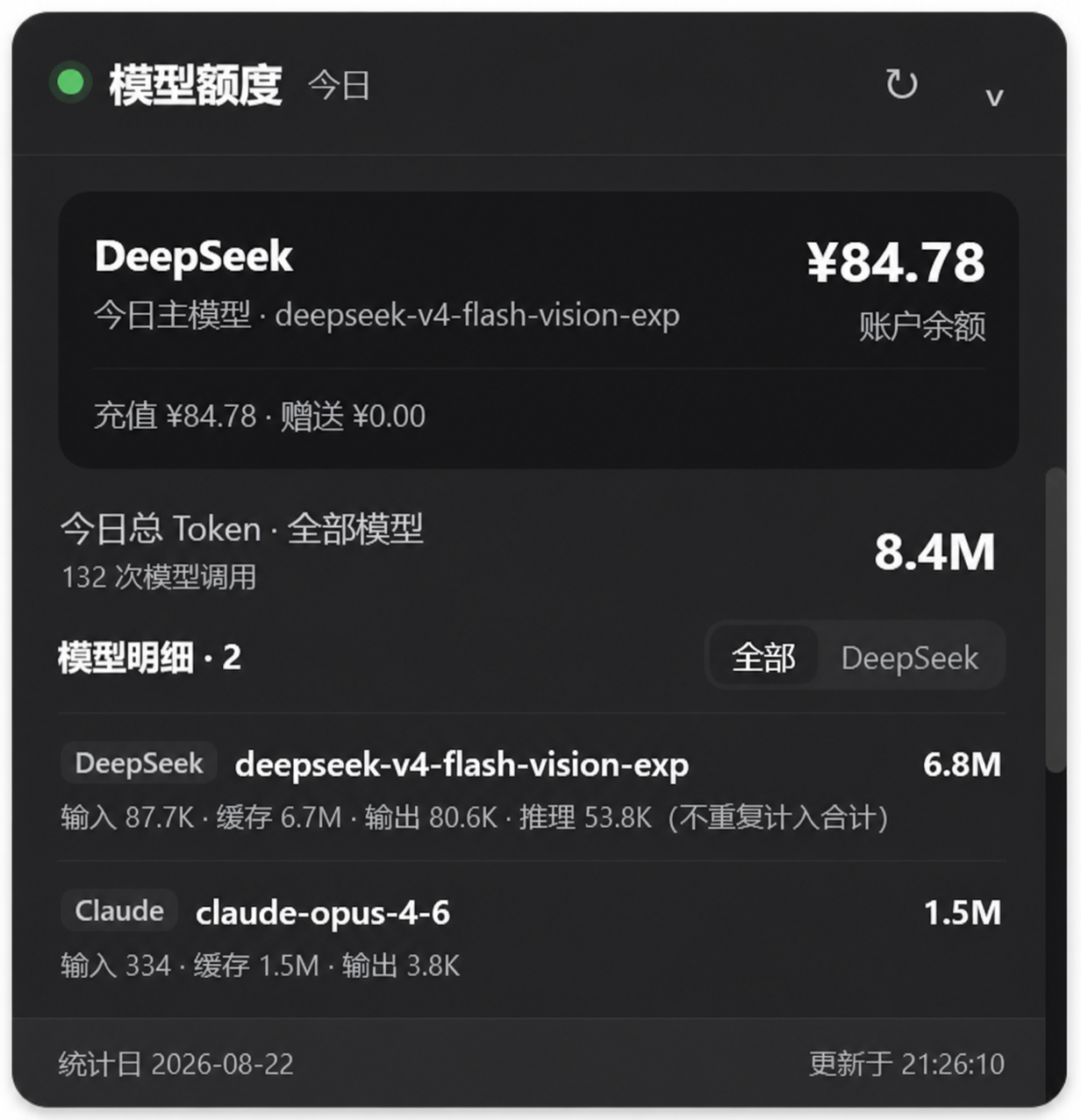
dsh-model-quota-usage
Run the following command in DeepSeek Harness:
dsh plugin install Hades03/dsh-model-quota-usage
Paste the following prompt into your AI chat to install this plugin:
Run dsh plugin install Hades03/dsh-model-quota-usage in your DeepSeek Harness terminal, or fetch the plugin source from the GitHub repository at https://github.com/Hades03/dsh-model-quota-usage, then restart DeepSeek Harness Desktop after installation or update to activate it.
About this plugin
When you juggle DeepSeek, Kimi, GLM, Claude, and other Harness providers every day, account balances and token usage are scattered across multiple vendor dashboards. dsh-model-quota-usage consolidates your real-time DeepSeek Open Platform balance and daily token consumption across all providers and models into a single draggable, collapsible floating panel, eliminating the need to tab back and forth.
The top section shows your DeepSeek balance; the body lists input, cache-read, cache-write, and output tokens per provider and per model, with a combined total. The token formula is explicit: Total = Input + Cache-read + Cache-write + Output. Reasoning tokens appear separately in model detail and are not added into the total again, preventing double-counting on providers that already include them in output. The panel is edge-anchored, remembers its position after you drag it, and snaps back to the default bottom-right corner with a double-click on the title bar. Local statistics refresh every 60 seconds; all data stays on your machine with zero telemetry.
Built for engineers who rotate across multiple providers in production and want persistent, at-a-glance cost awareness, as well as developers who prefer lightweight, local-only monitoring over yet another browser tab.
Screenshots
Use Cases
- Track token consumption across providers in a single glance at the desk
- Keep a persistent DeepSeek balance widget visible during long sessions
- Audit daily input, cache, and output tokens per model locally
Best For
- Engineers juggling multiple LLM providers in production
- Developers who want persistent cost awareness without extra tabs
- Teams that prefer local-only, zero-telemetry monitoring
Related Plugins
A service-oriented sidebar framework for DSH, offering a full workbench with file explorer, embedded browser, real terminal, Git panel, and extensible plugin services.

A beautiful, practical Claude Code-style TUI plugin with pixel whale top bar, flowing glow title, real-time status line, streaming thought expansion, time rewind, context progress bar and TPS gauge — zero core changes.

The plugin market for DeepSeek Harness: browse/search/one-click install community plugins and themes, with updates, backup/restore, hot disable, diagnostics, and AI fix.

A persistent whale widget on the DSH web UI that shows DeepSeek balance, today's usage, and per-turn cost, with drag-and-snap and sound effects.