dsh-about
Run the following command in DeepSeek Harness:
dsh plugin install YannZhou/dsh-about
Paste the following prompt into your AI chat to install this plugin:
Run dsh plugin install YannZhou/dsh-about in the DeepSeek Harness terminal to install this plugin; the full source is at https://github.com/YannZhou/dsh-about .
About this plugin
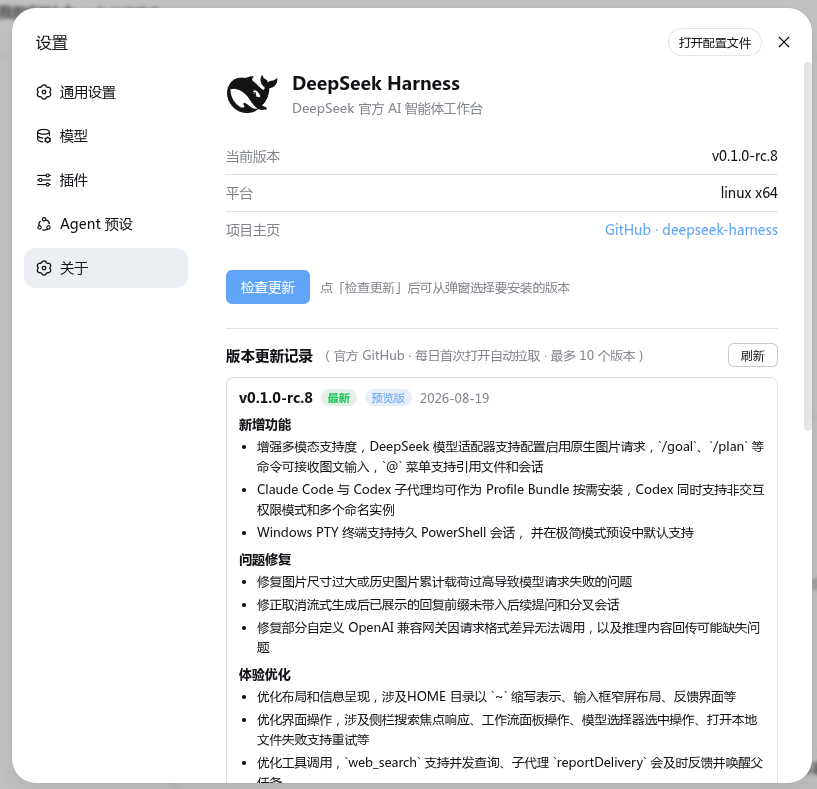
If DeepSeek Harness is part of your daily AI-assisted coding setup, juggling dsh CLI version, web frontend build, Node runtime, and checking whether a newer release has already shipped to npm tends to fragment across terminal logs and docs. dsh-about pulls all of that into a single Settings -> About panel: open it once and the full environment snapshot is right there, removing the need to hop between windows.
The plugin is built around the update loop. It compares the latest stable release against pre-release channels and presents tiered recommendations rather than a binary prompt. Picking a source triggers a one-click install that automatically restarts the web service, with no background daemon and identical behaviour on Windows, macOS, and Linux. Mirror sources - official, domestic, or a custom local endpoint - are swappable from a dropdown, and you can latency-test each with a click, which is a real quality-of-life improvement for users on cross-border or throttled connections. A built-in changelog view surfaces the ten most recent official release notes in Chinese, fetched daily and cached locally. When a git tag has been cut but the npm publish is still pending, the panel flags the mismatch explicitly and the notice clears itself once the package lands.
In short, dsh-about is for developers who run DeepSeek Harness as a core dev tool and want version hygiene, update decisions, and source switching to happen in one glanceable place instead of a series of scattered shell one-liners.
Screenshots
Use Cases
- Verify all dsh component versions and upgrade to the latest stable release with one click
- Switch to a domestic mirror and test latency before accelerating the update on cross-border networks
- Browse the ten most recent official release notes to stay on top of new features and fixes
Best For
- AI-assisted coding developers who run DeepSeek Harness as a core daily tool
- CI/CD engineers managing multiple dev machines with a unified version policy
- Terminal-heavy users who prefer a graphical settings panel over scattered CLI commands
Related Plugins
A service-oriented sidebar framework for DSH, offering a full workbench with file explorer, embedded browser, real terminal, Git panel, and extensible plugin services.

A beautiful, practical Claude Code-style TUI plugin with pixel whale top bar, flowing glow title, real-time status line, streaming thought expansion, time rewind, context progress bar and TPS gauge — zero core changes.

The plugin market for DeepSeek Harness: browse/search/one-click install community plugins and themes, with updates, backup/restore, hot disable, diagnostics, and AI fix.

A persistent whale widget on the DSH web UI that shows DeepSeek balance, today's usage, and per-turn cost, with drag-and-snap and sound effects.