dsh-side-chat
Run the following command in DeepSeek Harness:
dsh plugin install AHGGG/dsh-side-chat
Paste the following prompt into your AI chat to install this plugin:
In DeepSeek Harness, you can install this plugin by running `dsh plugin install AHGGG/dsh-side-chat`, with its full open-source code available at https://github.com/AHGGG/dsh-side-chat .
About this plugin
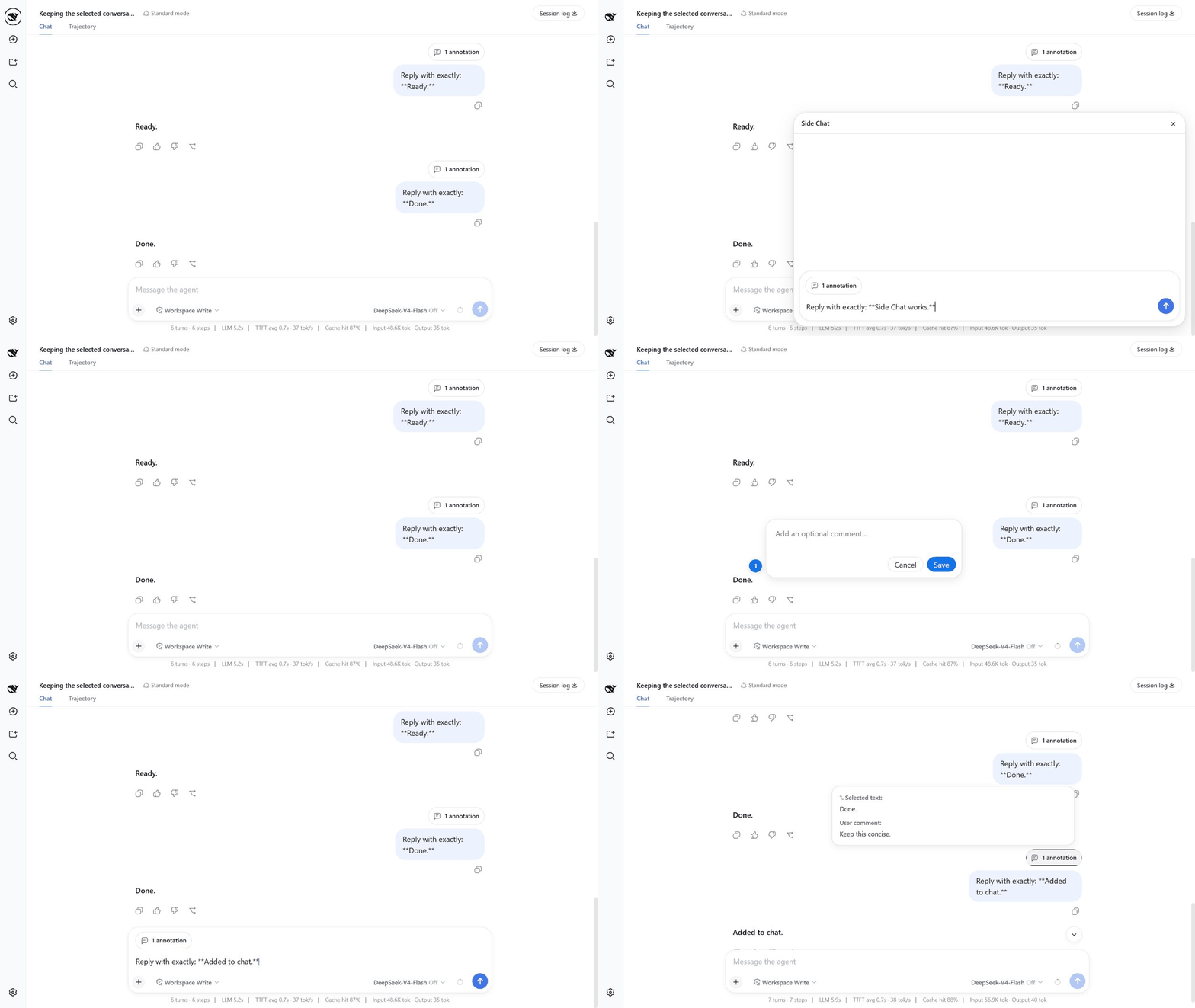
When engaging in long conversations or analyzing code with an AI assistant, you often want to dive deeper into a specific part of a response without derailing the main context or cluttering the primary thread. dsh-side-chat solves this by letting you open an independent side chat panel to ask focused follow-up questions about selected text, all without leaving your current DeepSeek Harness conversation.
The core strength lies in its focus and seamless integration. By selecting text from any completed message, you can instantly ask for more details or pose specific questions in the side panel. This creates a real Session fork that inherits the context, allowing you to independently choose models and reasoning effort. Once the focused discussion settles, you can attach it back to the main composer as a single reference. Crucially, the side chat shares the same workspace, meaning any file changes or tool side effects are real and persistent.
This plugin is ideal for developers, researchers, and power users who need to scrutinize code details, digest long technical documents, or explore tangential ideas while keeping the main workflow intact. It makes AI assistance more precise and unobtrusive, serving as a powerful companion for deep thinking and efficient workflows.
Screenshots
Use Cases
- Select code snippets to ask for optimization tips in the sidebar without interrupting the main thread.
- Initiate focused explanations and detailed discussions on specific paragraphs of long documents.
- Test different model reasoning efforts in an isolated branch and merge the results back to the main conversation.
Best For
- Software developers who need to keep their main workflow context clear.
- Researchers frequently using AI to digest long technical documents.
- Power users seeking efficient multitasking and deep AI interactions.
Related Plugins
A service-oriented sidebar framework for DSH, offering a full workbench with file explorer, embedded browser, real terminal, Git panel, and extensible plugin services.

A beautiful, practical Claude Code-style TUI plugin with pixel whale top bar, flowing glow title, real-time status line, streaming thought expansion, time rewind, context progress bar and TPS gauge — zero core changes.

The plugin market for DeepSeek Harness: browse/search/one-click install community plugins and themes, with updates, backup/restore, hot disable, diagnostics, and AI fix.

A persistent whale widget on the DSH web UI that shows DeepSeek balance, today's usage, and per-turn cost, with drag-and-snap and sound effects.