dsh_design
Run the following command in DeepSeek Harness:
dsh plugin install xbyzzZ/dsh_design
Paste the following prompt into your AI chat to install this plugin:
Run dsh plugin install xbyzzZ/dsh_design inside DeepSeek Harness to install; the source repository is at https://github.com/xbyzzZ/dsh_design
About this plugin
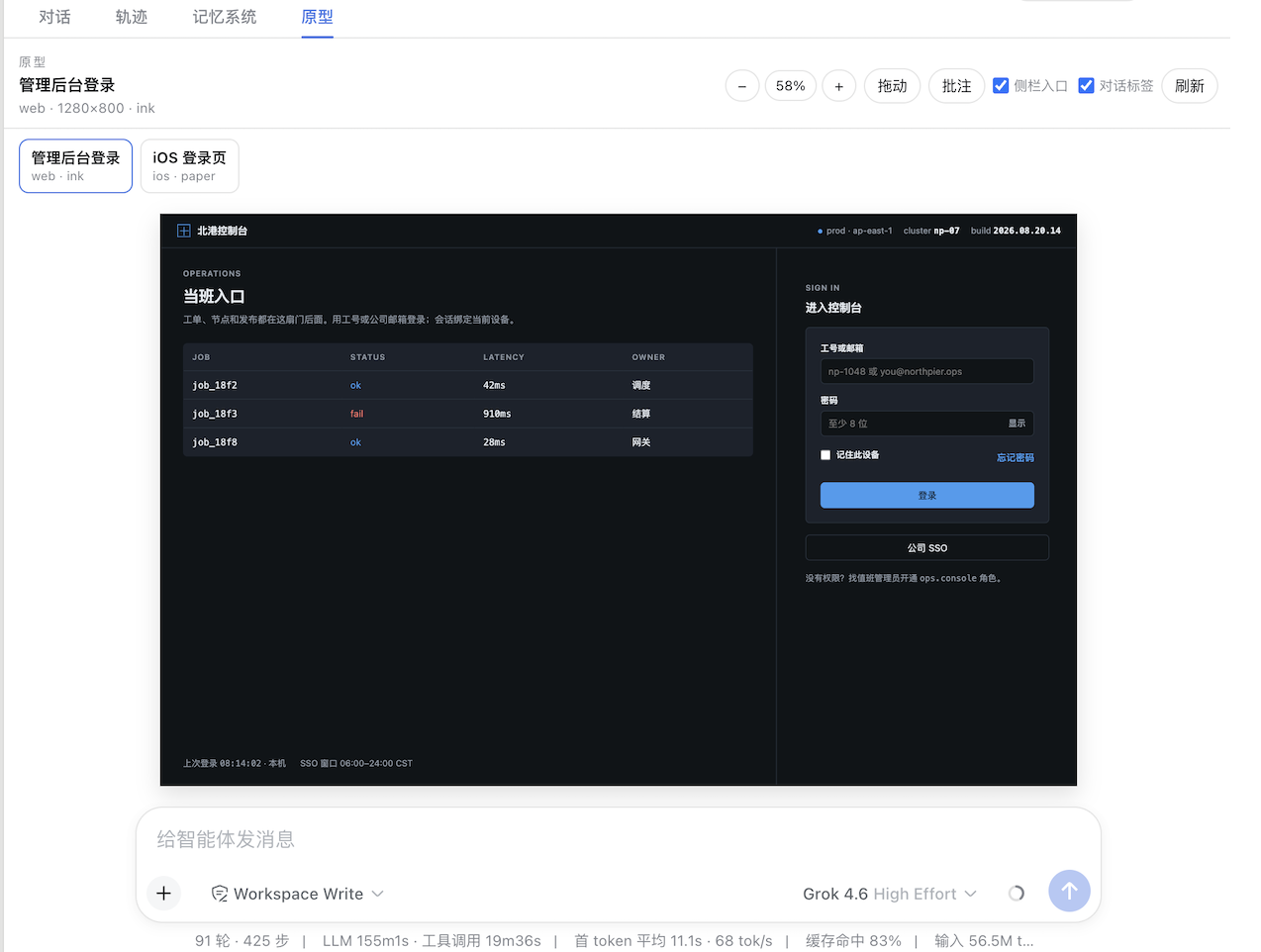
Asking an AI to produce a frontend page and then relying solely on a text description to judge layout, palette, and interaction is one of the most friction-heavy parts of conversational workflows. dsh_design renders clickable HTML prototypes directly inside the DeepSeek Harness chat window—no separate browser tab, no local dev server. Say "make a login page" and within seconds a scaled artboard appears in the sidebar; click around, drop pin annotations, and ask the agent to rewrite based on your feedback, all inside the same conversation thread.
The plugin covers three platform viewports (Web 1280×800, iOS 390×844, Android 412×915) with zoom, pan, and a multi-prototype switcher strip. Two visual baselines—paper for light product UIs and ink for dark operations UIs—give the agent a consistent design vocabulary. On the tool side, functions such as design_create, design_write, and design_comments let the agent read your pin coordinates and notes before rewriting, so design intent survives multiple iteration rounds without being diluted.
It is built for solo developers, UI designers, and product managers who already use DeepSeek Harness for rapid prototyping or frontend concept validation and want to compress the describe → preview → annotate → iterate loop into a single chat session, eliminating the back-and-forth of screenshots and verbal descriptions.
Screenshots
Use Cases
- Describe a page in chat and get a clickable, scaled artboard for Web, iOS, or Android within seconds
- Drop pin annotations on the artboard and ask the agent to rewrite the markup based on your notes
- Switch between paper and ink visual baselines to compare design directions in one workspace
Best For
- Solo developers prototyping UI concepts inside a chat workflow
- UI designers who want instant visual feedback without screenshot back-and-forth
- Product managers who want to review, annotate, and iterate on interface designs in a single conversation
Related Plugins
A service-oriented sidebar framework for DSH, offering a full workbench with file explorer, embedded browser, real terminal, Git panel, and extensible plugin services.

A beautiful, practical Claude Code-style TUI plugin with pixel whale top bar, flowing glow title, real-time status line, streaming thought expansion, time rewind, context progress bar and TPS gauge — zero core changes.

The plugin market for DeepSeek Harness: browse/search/one-click install community plugins and themes, with updates, backup/restore, hot disable, diagnostics, and AI fix.

A persistent whale widget on the DSH web UI that shows DeepSeek balance, today's usage, and per-turn cost, with drag-and-snap and sound effects.