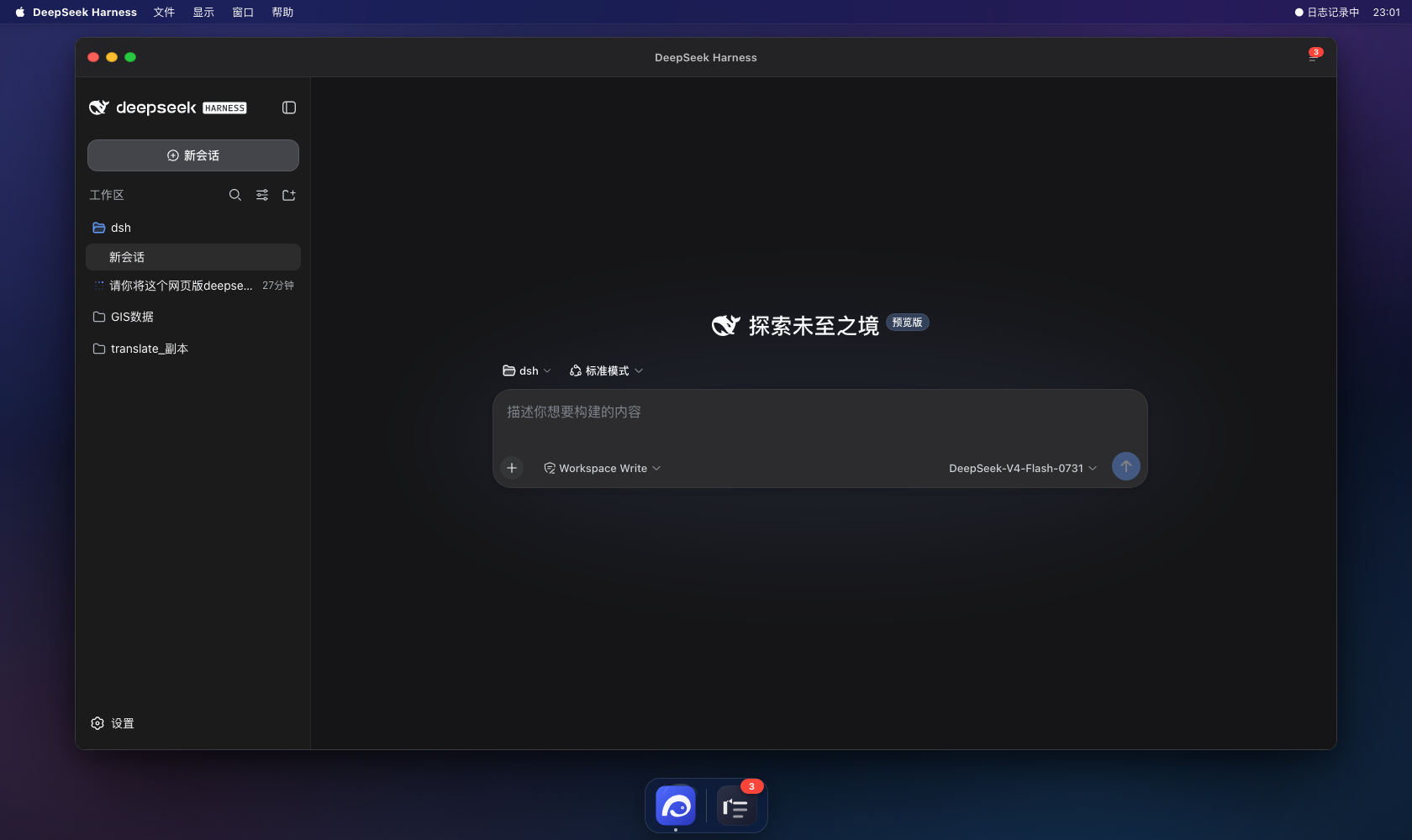
dsh-macos-skin
Run the following command in DeepSeek Harness:
dsh plugin install hero-goblins/dsh-macos-skin
Paste the following prompt into your AI chat to install this plugin:
Run dsh plugin install hero-goblins/dsh-macos-skin in your DeepSeek Harness terminal to install the plugin (source: https://github.com/hero-goblins/dsh-macos-skin).
About this plugin
dsh web is a browser-based DeepSeek Harness workspace, and on macOS it often feels a notch less polished than a native desktop app. Worse, confirming whether a plugin installed correctly or whether it silently threw errors at runtime used to mean digging through scattered text files under ~/.dsh/logs/ — a fragmented and frustrating debugging loop.
dsh-macos-skin tackles both problems in one pass. Visually, it wraps dsh web in a full macOS desktop skin: a frosted-glass menu bar (File / View / Window / Help with a live clock), traffic-light window controls (red and yellow minimize to the Dock, green goes full-screen), a bottom Dock with hover-to-enlarge icons, and auto light/dark theme following the system. For debugging, it ships a built-in real-time error log panel (Cmd+L or the Dock log icon) that aggregates browser-side window.onerror, unhandled Promise rejections, console.error/warn messages, cordis client plugin load failures, plus the server-side web.log and plugin install install.log into one place. You can filter by severity level, auto-scroll, clear the buffer, or export the whole thing as a .log file; when errors fire, a red badge appears on the Dock icon and title bar.
It is built for two audiences: macOS developers who live in dsh web daily and want the experience to feel closer to a native app, and plugin authors who install or debug dsh client-side plugins frequently and need instant assurance that everything loaded and is running cleanly.
Screenshots
Use Cases
- Use dsh web on macOS with a near-native desktop interaction style
- Pinpoint errors quickly via the real-time log panel while installing or debugging dsh client plugins
- Aggregate browser-side and server-side logs in one place, filter by level, and export as a .log file
Best For
- Developers who use dsh web daily on macOS
- Plugin authors who frequently install or debug dsh client-side plugins
- Users who want a unified log view without manually browsing multiple log files
Related Plugins
A service-oriented sidebar framework for DSH, offering a full workbench with file explorer, embedded browser, real terminal, Git panel, and extensible plugin services.

A beautiful, practical Claude Code-style TUI plugin with pixel whale top bar, flowing glow title, real-time status line, streaming thought expansion, time rewind, context progress bar and TPS gauge — zero core changes.

The plugin market for DeepSeek Harness: browse/search/one-click install community plugins and themes, with updates, backup/restore, hot disable, diagnostics, and AI fix.

A persistent whale widget on the DSH web UI that shows DeepSeek balance, today's usage, and per-turn cost, with drag-and-snap and sound effects.