dsh-skills-manager
Run the following command in DeepSeek Harness:
dsh plugin install Jiangdl0220/dsh-skills-manager
Paste the following prompt into your AI chat to install this plugin:
Install by running dsh plugin install Jiangdl0220/dsh-skills-manager in your terminal; source code: https://github.com/Jiangdl0220/dsh-skills-manager
About this plugin
Managing skills in DSH has always been a pain: every installed skill is only discoverable by typing the / command in the chat box, with no search, no way to disable, and no option to remove. Once your skill library grows past a dozen entries, the directory turns into a jumbled mess that is painful to navigate.
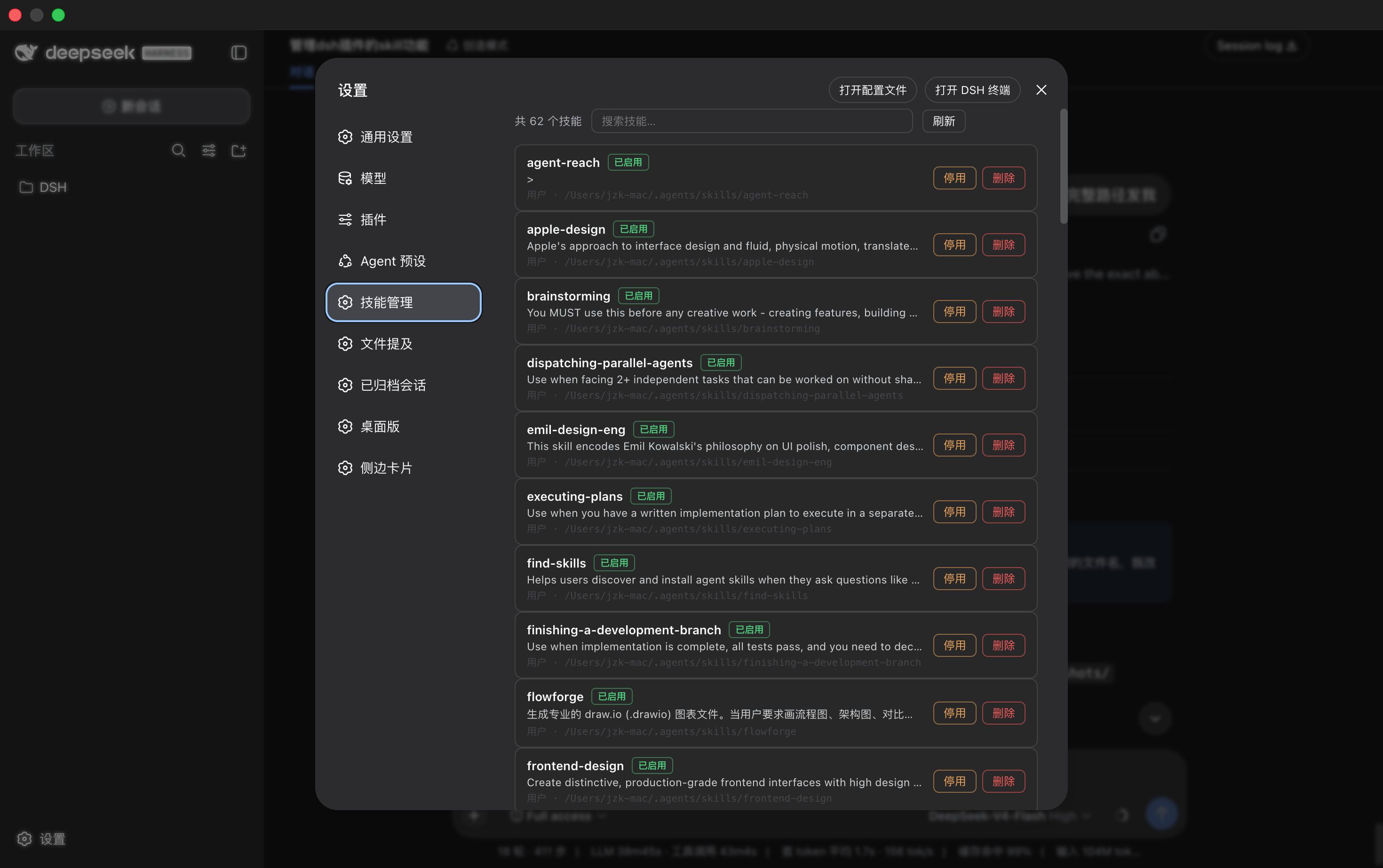
dsh-skills-manager fixes exactly that by adding a dedicated Skill Management page to the DSH settings panel. Every installed skill is listed with its name, description, source, file path, and current status. You can filter the list with a keyword search and choose how many entries appear per page (10, 20, 50, 100, or all at once). Toggle a skill off with a single click—its files stay exactly where they are, so re-enabling is instant and requires no reinstall. When you are truly finished with a skill, move it to the trash; if you change your mind, restore it with one click. Permanent deletion is only available explicitly from the trash. Bundled skills that ship with the application are locked read-only so nothing critical is ever at risk. Every path operation is guarded by fs.resolve and fs.contains, ensuring that only files under ~/.dsh/skills or the trash directory can be touched, keeping the security boundary tight.
The plugin depends solely on official DSH contract interfaces (typert, skills, fs, slots, locale, etc.) and does not call any desktop-only services, so it behaves identically on DSH Desktop and dsh web out of the box. If you maintain a large skill library or frequently swap skill sets between different workflows, dsh-skills-manager compresses what used to be endless /-command scrolling into a handful of clicks inside a settings panel.
Screenshots
Use Cases
- Your skill list has grown past ten entries and scrolling through / commands is painfully slow
- You want to temporarily disable a skill without uninstalling or reinstalling it
- You accidentally deleted a skill and need to restore it from the trash with one click
Best For
- Users who maintain a dozen or more DSH skills and want visual, searchable control
- Developers who switch between DSH Desktop and dsh web on different projects
- Power users who frequently re-enable and disable skill bundles to match varying workflows
Related Plugins
A service-oriented sidebar framework for DSH, offering a full workbench with file explorer, embedded browser, real terminal, Git panel, and extensible plugin services.

A beautiful, practical Claude Code-style TUI plugin with pixel whale top bar, flowing glow title, real-time status line, streaming thought expansion, time rewind, context progress bar and TPS gauge — zero core changes.

The plugin market for DeepSeek Harness: browse/search/one-click install community plugins and themes, with updates, backup/restore, hot disable, diagnostics, and AI fix.

A persistent whale widget on the DSH web UI that shows DeepSeek balance, today's usage, and per-turn cost, with drag-and-snap and sound effects.