context-vista
Run the following command in DeepSeek Harness:
dsh plugin install GooodWei/context-vista
Paste the following prompt into your AI chat to install this plugin:
You can install this plugin in DeepSeek Harness by running `dsh plugin install GooodWei/context-vista`, and its full source code is available at https://github.com/GooodWei/context-vista.
About this plugin
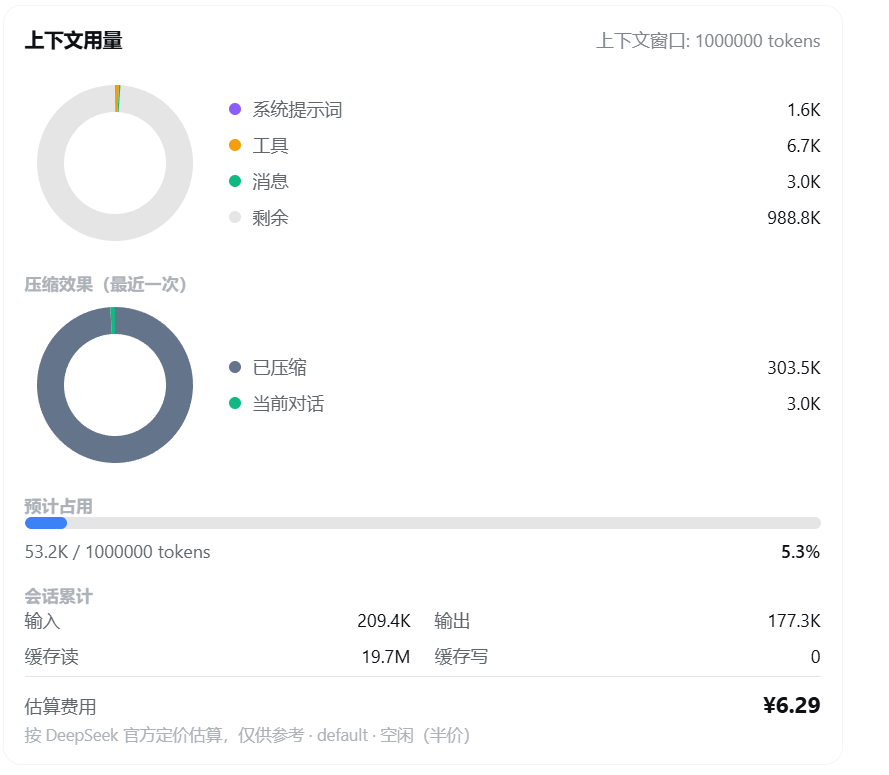
When engaging in long conversations or complex tool-calling sessions with LLMs, context window consumption often feels like a black box, making it hard to estimate costs or know when to clear memory. context-vista is built to solve this exact problem by making the context state in DeepSeek Harness completely transparent. With a simple /context command, you get a beautiful donut chart that breaks down token allocation across system prompts, tool calls, message history, and remaining space, along with cumulative session usage and estimated costs.
Beyond the on-demand detailed card, the plugin features a persistent mini floating card on the right side of the chat area. It tracks real-time context occupancy and includes a one-click compress button, allowing you to trigger context compaction without typing commands when the window gets tight. The floating card is draggable and collapsible, ensuring it never interrupts your immersive coding flow.
For developers and power users who keep a close eye on API bills, context-vista offers a highly flexible custom pricing system. You can define specific billing rules for different routes and models in your configuration file, complete with support for peak and off-peak pricing windows and multiple currencies. If you want to leverage long context windows while keeping precise control over every cent spent and every token utilized, this plugin is your perfect companion.
Screenshots
Use Cases
- Monitor token consumption and remaining space in real-time during long conversations.
- Trigger one-click context compression to extend sessions when the window limit is near.
- Accurately estimate and compare API costs across multiple models during development.
Best For
- Developers focused on API billing and cost control.
- Power users frequently utilizing long context and complex tool calls.
- Prompt engineers needing intuitive visibility into LLM memory states.
Related Plugins
A service-oriented sidebar framework for DSH, offering a full workbench with file explorer, embedded browser, real terminal, Git panel, and extensible plugin services.

A beautiful, practical Claude Code-style TUI plugin with pixel whale top bar, flowing glow title, real-time status line, streaming thought expansion, time rewind, context progress bar and TPS gauge — zero core changes.

The plugin market for DeepSeek Harness: browse/search/one-click install community plugins and themes, with updates, backup/restore, hot disable, diagnostics, and AI fix.

A persistent whale widget on the DSH web UI that shows DeepSeek balance, today's usage, and per-turn cost, with drag-and-snap and sound effects.