
dsh-atlas
Run the following command in DeepSeek Harness:
dsh plugin install sumarilkkxx/dsh-atlas
Paste the following prompt into your AI chat to install this plugin:
Run dsh plugin install sumarilkkxx/dsh-atlas in your terminal to install the plugin; the source code is available at https://github.com/sumarilkkxx/dsh-atlas
About this plugin
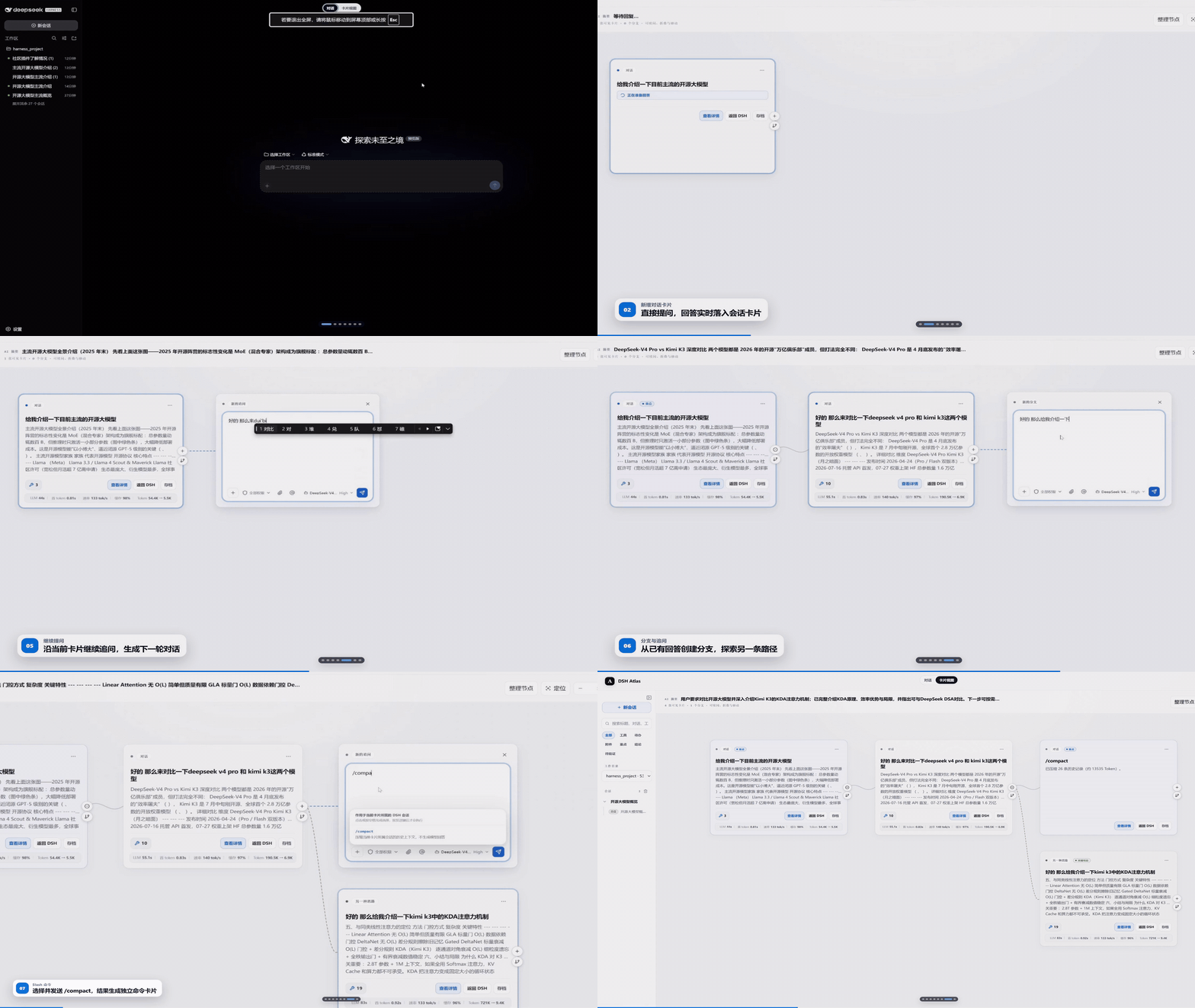
Long DSH sessions in a flat text log are hard to review, organize, and resume. Multiple rounds of reasoning, tool calls, and chart artifacts blend into hundreds of lines of output, burying the conclusions you actually need. Atlas treats the DSH Session Log as the single source of truth and projects every turn—user message, model response, and tool activity—into a card on a visual canvas so context, branches, and key findings are visible at a glance.
Core capabilities revolve around three dimensions: viewing, organizing, and continuing. Viewing: cards display preparation, reasoning, tool calls, and generation in real time; once a turn completes, the persisted history locks the final state and eliminates stale “Thinking” indicators. The detail panel preserves original tool-event order and embeds ECharts, Mermaid, and sandboxed render_html canvases. Organizing: the canvas supports drag, 50-to-400-percent zoom, auto-arrangement, and collapsible downstream cards. After searching sessions and cards, you can tag nodes as Important, Key Conclusion, or Needs Verification to track long-running work. Continuing: branching from any answer creates a real DSH Fork with full context preserved. Every card also surfaces aggregated metrics—LLM time, time to first token, token rate, and cache hit rate—without exposing individual model-call breakdowns.
Atlas does not duplicate the chat system or rewrite original conversations. Model selection, reasoning levels, permission presets (Read Only, Workspace Write, Full Access), Slash commands, and the at-sign context menu (local files, conversation history, Skills) all run through the active DSH session API. Atlas stores only auxiliary data such as layout, status, and versioned summaries. Local files are parsed in the browser and injected as turn-level context; original binaries are never uploaded or retained.
Built for developers who rely on DSH for multi-round deep reasoning, tool-chain orchestration, and code analysis, and for anyone who needs to quickly locate conclusions, compare branch paths, and take structured notes from long sessions.
Screenshots
Use Cases
- Locate key conclusions and verification items in a multi-hundred-line session log
- Fork a real branch from a specific answer to compare reasoning paths, tool calls, and artifacts across alternatives
- Review aggregated per-card metrics such as LLM time, time to first token, and token rate
Best For
- Developers who rely on DeepSeek Harness for multi-round deep reasoning and tool-chain orchestration
- Tech leads who need to annotate and share structured notes from long AI sessions
- Individuals who prefer a card-based canvas over a plain-text stream for managing DSH Web workflows
Related Plugins
A service-oriented sidebar framework for DSH, offering a full workbench with file explorer, embedded browser, real terminal, Git panel, and extensible plugin services.

A beautiful, practical Claude Code-style TUI plugin with pixel whale top bar, flowing glow title, real-time status line, streaming thought expansion, time rewind, context progress bar and TPS gauge — zero core changes.

The plugin market for DeepSeek Harness: browse/search/one-click install community plugins and themes, with updates, backup/restore, hot disable, diagnostics, and AI fix.

A persistent whale widget on the DSH web UI that shows DeepSeek balance, today's usage, and per-turn cost, with drag-and-snap and sound effects.