dsh-valley-meter
Run the following command in DeepSeek Harness:
dsh plugin install uckkk/dsh-valley-meter
Paste the following prompt into your AI chat to install this plugin:
Run dsh plugin install uckkk/dsh-valley-meter in your terminal (source code at https://github.com/uckkk/dsh-valley-meter), then restart the dsh web page to see the valley-meter card below the composer or at the sidebar footer.
About this plugin
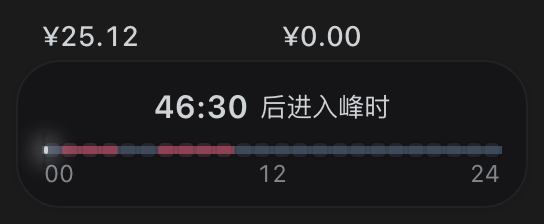
Working with DeepSeek Harness means peak and off-peak windows directly shape the cost of every single call, yet your balance and daily spend live on a separate official dashboard. Switching back and forth breaks your flow, and it is easy to miss a reading mid-session. dsh-valley-meter consolidates those four everyday questions — Is it off-peak right now? How long until the next valley? What is my balance? What have I spent today? — into a single compact dark card anchored below the composer or at the sidebar footer, so the answers are always at a glance without ever leaving the editor.
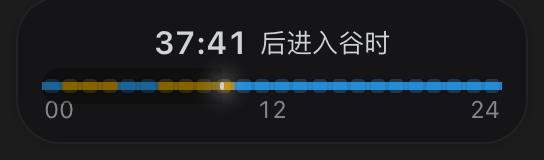
The card ships with a real-time, second-precise off-peak countdown, a two-color progress bar with a white time needle, a peak-versus-valley badge, and an account balance fetched independently from the official /user/balance endpoint. Daily spend is calculated by the plugin itself: it listens to llm/stream events, applies a built-in two-tier price table, and writes the running total to a local ledger file. No other plugin is required. The display toggles between a detailed card and a pure-number minimal mode with one click, and both the valley and peak accent colors are customizable via a color picker with instant preview.
If you are a regular Harness user who batches heavy workloads into off-peak hours while keeping peak windows light, or simply wants a quiet glance at balance and daily cost without breaking your flow, this widget is built exactly for that. Without an API key configured the balance slot shows a calm no-data placeholder while today's spend keeps accumulating normally — no errors, no pop-ups, ready to use from the moment you install it and restart the web page.
Screenshots
Use Cases
- Check the off-peak countdown before submitting heavy batch tasks
- Glance at balance and daily spend between coding sessions without leaving the editor
- Customize valley and peak colors to match your personal dark theme
Best For
- Regular Harness users who batch workloads into off-peak hours
- Developers who track cost per call and want real-time daily spend at a glance
- Solo developers who prefer minimal, zero-dependency widgets
Related Plugins
A service-oriented sidebar framework for DSH, offering a full workbench with file explorer, embedded browser, real terminal, Git panel, and extensible plugin services.

A beautiful, practical Claude Code-style TUI plugin with pixel whale top bar, flowing glow title, real-time status line, streaming thought expansion, time rewind, context progress bar and TPS gauge — zero core changes.

The plugin market for DeepSeek Harness: browse/search/one-click install community plugins and themes, with updates, backup/restore, hot disable, diagnostics, and AI fix.

A persistent whale widget on the DSH web UI that shows DeepSeek balance, today's usage, and per-turn cost, with drag-and-snap and sound effects.