dsh-prompt-vault
Run the following command in DeepSeek Harness:
dsh plugin install Frog755/dsh-prompt-vault
Paste the following prompt into your AI chat to install this plugin:
Run dsh plugin install Frog755/dsh-prompt-vault in your terminal to install the plugin, then hard-refresh the browser (Cmd/Ctrl+Shift+R) to see the 📚 button in the input toolbar. The source code is hosted at https://github.com/Frog755/dsh-prompt-vault.
About this plugin
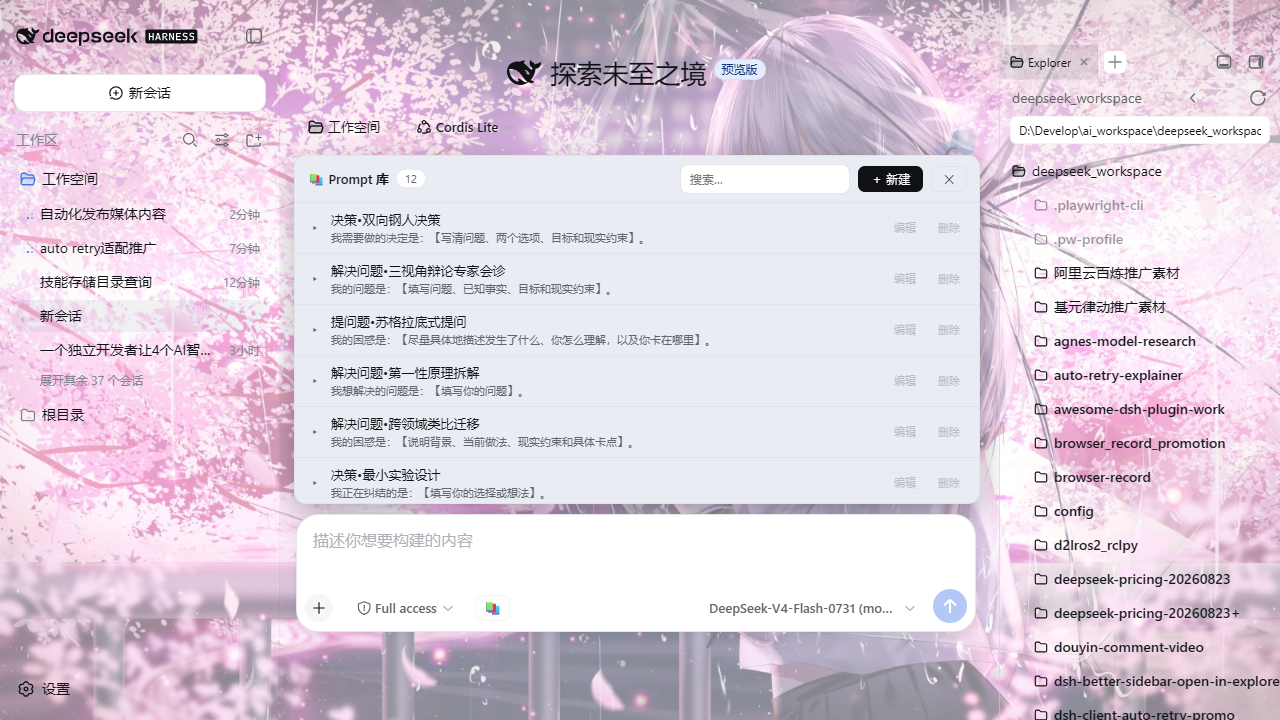
Retyping or pasting the same system prompt, code-review template, or translation instruction at the start of every session breaks your flow and invites typos. Prompt Vault gathers your go-to prompts into a compact panel above the DSH input box, so a single click fills the box and you can get back to writing.
The panel supports creating, editing, deleting (with a confirmation step), and searching entries. Each row shows a title plus a one-line preview; expanding reveals the full text. Clicking an entry appends its content to whatever draft already sits in the input box rather than overwriting it, making it easy to chain multiple prompts together. All data is persisted as a local JSON file (default path ~/.dsh/prompt-library.json, overridable via the DSH_PROMPT_VAULT_FILE environment variable) and survives uninstall. Two starter prompts-a code-review template and a bilingual translation prompt-ship out of the box and can be edited or removed at will.
The plugin is distributed as an npm package and mounted through a bundle patch, leaving DSH source code untouched. It is ideal for DSH users who reuse the same set of prompts daily and want a lightweight, client-side snippet manager without spinning up extra services or forking the host application.
Screenshots
Use Cases
- One-click reuse of fixed prompt templates into the input box
- Quickly swap between code-review, translation, and other scenario prompts
- Eliminate repetitive typing or copy-paste of the same instructions
Best For
- DASH power users with a stable set of go-to prompts
- Developers who prefer a lightweight, local-first snippet manager
- Anyone who wants prompt reuse without extra services or source forks
Related Plugins
A service-oriented sidebar framework for DSH, offering a full workbench with file explorer, embedded browser, real terminal, Git panel, and extensible plugin services.

A beautiful, practical Claude Code-style TUI plugin with pixel whale top bar, flowing glow title, real-time status line, streaming thought expansion, time rewind, context progress bar and TPS gauge — zero core changes.

The plugin market for DeepSeek Harness: browse/search/one-click install community plugins and themes, with updates, backup/restore, hot disable, diagnostics, and AI fix.

A persistent whale widget on the DSH web UI that shows DeepSeek balance, today's usage, and per-turn cost, with drag-and-snap and sound effects.