dsh-plugin-no-workspace
Run the following command in DeepSeek Harness:
dsh plugin install SpookySandwich/dsh-plugin-no-workspace
Paste the following prompt into your AI chat to install this plugin:
Run dsh plugin install SpookySandwich/dsh-plugin-no-workspace inside DeepSeek Harness; the source repository is available at https://github.com/SpookySandwich/dsh-plugin-no-workspace . After installation or upgrade, restart DSH so both host-side and client-side code reload.
About this plugin
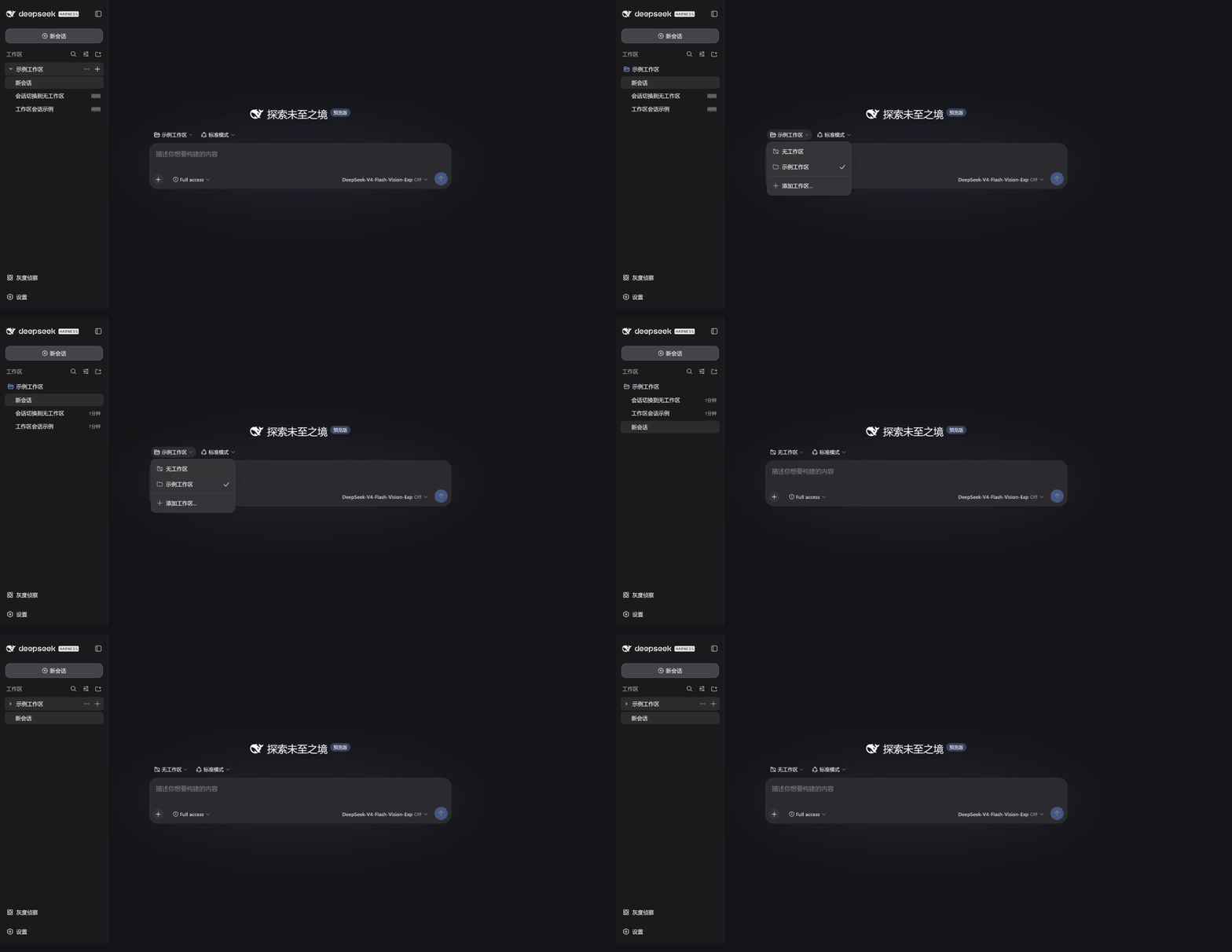
By default, DeepSeek Harness tucks every session into a workspace; those that do not belong end up in a phantom "Ungrouped" folder that looks like a directory but is not one. dsh-plugin-no-workspace elevates "no workspace" to a true first-class state: independent sessions appear as top-level entries in the sidebar, never inheriting the current or most-recent workspace and never wrapped in a bogus container. Clicking "New Session" at the top gives you a clean standalone conversation with input, model selection, and attachments ready to use immediately; switching the workspace selector to "No Workspace" detaches an existing session losslessly, preserving every event, draft, and piece of context.
The plugin is deliberately lightweight. It wraps DSH's already-registered slots rather than replacing the sidebar or fabricating directory structures, so native workspace features such as search, drag-and-drop, sorting, archiving, and the directory picker remain completely untouched. New standalone sessions use the user's home directory as a neutral execution path, avoiding any accidental pollution of project folders. The UI automatically localizes the label to your display language, showing "No Workspace" or "无工作区" as appropriate.
This plugin is a good fit for developers who often want to ask a quick question, brainstorm across projects, or simply start a conversation without first creating a folder to house it. It has been verified against DSH 0.1.1-rc.2 and confirmed to coexist peacefully with other client plugins such as dsh-plugin-message-edit, dsh-plugin-marginalia, and dsh-plugin-rollout-scout.
Screenshots
Use Cases
- Click New Session at the top to create a standalone conversation that inherits no workspace
- Switch the workspace selector to No Workspace to detach an existing session losslessly
- Collapse all workspaces while standalone sessions remain as first-level sidebar entries
Best For
- Developers who frequently start quick questions or brainstorm without pre-creating a folder
- DeepSeek Harness users juggling multiple projects who need workspace-independent conversations
- Power users who want native workspace functionality preserved alongside flexible session states
Related Plugins
A service-oriented sidebar framework for DSH, offering a full workbench with file explorer, embedded browser, real terminal, Git panel, and extensible plugin services.

A beautiful, practical Claude Code-style TUI plugin with pixel whale top bar, flowing glow title, real-time status line, streaming thought expansion, time rewind, context progress bar and TPS gauge — zero core changes.

The plugin market for DeepSeek Harness: browse/search/one-click install community plugins and themes, with updates, backup/restore, hot disable, diagnostics, and AI fix.

A persistent whale widget on the DSH web UI that shows DeepSeek balance, today's usage, and per-turn cost, with drag-and-snap and sound effects.