dsh-file-review-tab
Run the following command in DeepSeek Harness:
dsh plugin install Lzh3070/dsh-file-review-tab
Paste the following prompt into your AI chat to install this plugin:
To install this plugin in DeepSeek Harness, provide DSH with the full source URL https://github.com/Lzh3070/dsh-file-review-tab and complete installation through the plugin installation entry.
About this plugin
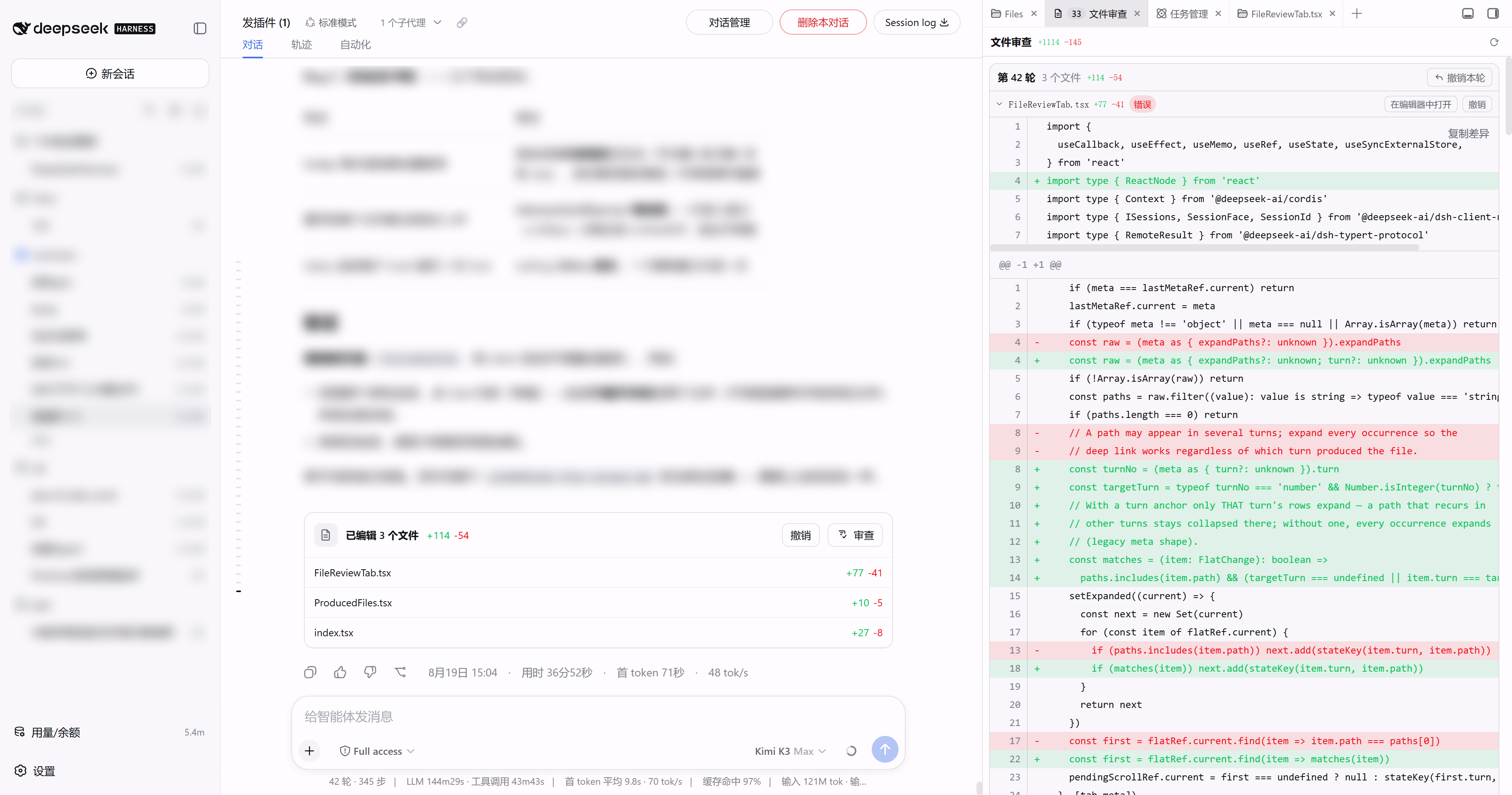
When a DSH Web conversation edits multiple files over several turns, reviewing changes can become awkward: edits pile up at the end of the chat, full-width drawers interrupt the flow, and it is not always easy to see what happened in which turn. dsh-file-review-tab moves file review into a more persistent place by adding a File Review tab inside dsh-better-sidebar, while still keeping the chat turn-tail review row. Both entry points share the same review state instead of competing with each other.
The plugin organizes changes by conversation turn. After each turn, the chat still shows a compact review line with edited-file counts and diff summaries; clicking Review or a file name opens the sidebar tab and scrolls directly to the matching diff group. The sidebar tab supports line-level red/green diffs, per-turn and per-file undo, reapply, and a live badge for changed files. It also extends the same review model to PTC / Code Mode by capturing edit and write calls made inside run_code, while session isolation and scoped styling keep multiple sessions and other plugins from interfering.
This is useful for people who regularly let an agent modify code or documents in DSH Web and want a calmer review workflow: less interruption in the chat, but fast access to diffs, undo, and reapply whenever needed. If you already use dsh-better-sidebar and prefer a sidebar-based audit trail over temporary full-width panels, dsh-file-review-tab gives you a focused place to track and review file changes.
Screenshots
Use Cases
- Review each turn's changes after multi-file edits.
- Inspect edit and write calls made inside run_code.
- Undo or reapply changes by turn or file without opening a full-width drawer.
Best For
- Developers who use DSH Web and better-sidebar frequently.
- Users who want a chat review line plus a sidebar diff workflow.
- People who often let agents edit multiple files and need undo controls.
Related Plugins
A service-oriented sidebar framework for DSH, offering a full workbench with file explorer, embedded browser, real terminal, Git panel, and extensible plugin services.

A beautiful, practical Claude Code-style TUI plugin with pixel whale top bar, flowing glow title, real-time status line, streaming thought expansion, time rewind, context progress bar and TPS gauge — zero core changes.

The plugin market for DeepSeek Harness: browse/search/one-click install community plugins and themes, with updates, backup/restore, hot disable, diagnostics, and AI fix.

A persistent whale widget on the DSH web UI that shows DeepSeek balance, today's usage, and per-turn cost, with drag-and-snap and sound effects.