dsh-agent-sticky-note
Run the following command in DeepSeek Harness:
dsh plugin install alanpaul1969/dsh-agent-sticky-note
Paste the following prompt into your AI chat to install this plugin:
Run dsh plugin install alanpaul1969/dsh-agent-sticky-note in your terminal to install this plugin; the source repository is available at https://github.com/alanpaul1969/dsh-agent-sticky-note.
About this plugin
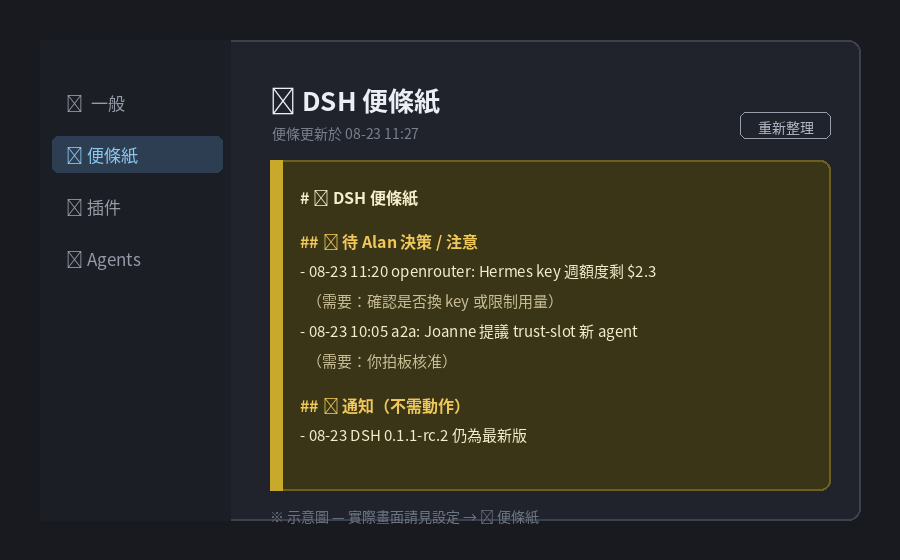
When an agent runs background watchers or headless workers, the decisions it needs from you, version notices, and urgent flags tend to drown in a flood of chat messages — and if you are reaching the DSH Web GUI remotely over Tailscale, the server desktop is simply out of reach. dsh-agent-sticky-note addresses exactly that: it renders the markdown note file your agent maintains (default ~/Desktop/DSH-便條紙.md) as a bright sticky-note tab inside the DSH Settings panel, so critical items stay visible at a glance without scrolling through history.
The plugin is deliberately tiny. On the host side it registers a single GET /api/sticky-note endpoint via ctx.webServer; on the client side it injects a settings.section slot that polls every 30 seconds with a manual refresh button, styled as a yellow sticky note with full dark-mode support. There are zero third-party dependencies, no telemetry, and no outbound network calls — strictly read-only.
It is a good fit if you run DeepSeek Harness with agents that have background tasks needing your attention, if you frequently access the GUI remotely and cannot rely on a local desktop, or if your A2A pipeline already follows the AGENT-PROTOCOL note-writing convention. Point the agent writer and the STICKY_NOTE_FILE env variable at the same path and the GUI always reflects the latest state.
Screenshots
Use Cases
- Access the DSH Web GUI remotely over Tailscale and see agent-pending decisions without needing the server desktop.
- Background watchers or headless workers push version notices that appear in the GUI within 30 seconds via auto-poll.
- Important flags remain visible in the Settings tab even when chat history overwhelms the conversation.
Best For
- Developers running DeepSeek Harness with agents that spawn background tasks.
- Ops engineers who manage DSH instances remotely over Tailscale or VPN.
- Multi-agent collaboration teams that already adopt the AGENT-PROTOCOL note-writing convention.
Related Plugins
A service-oriented sidebar framework for DSH, offering a full workbench with file explorer, embedded browser, real terminal, Git panel, and extensible plugin services.

A beautiful, practical Claude Code-style TUI plugin with pixel whale top bar, flowing glow title, real-time status line, streaming thought expansion, time rewind, context progress bar and TPS gauge — zero core changes.

The plugin market for DeepSeek Harness: browse/search/one-click install community plugins and themes, with updates, backup/restore, hot disable, diagnostics, and AI fix.

A persistent whale widget on the DSH web UI that shows DeepSeek balance, today's usage, and per-turn cost, with drag-and-snap and sound effects.