blocker-notify
Run the following command in DeepSeek Harness:
dsh plugin install Frost-Reed/blocker-notify
Paste the following prompt into your AI chat to install this plugin:
Run dsh plugin install Frost-Reed/blocker-notify in your terminal, or ask the Agent in any DSH session to install the plugin from https://github.com/Frost-Reed/blocker-notify.
About this plugin
When a DeepSeek Harness Agent is working through a multi-step task, it often pauses and waits for you: to approve a sandbox permission bump, to answer a question, or to review a plan. If several sessions are running in parallel, those pauses are easy to overlook, and you end up switching back and forth just to find out which Agent needs you. blocker-notify eliminates that guessing game by watching for actionable blocking signals and alerting you the instant one appears.
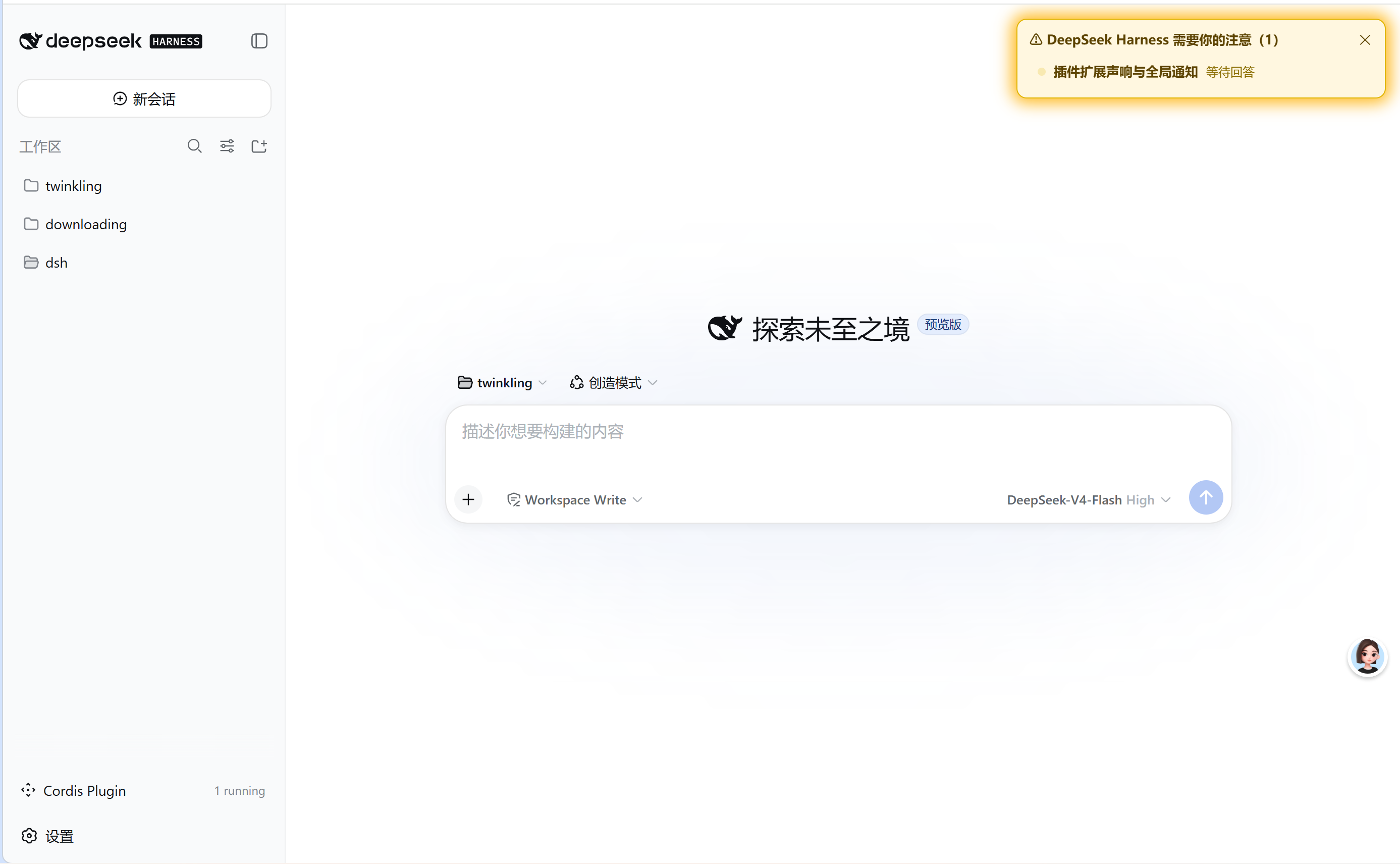
Alerts arrive through four simultaneous channels: an amber banner in the top-right corner listing every blocked session with its title and status, a blinking yellow dot on the left-side workspace entry, a short two-beep tone generated via the Web Audio API, and a native OS notification on Windows or macOS. The plugin is deliberately quiet about finished events: sandbox denials are logged for diagnostics but never trigger a banner, a chime, or a system popup. Only live, actionable blocks (approvals, questions, plan reviews) get your attention, and clicking a banner row jumps to the session and clears that entry immediately.
This plugin suits any DSH user who delegates long-running work to Agents across multiple sessions and wants to be pulled back the moment a decision is needed, rather than refreshing every tab. It supports both a quick dynamic mode for an instant trial and a persistent bundle install for daily use, so the signal always reaches you exactly when your input unblocks the Agent.
Screenshots
Use Cases
- Agent requests sandbox escalation and an OS notification with banner appears instantly
- Across parallel Agent tasks, blocked session entries flash and highlight automatically
- While you are in another window, a chime alerts you that a session awaits your input
Best For
- Workflow users managing multiple long-running DSH tasks simultaneously
- Users who prefer proactive alerts over polling each session for blocks
- Automation developers in sandboxed environments who need fast approval turnaround
Related Plugins
A service-oriented sidebar framework for DSH, offering a full workbench with file explorer, embedded browser, real terminal, Git panel, and extensible plugin services.

A beautiful, practical Claude Code-style TUI plugin with pixel whale top bar, flowing glow title, real-time status line, streaming thought expansion, time rewind, context progress bar and TPS gauge — zero core changes.

The plugin market for DeepSeek Harness: browse/search/one-click install community plugins and themes, with updates, backup/restore, hot disable, diagnostics, and AI fix.

A persistent whale widget on the DSH web UI that shows DeepSeek balance, today's usage, and per-turn cost, with drag-and-snap and sound effects.