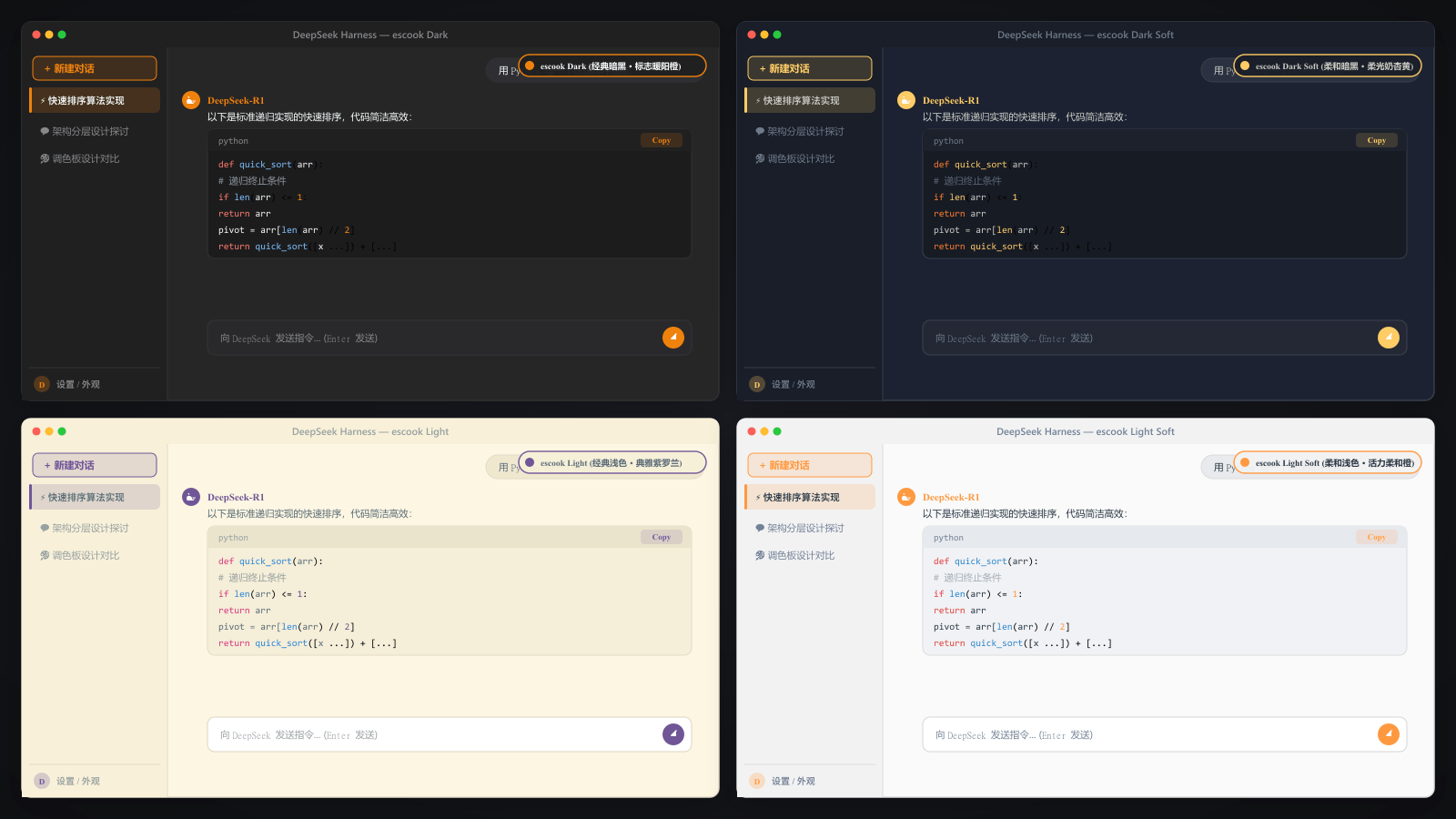
dsh-theme-escook
Run the following command in DeepSeek Harness:
dsh plugin install Simon-yyy/dsh-theme-escook
Paste the following prompt into your AI chat to install this plugin:
Run dsh plugin install Simon-yyy/dsh-theme-escook in the DeepSeek Harness terminal to install (source: https://github.com/Simon-yyy/dsh-theme-escook).
About this plugin
DeepSeek Harness is powerful, but its default interface feels visually flat after hours of coding, leaving your eyes tired and your workspace feeling a little soulless. dsh-theme-escook ports the beloved VS Code escook palette into Harness, pairing a #1f2430 deep-night base with #ffcc66 amber-gold accents so that the sidebar, chat bubbles, settings panels, marketplace cards, and even scrollbars all sit under a calm, warm glow.
Syntax highlighting is tuned specifically for the dark canvas: pink keywords, cyan functions, mint-green strings, and amber numbers in soft pastel tones that stay readable without straining your eyes during long sessions. Hover states, focus rings, and scrollbar styling are redefined to feel like a carefully polished desktop app. Switching themes requires no server restart—one click in the DSH Market Theme tab applies it instantly; click again to revert.
Built for developers who prefer a dark workspace and want visual harmony between their editor and Harness, or for anyone who simply wants to give their daily tooling a touch of warmth and craft. Install and go—zero configuration needed.
Screenshots
Use Cases
- Reducing eye strain during long coding sessions with soft dark tones
- Unifying the dark aesthetic between your IDE and Harness
- Previewing and switching color schemes instantly in the Market Theme tab
Best For
- Developers who prefer a dark working environment
- Professional developers who value interface polish and visual consistency
- Power users who enjoy customizing tool aesthetics
Related Plugins

whale-girl is a desktop pet in the DSH Web GUI (bottom-right for instant companionship) — draggable, feedable, playable; completed tasks, sessions and companionship time accrue into seniority levels, titles, and memories.

A WebGPU ocean skin for DeepSeek Harness with five-wave Gerstner waves, translucent theme, day/night cycle, and quick controls, installable as plugin or extension.

A Galgame-style conversation view and visual scene editor for DSH web sessions, with a real-time editing mode.

A native skinning plugin for DeepSeek Harness: 8 designer themes, wallpapers, accent colors, and shareable theme packs, built purely on design tokens.