dsh-companion
Run the following command in DeepSeek Harness:
dsh plugin install Wanbinyu/dsh-companion
Paste the following prompt into your AI chat to install this plugin:
Run dsh plugin install Wanbinyu/dsh-companion in your DeepSeek Harness terminal to install this plugin; source code at https://github.com/Wanbinyu/dsh-companion
About this plugin
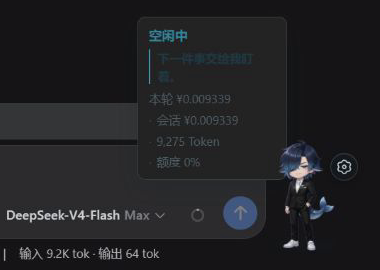
Running a multi-turn, tool-heavy task in DeepSeek Harness Web can feel disorienting: the text streams on but there is no at-a-glance signal telling you whether the model is still thinking, has fired off another tool call, or is now waiting for your approval. dsh-companion maps six real-time states—idle, thinking, tool call, waiting, completed, and failed—to distinct animations and status bubbles on a little whale-boy character, so you can confirm progress at a glance without repeatedly refreshing or guessing.
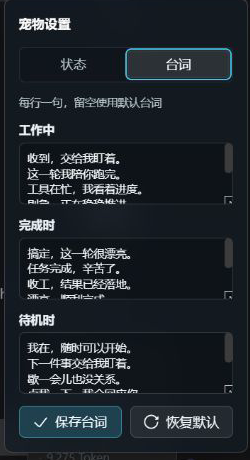
The character is fully interactive: drag it to reposition, resize between 80 and 140 px, and click for a short feedback animation plus a status bubble. All three dialogue sets (working, completed, idle) are line-by-line editable in the settings panel. If dsh-billing is already installed in the same Web profile, Companion automatically reads the public, read-only session projection and displays current-turn cost, cumulative tokens, and quota progress with zero extra configuration. Every value stays in the local browser; prompts, model replies, tool parameters, API keys, and file contents are never read, stored, or transmitted, and no telemetry is sent.
A great fit for developers who regularly drive multi-turn tool chains, plan reviews, or long-form generation in Harness Web and want a lightweight, privacy-safe visual anchor to make wait periods feel shorter.
Screenshots
Use Cases
- Tracking progress of long multi-turn tool calls at a glance
- Pairing with dsh-billing to monitor task state and per-turn cost side by side
- Customizing character dialogue and animations to make wait periods more engaging
Best For
- Developers running long tasks in DeepSeek Harness Web
- Users who prefer a visual anchor over constantly refreshing the console
- Privacy-focused developers who want a purely local plugin with no telemetry
Related Plugins
A service-oriented sidebar framework for DSH, offering a full workbench with file explorer, embedded browser, real terminal, Git panel, and extensible plugin services.

A beautiful, practical Claude Code-style TUI plugin with pixel whale top bar, flowing glow title, real-time status line, streaming thought expansion, time rewind, context progress bar and TPS gauge — zero core changes.

The plugin market for DeepSeek Harness: browse/search/one-click install community plugins and themes, with updates, backup/restore, hot disable, diagnostics, and AI fix.

A persistent whale widget on the DSH web UI that shows DeepSeek balance, today's usage, and per-turn cost, with drag-and-snap and sound effects.