
dsh-quick-phrases
Run the following command in DeepSeek Harness:
dsh plugin install xianrui69/dsh-quick-phrases
Paste the following prompt into your AI chat to install this plugin:
Run the command dsh plugin install xianrui69/dsh-quick-phrases in the DeepSeek Harness terminal to install the plugin; the full source repository is available at https://github.com/xianrui69/dsh-quick-phrases .
About this plugin
Retyping the same boilerplate prompts or scrolling through a template file in the middle of a DeepSeek Harness session fragments your focus and adds a few seconds of friction to every turn. dsh-quick-phrases pins a row of clickable phrase chips directly above the composer: one click drops the full text into the draft, and each chip can independently toggle an auto-submit mode that verifies the write before pressing send, eliminating the extra Enter for your most frequent lines.
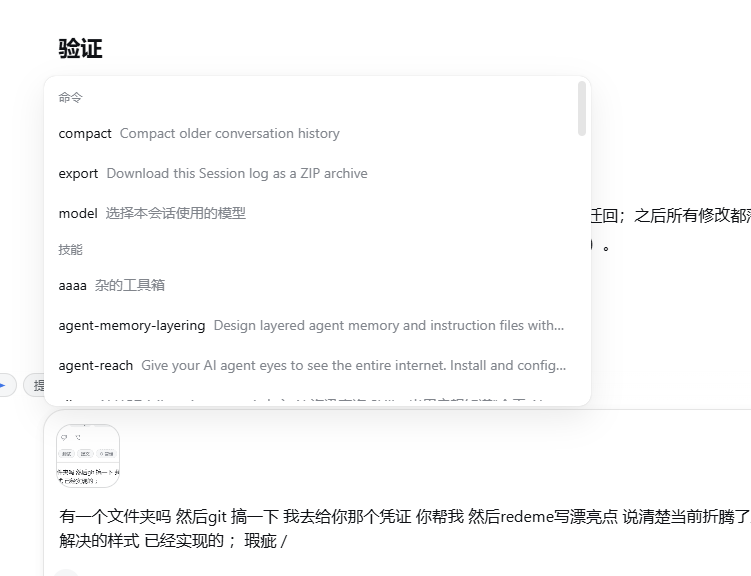
Typing a slash opens a pinned phrase menu with fuzzy name and content filtering and per-phrase on/off switches; drafting /phrase-name and pressing Enter expands the complete text for every registered phrase regardless of menu visibility. The chip bar and its management panel are a single draggable floating unit anchored to the composer, so it tracks sidebar toggles and window resizes without drifting. Hiding the bar still leaves a translucent gear entry, and the DSH settings dialog exposes a dedicated floating editor for the same phrase table. Persistence is a locally stored JSON file with atomic writes and automatic migration from older localStorage data; nothing is sent to the model or logged in session history.
It is a natural fit for developers and power users who rely on fixed questions, templated instructions, or canned replies inside DSH sessions and prefer purely local, zero-dependency, no-build tooling. The entire plugin is hand-written front-end JavaScript that can be edited and deployed on the spot, with no compilation chain required.
Screenshots
Use Cases
- Inserting the same boilerplate questions or prompts repeatedly in DSH sessions
- One-click phrase insertion with optional verified auto-submit for faster turns
- Keeping all phrase data on a local file that never touches model context or session logs
Best For
- Developers who rely on DeepSeek Harness daily for coding or writing assistance
- Users who prefer purely local, zero-dependency, no-build front-end tooling
- Power users who want to cut repeated typing with a few pre-set phrases in a custom input workflow
Related Plugins
A service-oriented sidebar framework for DSH, offering a full workbench with file explorer, embedded browser, real terminal, Git panel, and extensible plugin services.

A beautiful, practical Claude Code-style TUI plugin with pixel whale top bar, flowing glow title, real-time status line, streaming thought expansion, time rewind, context progress bar and TPS gauge — zero core changes.

The plugin market for DeepSeek Harness: browse/search/one-click install community plugins and themes, with updates, backup/restore, hot disable, diagnostics, and AI fix.

A persistent whale widget on the DSH web UI that shows DeepSeek balance, today's usage, and per-turn cost, with drag-and-snap and sound effects.