dsh-git-branch-manage
Run the following command in DeepSeek Harness:
dsh plugin install LongSir0419/dsh-git-branch-manage
Paste the following prompt into your AI chat to install this plugin:
Run dsh plugin install LongSir0419/dsh-git-branch-manage in your terminal to install this plugin; the source code is available at https://github.com/LongSir0419/dsh-git-branch-manage
About this plugin
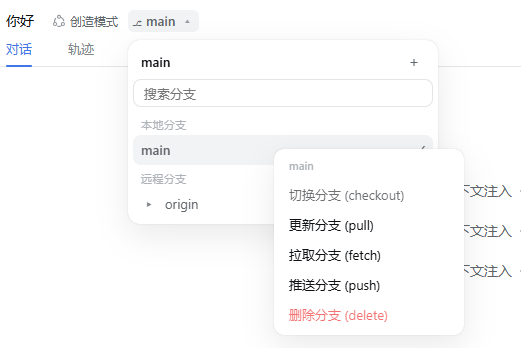
Jumping back and forth to a terminal just to check or manage Git branches breaks the flow of coding inside DeepSeek Harness. dsh-git-branch-manage places a branch badge right in the session header and the new-session hero page, so the current branch is always visible without leaving the conversation.
A left-click opens an IDEA-style branch tree: local branches are filtered to those active within the last seven days, and remote branches are listed alongside. A right-click gives quick access to switch, pull, fetch, and push. Creating a branch first fetches the latest remote state, then creates and switches with prefix suggestions; deletion is local-only, uses the safe -d flag, and is refused for the checked-out branch or any remote reference. Every action shows a loading spinner and a confirmation dialog for switches.
The plugin suits developers who work daily inside DSH, need to hop between branches often without switching windows, and prefer the familiar JetBrains-style interaction model.
Screenshots
Use Cases
- Check the current branch without leaving the DSH conversation
- Rapidly switch between multiple development branches without losing context
- Create a new branch and jump straight into a coding session
Best For
- Engineers doing daily development inside DeepSeek Harness
- Developers who prefer the JetBrains IDE interaction style
- Teams that manage and switch Git branches frequently
Related Plugins
A service-oriented sidebar framework for DSH, offering a full workbench with file explorer, embedded browser, real terminal, Git panel, and extensible plugin services.

A beautiful, practical Claude Code-style TUI plugin with pixel whale top bar, flowing glow title, real-time status line, streaming thought expansion, time rewind, context progress bar and TPS gauge — zero core changes.

The plugin market for DeepSeek Harness: browse/search/one-click install community plugins and themes, with updates, backup/restore, hot disable, diagnostics, and AI fix.

A persistent whale widget on the DSH web UI that shows DeepSeek balance, today's usage, and per-turn cost, with drag-and-snap and sound effects.