dsh-raiden-theme
Run the following command in DeepSeek Harness:
dsh plugin install lengzhanbao/dsh-raiden-theme
Paste the following prompt into your AI chat to install this plugin:
Run dsh plugin install lengzhanbao/dsh-raiden-theme in DeepSeek Harness to install this plugin (source repository: https://github.com/lengzhanbao/dsh-raiden-theme).
About this plugin
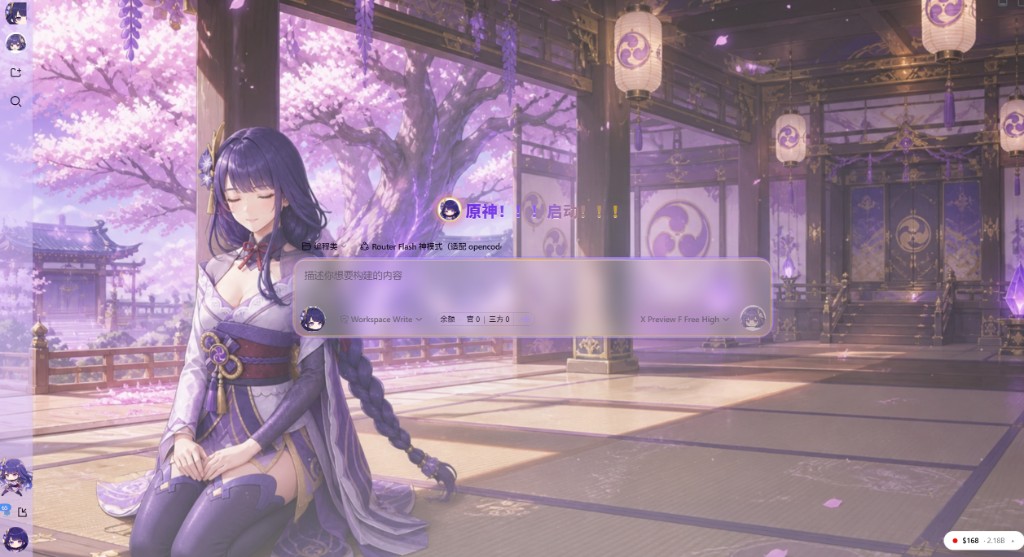
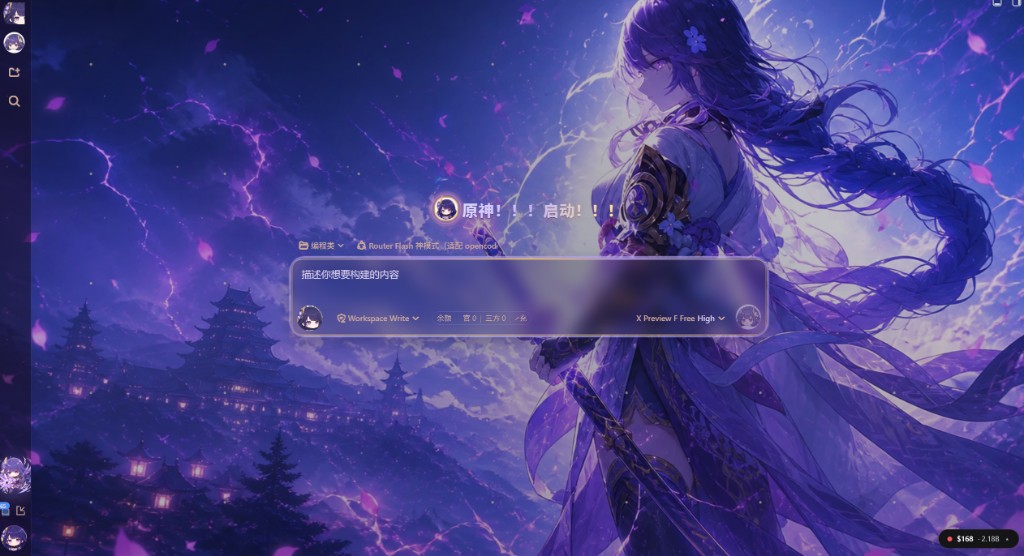
DSH Web's default interface is functional yet visually restrained, lacking a sense of personality and atmosphere. Raiden Inazuma Atelier is a pure-appearance theme plugin built exactly for that gap: a violet-and-gold acrylic dialog stage, Inazuma-style full-screen wallpapers that follow the global light/dark setting, chibi sidebar animations, and an optional Agent preset. Everything is injected on the client side with zero impact on session or model logic.
Wallpapers use a fused-scene approach, baking the character directly into the background to avoid the awkwardness of overlapping layers. Light mode shows a cherry-blossom pavilion with wisteria and warm sunlight, the General seated on the left. Dark mode presents a castle thunderstorm with violet electricity and drifting petals, the General holding her naginata on the right. The dialog area features a semi-transparent frosted panel with a pink-violet outer frame and gold inner border. Ambient particles float petals in light mode and scatter sparks in dark mode, both dismissible under reduced-motion. A six-frame slow boxing-lightning chibi loop sits in the workspace corner of the sidebar, auto-switching to a static frame when reduced motion is enabled. The settings panel offers a master toggle, four opacity sliders, character opacity, and an independent animation toggle, all taking effect instantly and stored in browser localStorage.
For those who also want a touch of character voice, the Agent Preset menu includes a calm, concise Inazuma-toned Raiden preset. It is fully independent from the skin toggle: disabling the skin does not remove the preset, and enabling the skin does not force the tone. The plugin ships disabled by default; flip the master switch in Settings, hard-refresh the browser, and you are ready to go. Uninstalling restores the original title and appearance automatically.
Ideal for DSH Web power users and Genshin fans who want their chat interface to feel less like a blank white page. All character assets are unofficial fan art, the source code is MIT-licensed, and assets are intended solely for this theme's UI display.
Screenshots
Use Cases
- Turn the DSH Web chat stage into an Inazuma purple-gold acrylic scene
- Add a chibi Raiden Shogun looping animation to the sidebar workspace
- Switch to a calm, concise Inazuma tone via the Agent preset
Best For
- DSH Web users who love Raiden Shogun from Genshin Impact
- Developers who want a personalized look without touching core logic
- Solo developers who enjoy anime-style UI reskins
Related Plugins

whale-girl is a desktop pet in the DSH Web GUI (bottom-right for instant companionship) — draggable, feedable, playable; completed tasks, sessions and companionship time accrue into seniority levels, titles, and memories.

A WebGPU ocean skin for DeepSeek Harness with five-wave Gerstner waves, translucent theme, day/night cycle, and quick controls, installable as plugin or extension.

A Galgame-style conversation view and visual scene editor for DSH web sessions, with a real-time editing mode.

A native skinning plugin for DeepSeek Harness: 8 designer themes, wallpapers, accent colors, and shareable theme packs, built purely on design tokens.